Paper Deck-L1
7-9
Handling Options
7
Paper Deck-L1
If you attach the Paper Deck-L1 to the machine, you have one additional source of paper for
printing jobs. Up to 2,500 sheets (20-lb bond (80g/m
2
)) of paper can be loaded in the paper
deck.
IMPORTANT
•
When the machine is in the Sleep mode (the touch panel is not displayed, and only the main power
indicator is lit), you may not be able to open the paper deck. In this case, press the control panel
power switch to reactivate the machine, and press the Open button.
NOTE
•
The paper size of the Paper Deck is fixed to LTR.
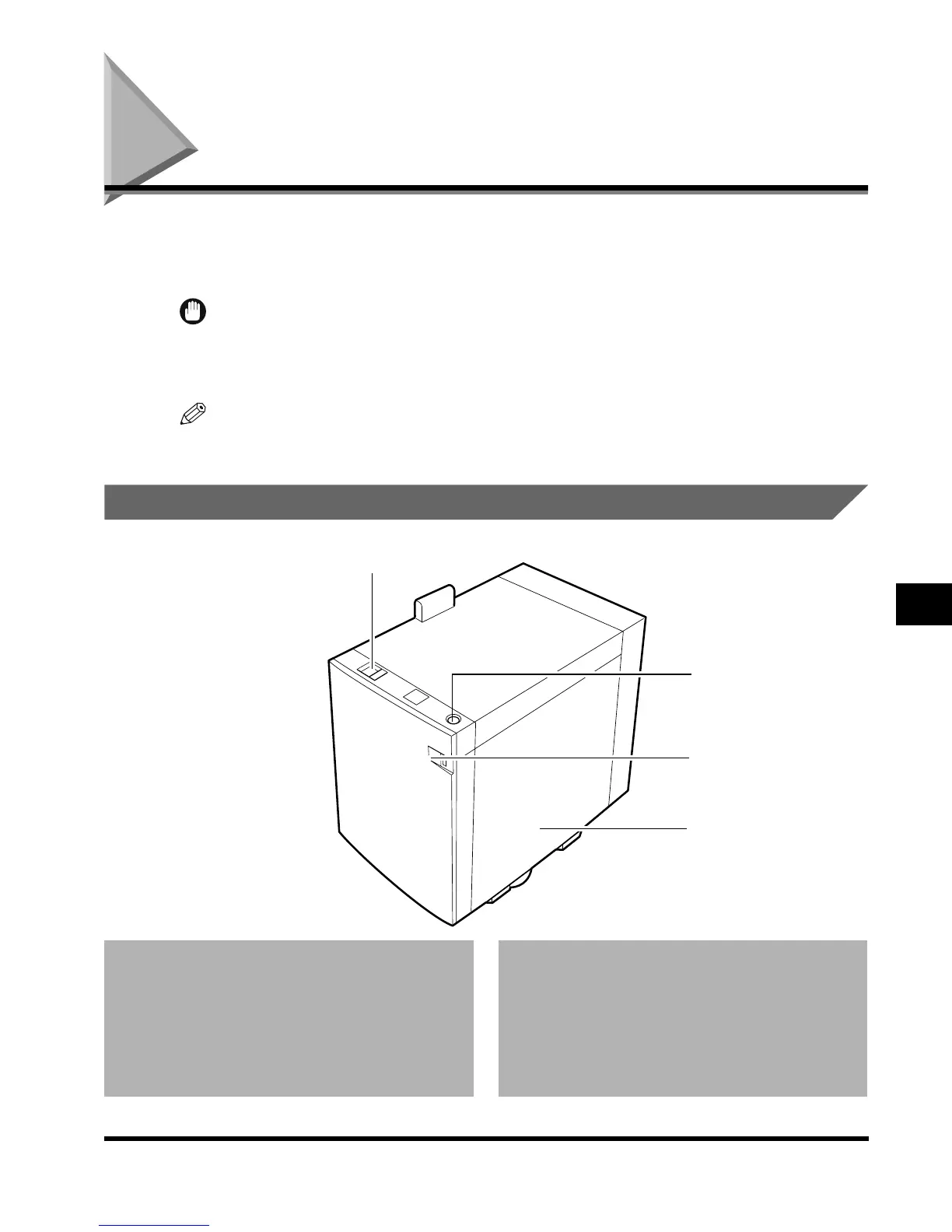
Parts and Their Functions
1 Release lever
Press to remove the Paper Deck from the main
unit.
2 Open button
Press to load paper or to check for a paper jam.
3 Paper supply indicator
Enables you to check the amount of paper
remaining in the Paper Deck.
4 Paper deck
Maximum of 2,500 sheets (20-lb bond (80g/m
2
))
can be loaded.
2
3
4
1
E1L_US_U_.book-INDEX Page 9 Wednesday, May 23, 2001 11:40 PM












 To Next Page