Adding Toner
5-9
Routine Maintenance
5
Adding Toner
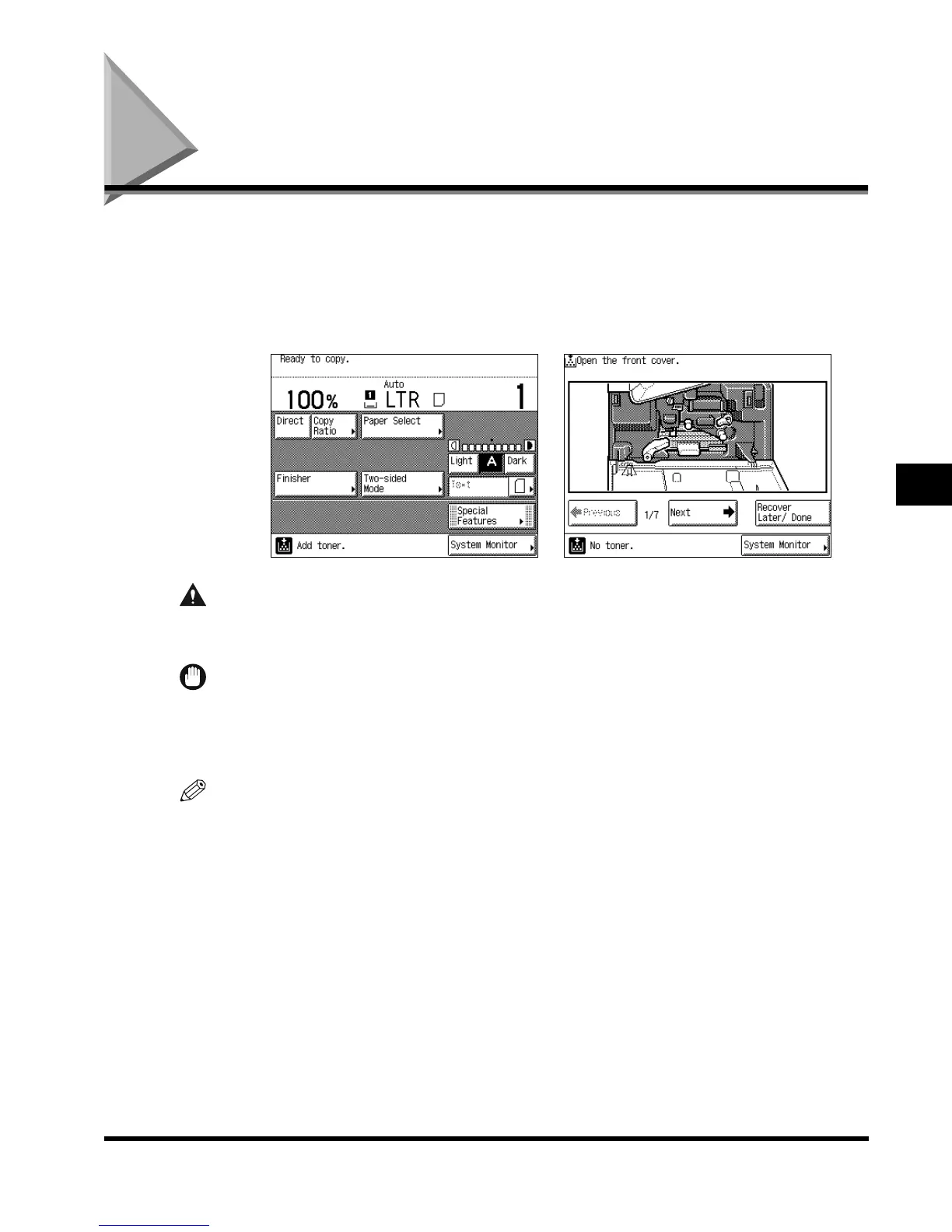
When there is only a small amount of toner remaining in the machine, the message shown
below, on the left side, appears on the touch panel display. Prints can still be made, but at
this time you should purchase new toner so that you have it on hand when it is needed.
When the toner has run out and prints can no longer be made, the message shown below,
on the right side, appears on the touch panel display. The message explains how to add
toner.
CAUTION
• Do not throw used toner cartridges into open flames, as this may ignite the toner
remaining inside the cartridge, and result in burns or a fire.
IMPORTANT
•
Use only the toner cartridge recommended for use on this machine.
•
Never add more than one toner cartridge.
•
Add toner soon after the <Add toner.> message is displayed.
NOTE
•
When the <Add toner.> message appears, approximately 300 prints can still be made (LTR-size
Canon Standard Chart). However, since this number may vary depending upon the original, it is
recommended that toner be added as soon as possible.
•
You can check how to add toner by pressing “Previous” or “Next” from the screen.
•
If the toner runs out during a print job, the remaining prints are made after you add toner.
E1L_US_U_.book-INDEX Page 9 Wednesday, May 23, 2001 11:40 PM












 To Next Page