3
Setting Specifications That Are Common to Each Function (Common Settings)
3-23
Selecting and Storing Settings to Suit your Needs
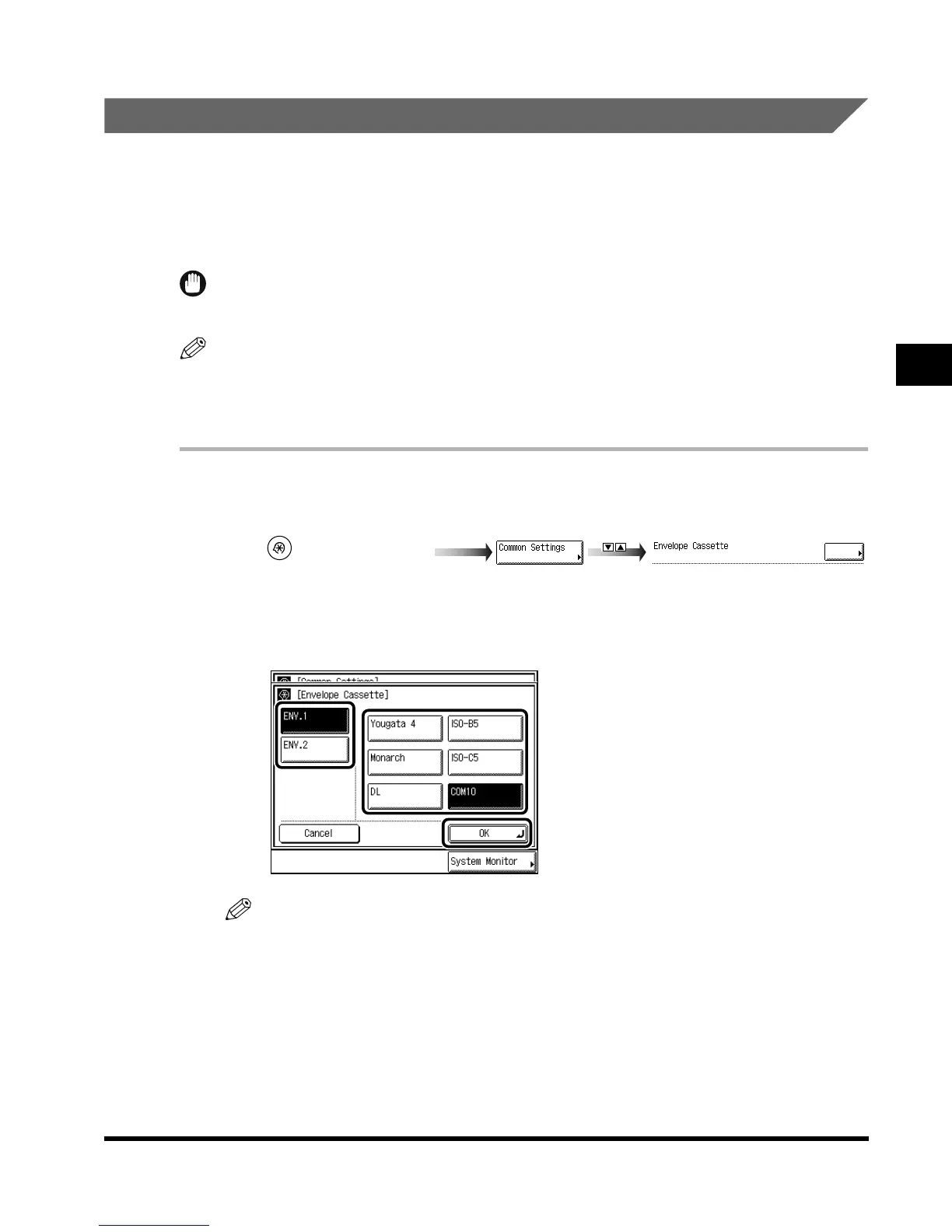
Registering the Envelope Feeder Attachment
You can use the paper drawer 1 as an envelope cassette, if you attach the Envelope Feeder
Attachment and set the size switch and the paper size dial. The envelope cassette can hold
the following six types of envelopes: COM10/ISO-B5/Monarch/ISO-C5/DL/Yougata 4.
This section describes how to specify the type of envelopes and which cassette they are to
be loaded in.
IMPORTANT
•
When the Envelope Feeder Attachment (option) is not attached, this procedure is not necessary.
NOTE
• The default settings are as follows:
- ENV.1: COM 10
- ENV.2: COM 10
1
Call up the desired screen as follows:
2
Press “ENV. 1” or “ENV. 2” → select the type of envelope → press
“OK.”
NOTE
•
For the size switch set in Envelope Cassette, select the same type as the envelope.
3
Press “Done.”
Repeat this procedure.
The specified mode is set and the display returns to the Basic Features screen.
(Additional Functions)
Envelope Cassette
E1L_US_U_.book-INDEX Page 23 Wednesday, May 23, 2001 11:40 PM












 To Next Page