Adjusting the Machine (Adjustment/Cleaning)
3-38
Selecting and Storing Settings to Suit your Needs
3
Adjusting the Machine (Adjustment/Cleaning)
You can perform a fine adjustment of the print image and the saddle stitch position.
NOTE
• The Adjustment/Cleaning screen is made up of several screens. Use “ ▼” or “▲” to scroll to the
desired screen and make the required settings.
•
When “
▼
” or “
▲
” should be pressed, the indication is displayed in this manual.
Fine-adjusting the Zoom When Differences in Original
Image and Print Image Occur
When you print a copy or a document in a mail box, and a slight difference occurs between
the size of the original image and the size of the print image, you can perform a fine
adjustment with this function to reduce this print image error.
1
Call up the desired screen as follows:
2
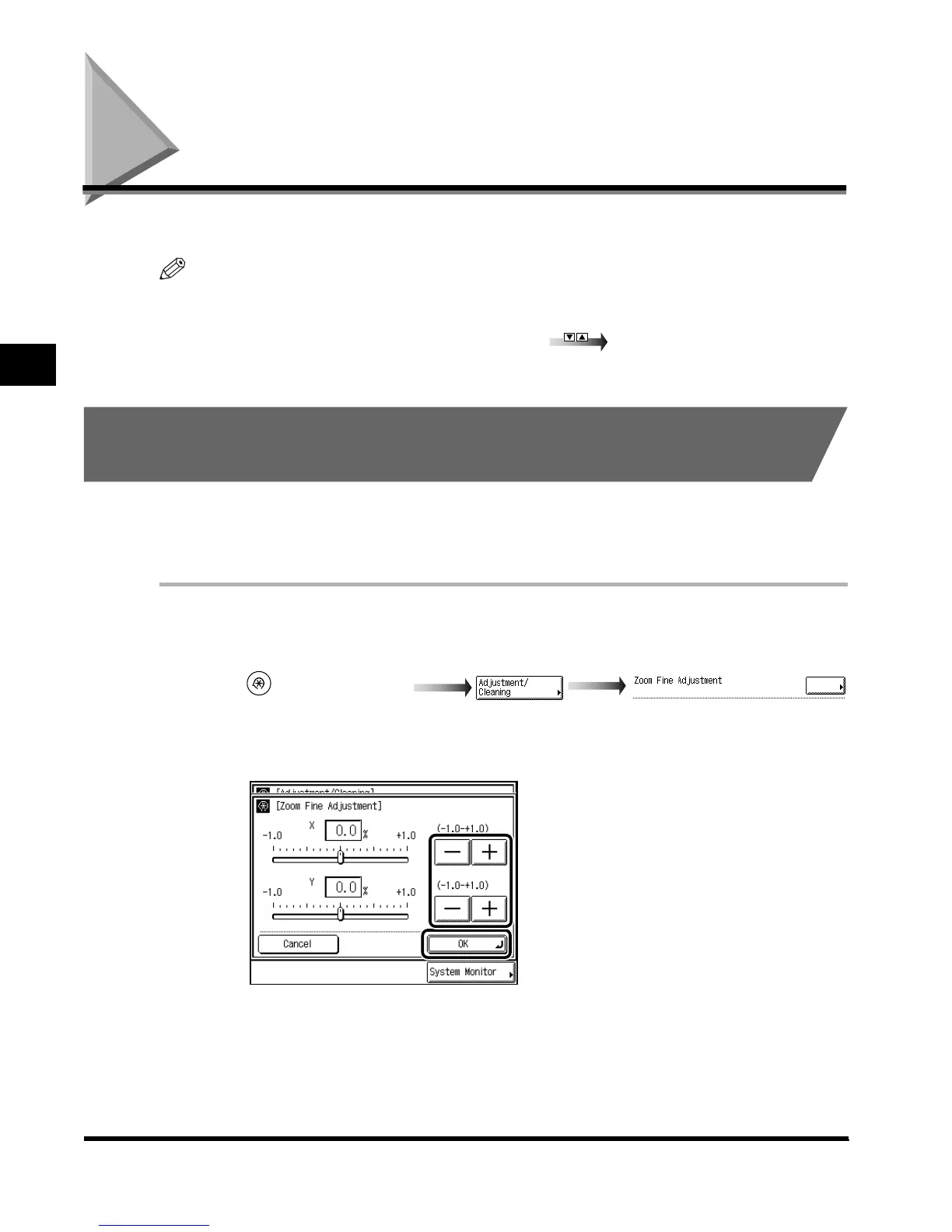
Press “–” or “+” to adjust the percentage (%), and press “OK.”
The adjustment range for both the X (left-right direction) and the Y (up-down direction) is
from –1.0% to +1.0% in 0.1% increments.
(Additional Functions)
Zoom Fine Adjustment
E1L_US_U_.book-INDEX Page 38 Wednesday, May 23, 2001 11:40 PM












 To Next Page