Setting Specifications of System Manager Settings (System Manager Settings)
4-2
System Manager Settings
4
Setting Specifications of System Manager
Settings (System Manager Settings)
You can set a password for the system manager. Once the System Manager ID/Password is
set, restrictions can be placed on storing or changing the System Settings.
IMPORTANT
•
Attaching the Card Reader-C1 erases the System Manager ID and Password already stored.
NOTE
• When the Card Reader-C1 is attached, the number of 1 to 300 cannot be stored for the System
Manager ID.
• For details on how to enter the characters, see ‘Entering Characters from the Touch Panel
Display,’ on p. 1-31.
• The maximum number of characters you can assign for a name, contact, and comment is 32, and
for an e-mail address is 64.
• The maximum number of digits you can store for the System Manager ID and Password is seven.
If you store either with less than seven digits, the machine stores them with leading zeroes, as
follows:
• Example: When <321> is entered → <0000321> is stored.
1
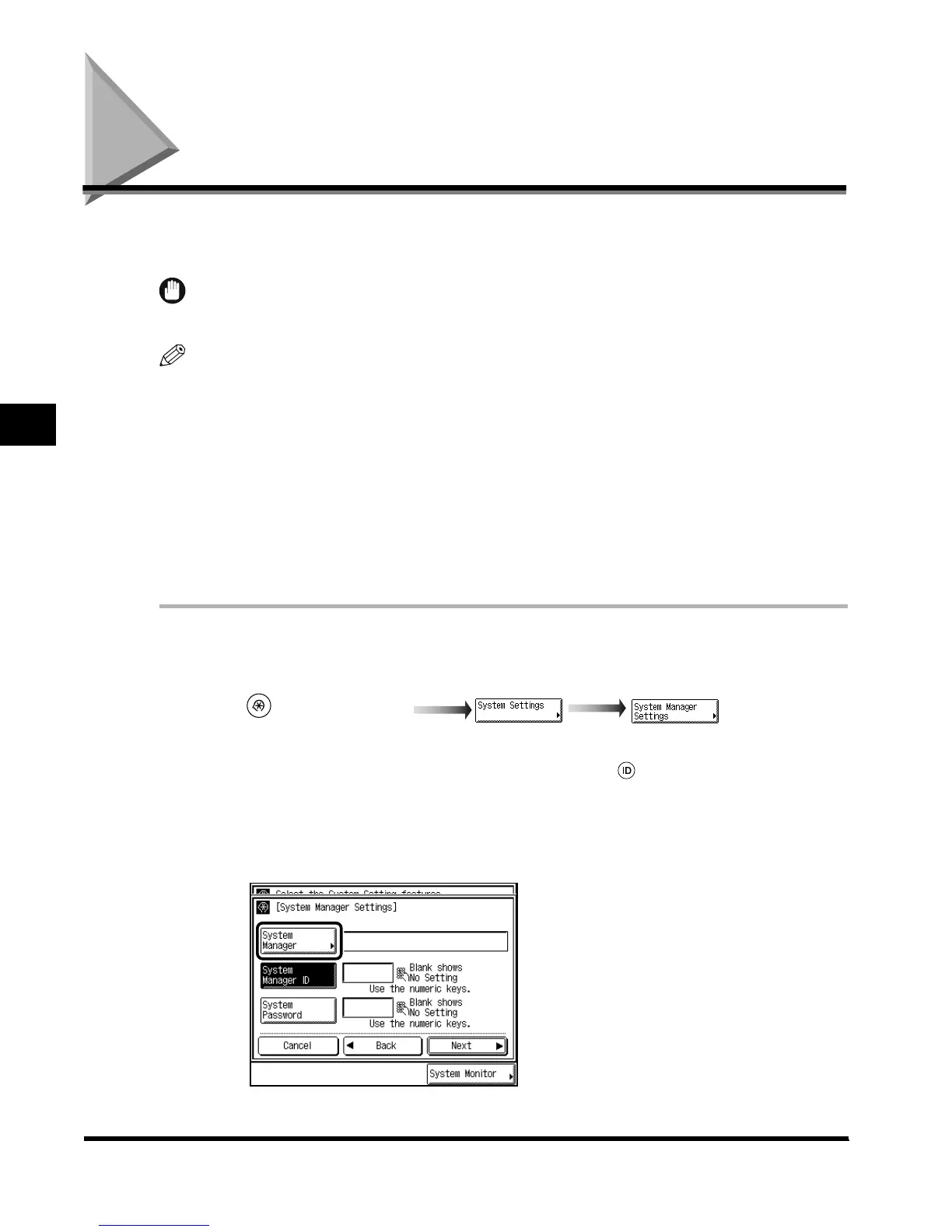
Call up the desired screen as follows:
When the System Manager ID/Password is set, enter the System Manager ID and System
Password after pressing “System Settings.” Then, press (ID).
2
Press “System Manager,” and enter the name of the system
manager.
(Additional Functions)
E1L_US_U_.book-INDEX Page 2 Wednesday, May 23, 2001 11:40 PM












 To Next Page