3
Setting Specifications That Are Common to Each Function (Common Settings)
3-21
Selecting and Storing Settings to Suit your Needs
1
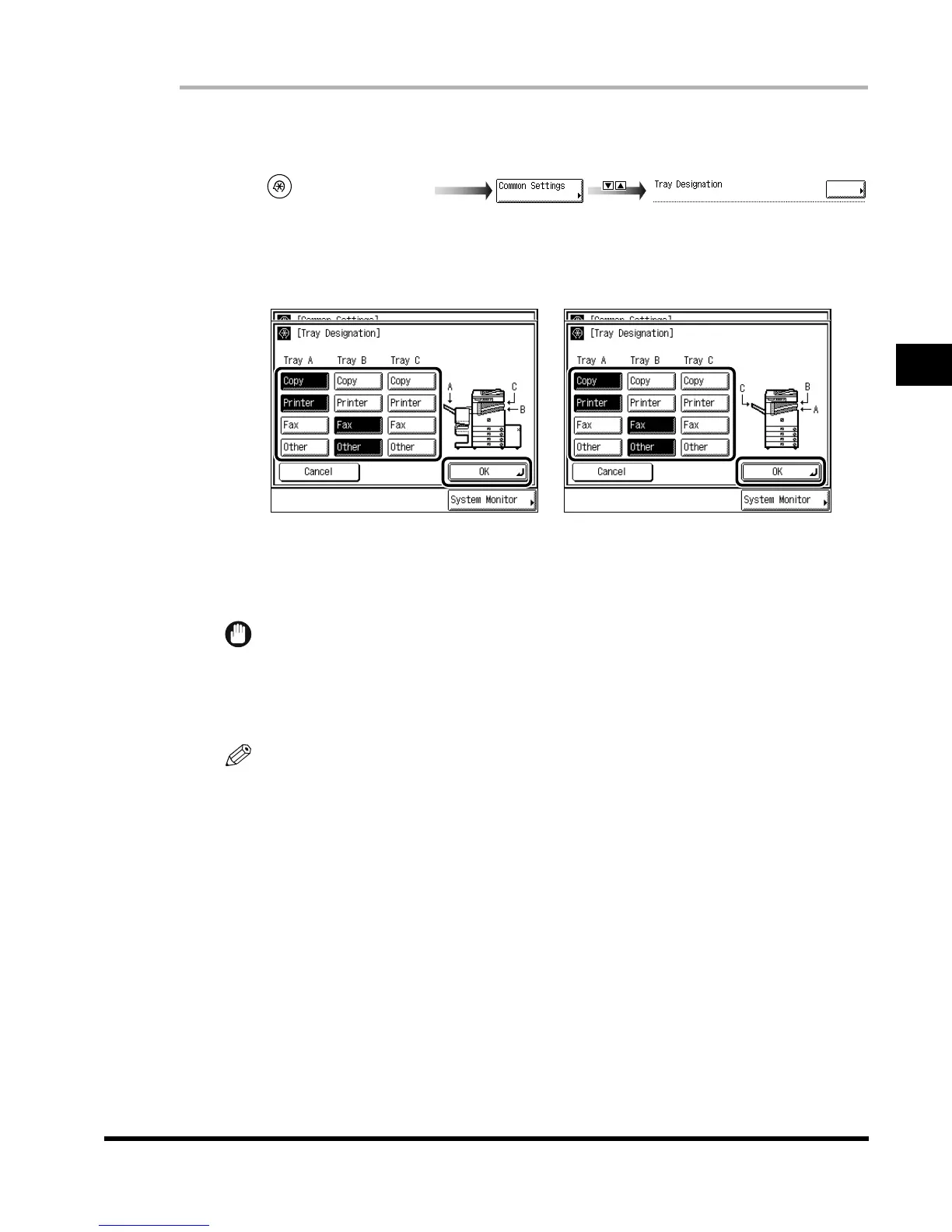
Call up the desired screen as follows:
2
Select the functions of dedicated output trays A, B, and C, and press
“OK.”
“Fax” is displayed when the Fax board is attached.
IMPORTANT
•
When the paper reaches the stacking limit of the tray while Trays A, B, and C are set as the
designated tray for a certain function, the machine automatically changes the output tray to
another available tray. However, it is recommended that a single output tray should be
assigned to received fax documents to prevent them from being lost.
NOTE
•
Prints of the Mail Box and Report modes are output as “Other.”
•
In the case that the Saddle Finisher-G1 is not attached, Tray C can only be assigned to a
single function, which no other tray is assigned to.
•
When the Saddle Finisher-G1 is attached, the print is output to Tray B, regardless of the
dedicated tray setting if transparency, envelope, heavyweight paper, tracing paper, or free size
paper is selected.
•
When the Saddle Finisher-G1 is attached, the print is output to Tray A regardless of the
dedicated tray setting if the Staple mode is set.
•
When the Inner 2way Tray-A1 is attached, the print is output to Tray A regardless of the
dedicated tray setting, if Transparency, Envelope, Heavyweight paper, Tracing paper, or Free
size paper is selected.
3
Press “Done.”
Repeat this procedure.
The specified mode is set and the display returns to the Basic Features screen.
(Additional Functions)
Tray Designation
When the Saddle Finisher-G1 is
attached
When the Inner 2way Tray-A1 is
attached
E1L_US_U_.book-INDEX Page 21 Wednesday, May 23, 2001 11:40 PM












 To Next Page