7
Saddle Finisher-G1/Puncher Unit-K1
7-49
Handling Options
NOTE
•
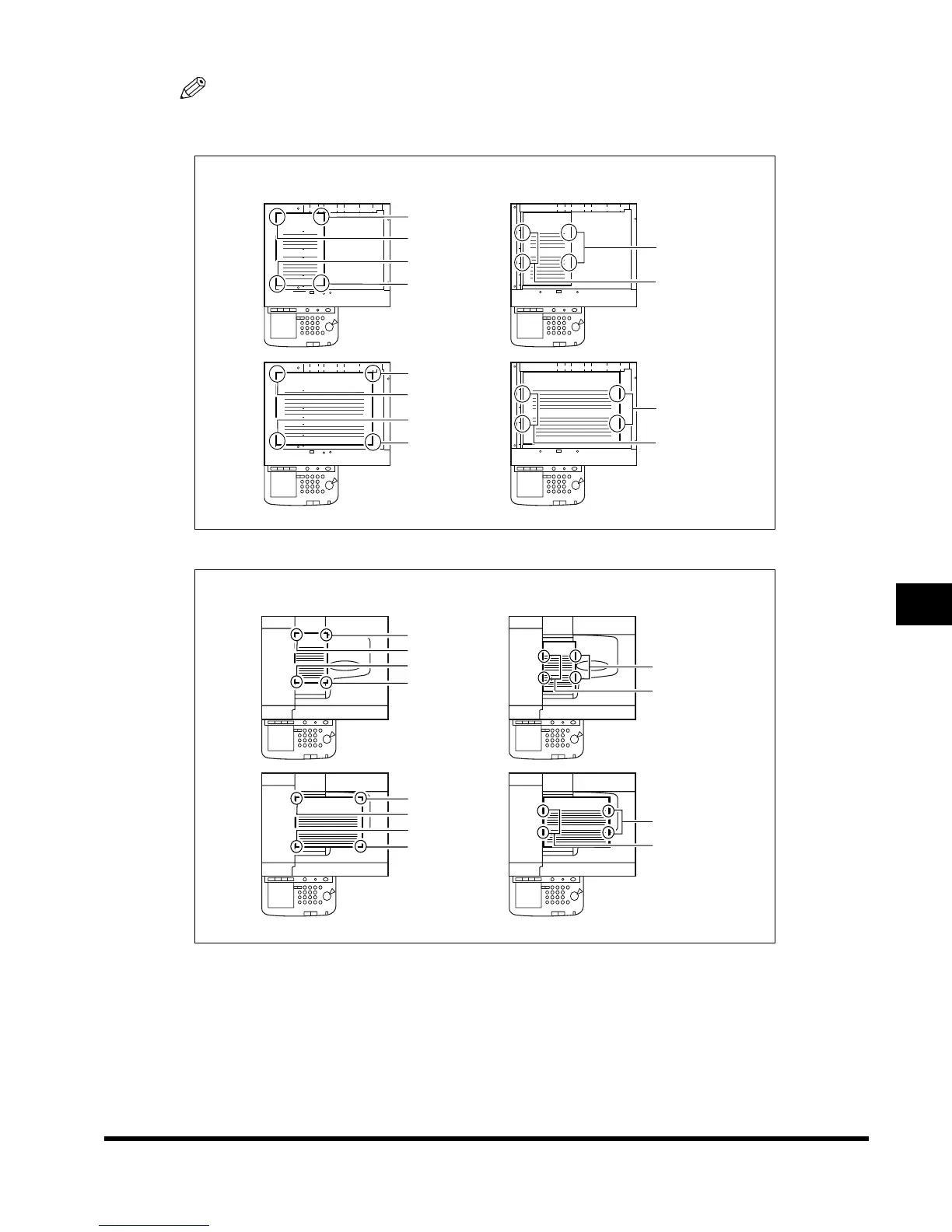
Copies are stapled in the following places:
- When an original is placed on the platen glass:
- When originals are placed in the feeder:
•
If the number of sheets in one set exceeds 25 (for 11" x 17" and LGL size) or 50 (for LTR and LTRR
size), stapling will not be performed. Only Collating will be performed.
•
If the machine stops during stapling and <Load staples> is displayed, it means that almost all of the
staples have been used up and the staple case must be replaced. To proceed, replace the staple
case. (See ‘Replacing the Staple Case in the Stapler Unit,’ on p. 7-63.)
V
ABC
ABC
V
ABC
V
ABC
Upper left
Upper right
Lower right
Left side
Right side
Lower left
Upper left
Upper right
Lower right
Left side
Right side
Lower left
Double staple areaCorner staple area
ABC
ABC
ABC
ABC
Upper right
Upper left
Lower left
Left side
Right side
Left side
Right side
Lower right
Upper right
Upper left
Lower left
Lower right
Double staple areaCorner staple area
E1L_US_U_.book-INDEX Page 49 Wednesday, May 23, 2001 11:40 PM












 To Next Page