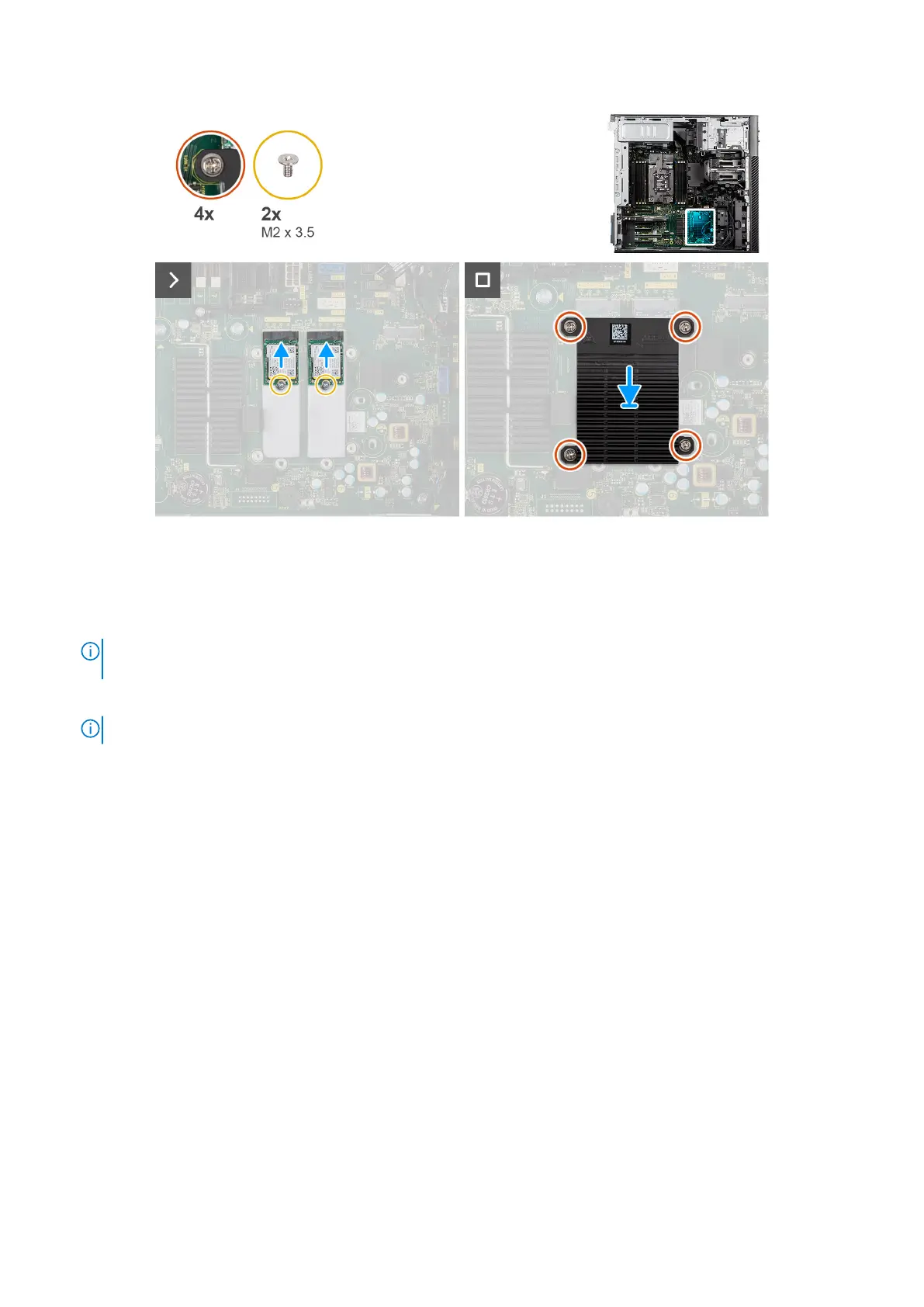
Figure 74. Installing the M.2 2230 PCIe solid state drive
Steps
1. Align the notch on the solid state drive with the tab on the solid state drive connector.
2. Insert the solid state drive at a 45-degree angle into the slot on the system board.
NOTE:
When replacing a M.2 2280 solid state drive from a M.2 2230 solid state drive, ensure to move the standoff nut
to the M.2 2230 solid state drive slot position.
3. Replace the single (M2x3.5) screw to secure the solid state drive to the system board.
NOTE: If the computer has two solid state drives installed, repeat step 2 to step 3 for the second solid state drive.
4. Align and place the M.2 heat sink over the solid state drive.
5. Tighten the four captive screws to secure the M.2 heat sink to the system board.
Next steps
1. Install the air shroud.
2. Install the side cover.
3. Follow the procedure in After working inside your computer.
Removing the M.2 2280 PCIe solid state drive
Prerequisites
1. Follow the procedure in Before working inside your computer.
2. Remove the side cover.
3. Remove the air shroud.
About this task
The following images indicate the location of the M.2 2280 solid state drive and provide a visual representation of the removal
procedure.
102
Removing and installing Customer Replaceable Units (CRUs)














 To Next Page