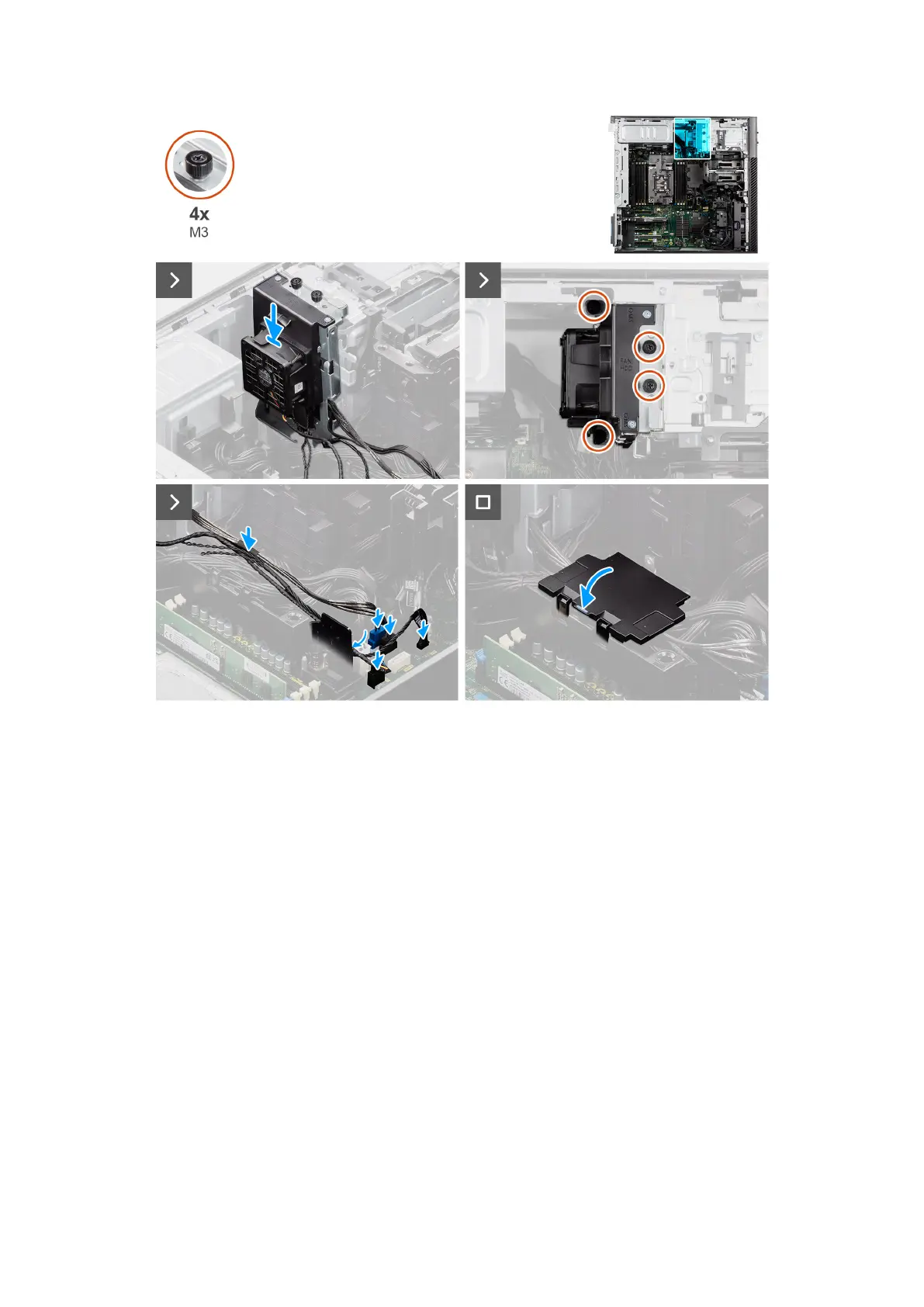
Figure 94. Installing the hard-drive fan assembly
Steps
1. Slide the hard-drive fan assembly into the slot on the chassis.
2. Tighten the four (M3) captive screws to secure the hard-drive fan assembly to the chassis and system board.
3. Lift the cover of the bottom air shroud to route the cables.
4. Connect the SATA power cables, thermal sensor cable, and fan-hard drive cable to the connectors on the system board.
Next steps
1. Install the air shroud.
2. Install the side cover.
3. Follow the procedure in After working inside your computer.
NVMe-fan assembly (optional)
Removing the NVMe-fan assembly (optional)
Prerequisites
1. Follow the procedure in Before working inside your computer.
2. Remove the side cover.
3. Remove the air shroud.
Removing and installing Field Replaceable Units (FRUs)
123














 To Next Page