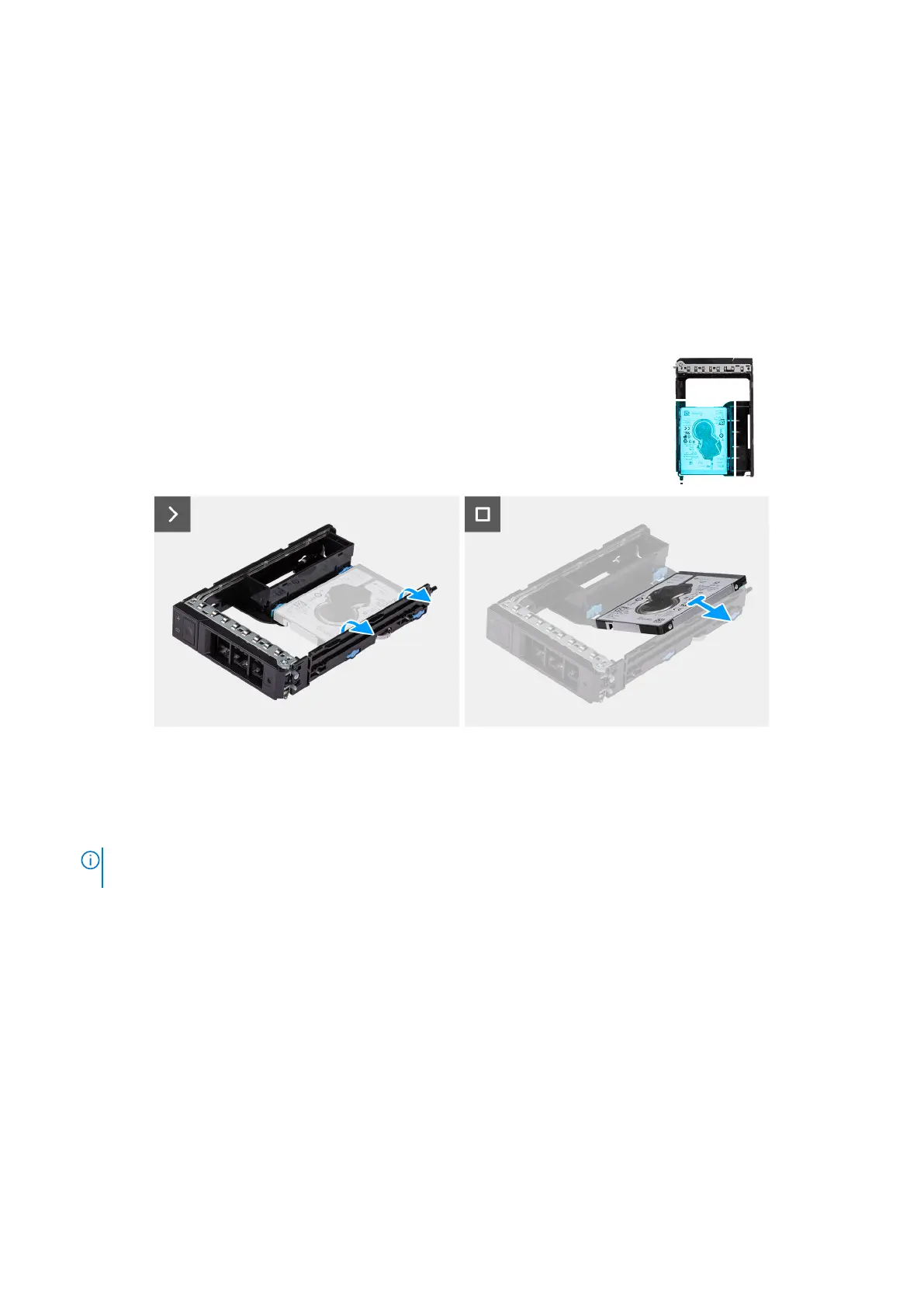
Removing a 2.5-inch hard drive from the external hard-drive
assembly
Prerequisites
1. Follow the procedure in Before working inside your computer.
2. Remove the external 2.5-inch hard-drive assembly
About this task
The following images indicate the location of a 2.5-inch hard-drive in the external hard-drive assembly and provide a visual
representation of the removal procedure.
Figure 23. Removing a 2.5-inch hard drive from the external hard-drive assembly
Steps
1. Pry the sides of the external hard-drive bracket to release the pins on the bracket from the slots on the hard drive.
2. Lift and remove the hard drive off the external hard-drive bracket.
NOTE:
Perform step 1 to step 2 to remove the second external 2.5-inch hard-drive assembly from the lower bay (if
applicable).
Installing a 2.5-inch hard drive from the external hard-drive
assembly
Prerequisites
If you are replacing a component, remove the existing component before performing the installation procedure.
About this task
The following images indicate the location of a 2.5-inch hard drive in the external hard-drive assembly and provide a visual
representation of the installation procedure.
Removing and installing Customer Replaceable Units (CRUs)
49














 To Next Page