Steps
1. Unlock the side-panel latch using a Phillips screwdriver.
2. Press to open the latch of the side cover.
3. Pull the release latch to release the side cover from the computer.
4. Open the side cover at an angle and lift the cover away from the chassis.
Installing the side cover
Prerequisites
If you are replacing a component, remove the existing component before performing the installation procedure.
About this task
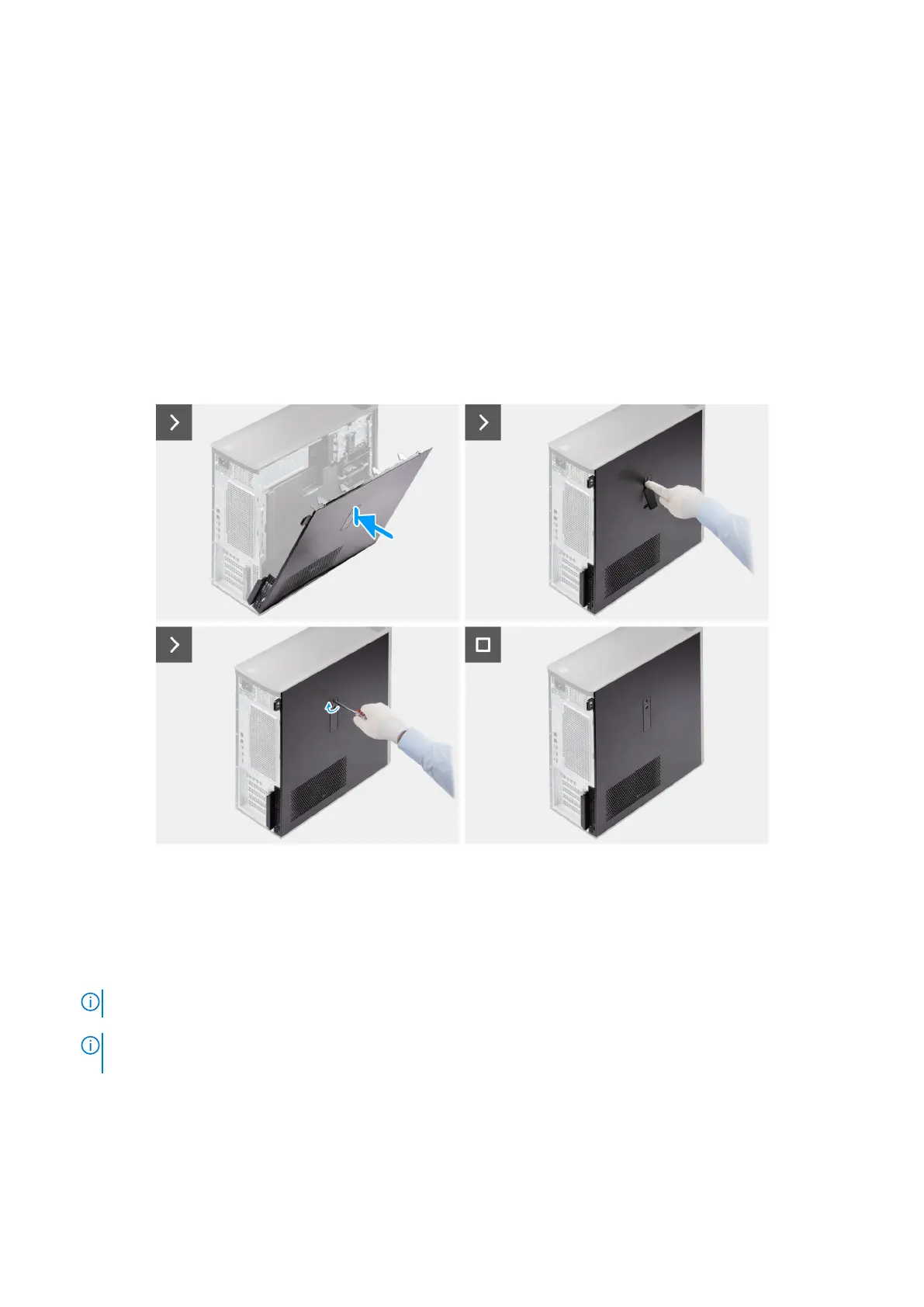
The following images indicate the location of the side cover and provide a visual representation of the installation procedure.
Figure 11. Installing the side cover
Steps
1. Align the tabs on the side cover with the slots on the chassis.
2. Press the side cover back towards the side of the computer to secure it.
NOTE: The release latch automatically locks the side cover to the computer.
NOTE: To set the side-panel latch to the locked position, use a Phillips screwdriver to turn the side-panel latch to the
locked position.
Next steps
1. Follow the procedure in After working inside your computer.
38
Removing and installing Customer Replaceable Units (CRUs)














 To Next Page