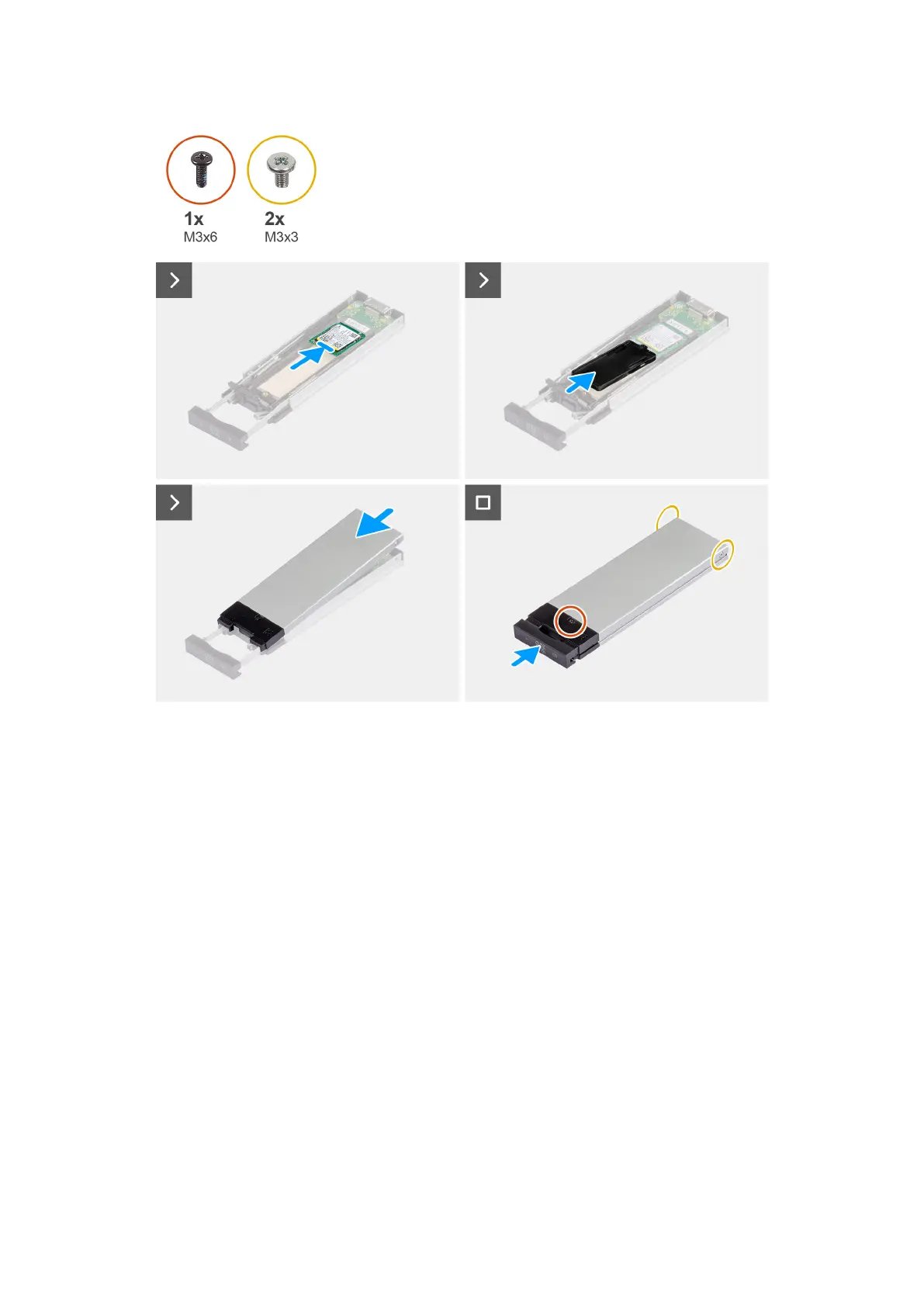
Figure 34. Installing the external M.2 2230 solid-state drive
Steps
1. Align the notch on the solid-state drive with the tab on the solid-state drive connector.
2. Insert the solid-state drive at a 45-degree angle into the slot on the solid-state drive assembly.
3. Align and place the solid-state drive bracket onto the solid-state drive assembly.
4. Place the cover over the solid-state drive assembly.
5. Install the single (M3x6) screw and the two (M3x3) screws to secure the cover to the solid-state drive assembly.
Next steps
1. Install the external solid-state drive assembly.
2. Follow the procedure in After working inside your computer.
Removing the external M.2 2280 solid-state drive
Prerequisites
1. Follow the procedure in Before working inside your computer.
2. Remove the external solid-state drive assembly.
About this task
The following images indicate the location of the external M.2 2280 solid-state drive and provide a visual representation of the
removal procedure.
60
Removing and installing Customer Replaceable Units (CRUs)














 To Next Page