122
EBS Ink Jet Systeme 20140704#1.0
When the button is touched, printing is disabled, and the printer
status changes to Print off (ready).
Another project can be read-in for printing by touching the button.
You can change printing parameters before you start printing. The printing
parameter window is displayed with the button. The parameters apply to
the current printing, and they are not saved as the parameters for a given
project. Use the Printing parameters option in the project processor in order to
save the parameters for a given project, and then save the changes for the
project – see Printing Parameters (p. 82).
Maintenance, Storage and Transport
It is recommended that the outer face of the print head, especially the
nozzle plate 2, and possibly the guide rolls 1 and 3 should be washed in
order to remove the remnants of ink and dirt after the work has been
finished and the printer has been switched off. The washing should be
done in the following way:
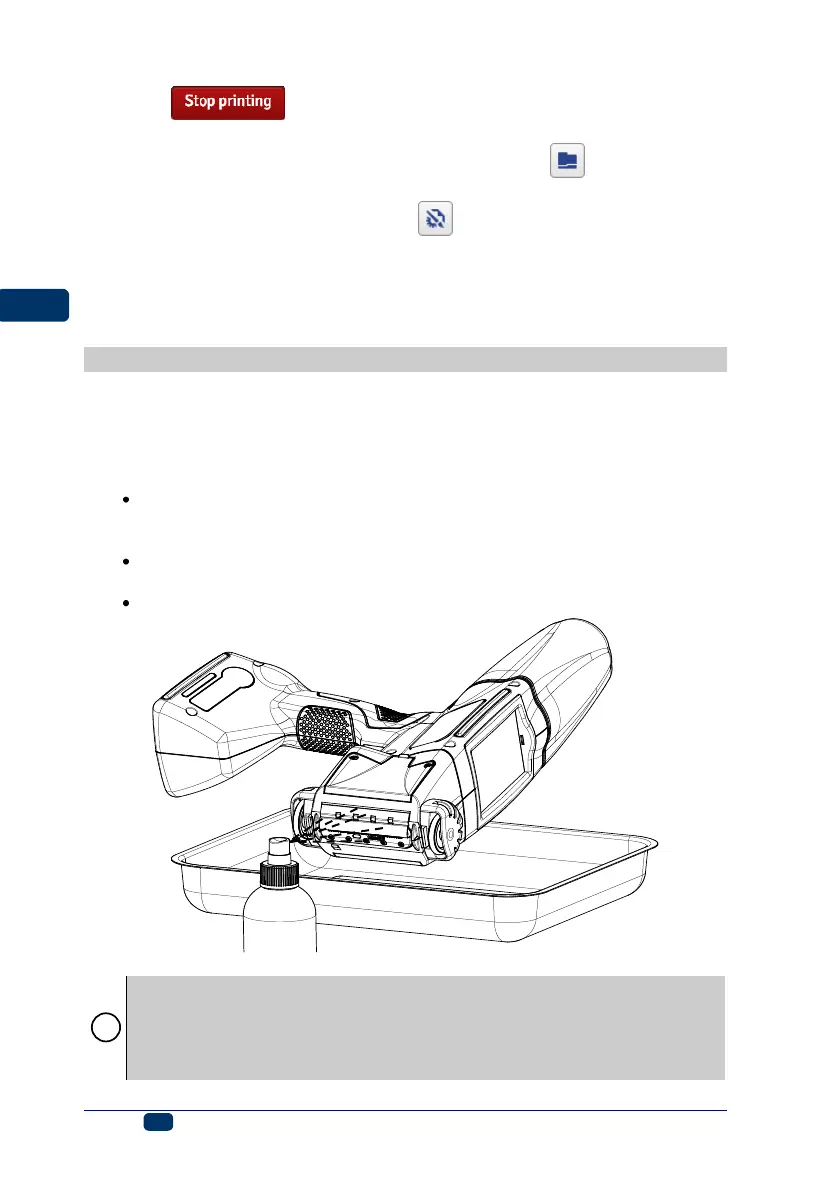
Place the HANDJET printer on its side and tilt its face downwards
carefully (see the drawing below); in such a position dirty wash-up can
flow freely out of the printer,
Place a piece of absorptive cloth or a metal vessel, e.g. a tray, under
the printer face,
Wash the printer face with the use of a wash-up atomizer.
If the printer face is washed in a different way than that shown above,
then wash-up may get in to the printer’s movable, bearing-based parts or
inner electronic subassemblies unintentionally. In effect, the roll guides
may seize or ever lockup permanently and the (shaft-encoder) position
sensor and other electronic subassemblies may get damaged.



 To Next Page