32
EBS Ink Jet Systeme 20140704#1.0
– WiFi disconnected.
Confirm the modification to the parameters with the button.
Bluetooth Interface
You can use Bluetooth technology to communicate the printer with an external
device from which data for printing comes (e.g. automatic scales, a barcode
reader, etc.).
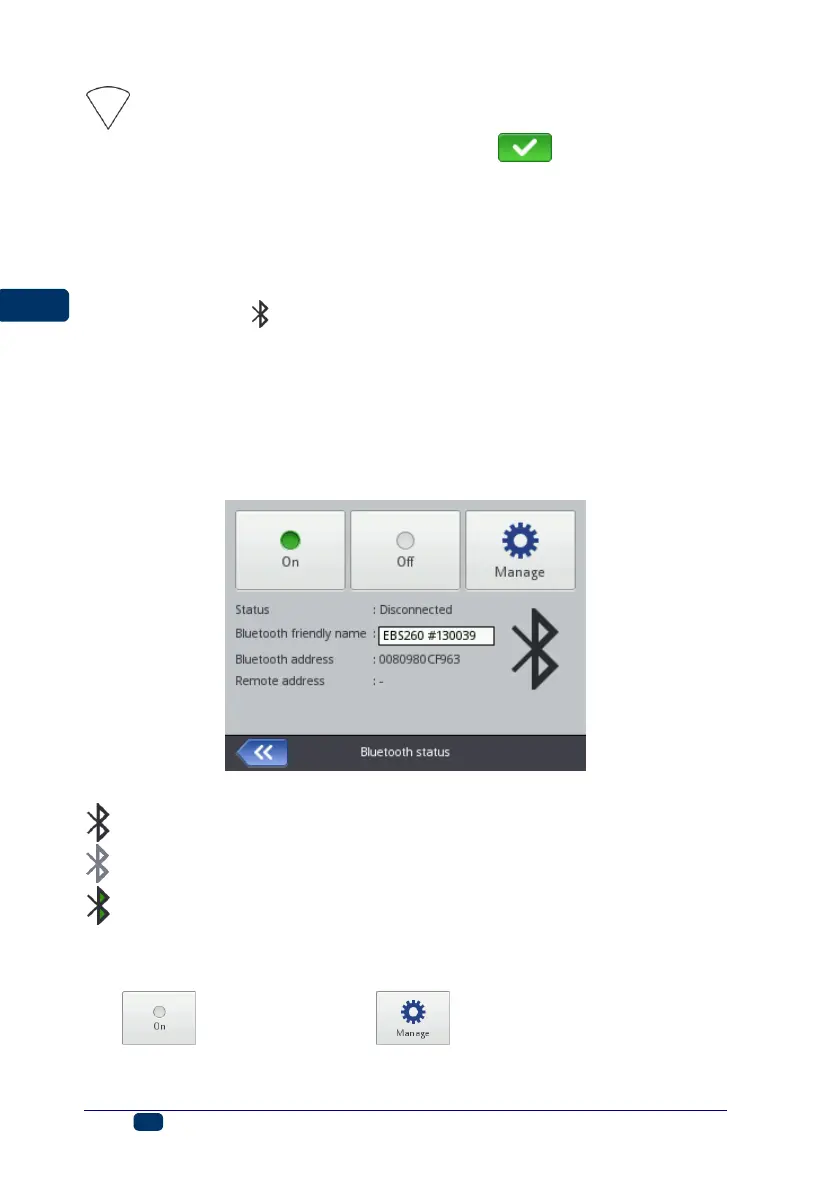
The Bluetooth parameter settings are accessible in two ways:
By touching the icon (D) on the status bar of main screen 12, or
By touching the Tools (U), Settings and Bluetooth buttons in turn.
The display shows the state, name and address of the Bluetooth module of the
printer. The Bluetooth name can be modified by touching the white box where
the name is given. If the printer is connected with an external device, the
address of that device is also displayed. With the buttons available you can
switch the Bluetooth module on and off and also move to the device search
display (Bluetooth must be active before you start doing that).
A Bluetooth status icon is displayed in the top left-hand corner of main screen 12:
– Bluetooth active
– Bluetooth inactive
– the printer is connected with an external device.
Establishing Connection between Printer and External Device
1. Move to the Bluetooth parameter settings, activate Bluetooth (with the
button) and touch the button.



 To Next Page