70
EBS Ink Jet Systeme 20140704#1.0
Purging
NOTE: Before starting purging direct the outlet of the nozzles 2 to a vessel, e.g.
the one that is used for washing the printer!!!
The purging function is used for clearing slightly chocked nozzles or for removing air
from the head. Make several sample prints after purging. If the print quality turns out
to be unsatisfactory, start purging again. The purging is initiated by pressing trigger
6 and holding it in that position. When you do that, all head electromagnets open
and ink starts flowing out at pressure! When you relax the trigger, the purging stops.
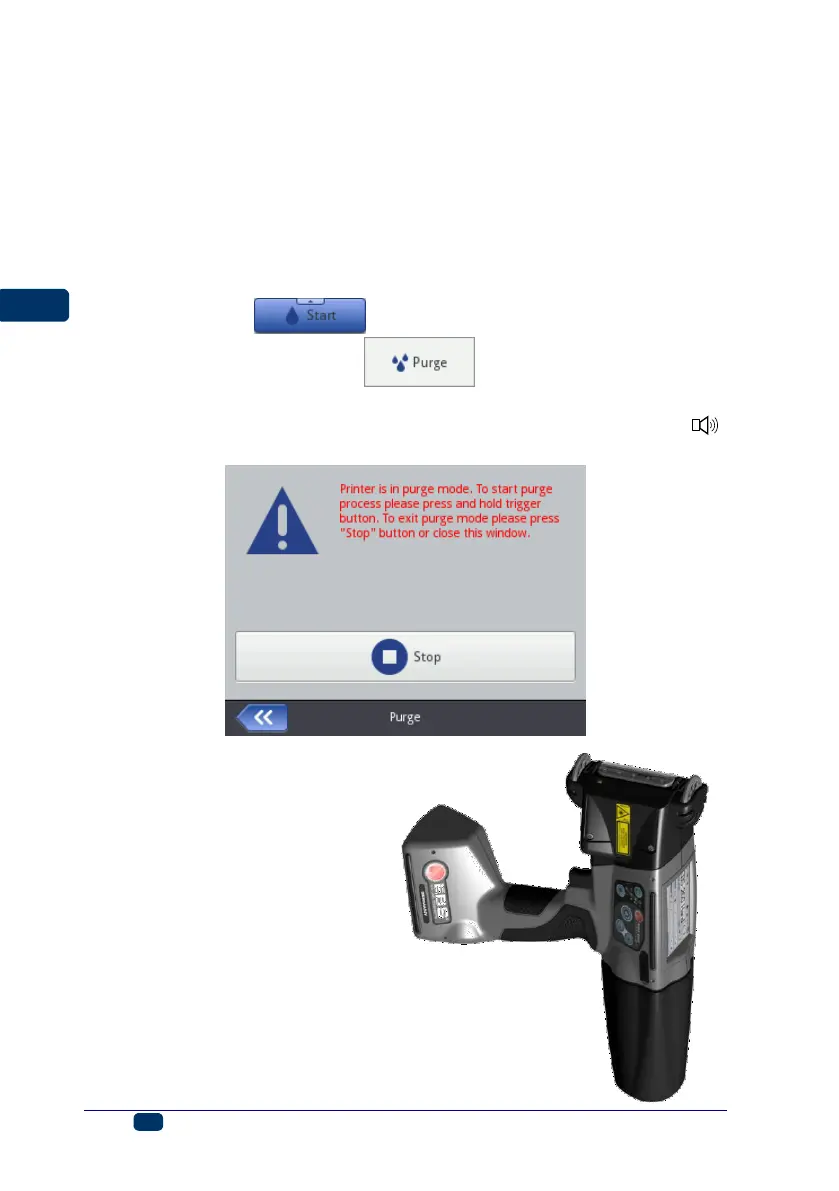
Purging can be initiated in several ways:
by touching the Tools (U), Service and Purge buttons in turn,
by touching the button (W) and holding it until a drop-down
menu appears; then choosing ,
by pressing trigger 6 quickly three times and holding it for a few seconds.
NOTE! As the result, an audible warning signal is generated by buzzer 34 ,
then all head electromagnets open and ink starts flowing out at pressure!
When air accumulates in the ink
container (e.g. when the container
is removed and installed again), the
ink system should be vented by
purging. In order to purge the
system you should position the
printer with the container
downwards and start purging. Hold
trigger 6 until ink starts flowing out
of the nozzles.



 To Next Page