20140704#1.0 EBS Ink Jet Systeme
27
Display Parameters Settings
You can save the energy of printer batteries by making appropriate settings for
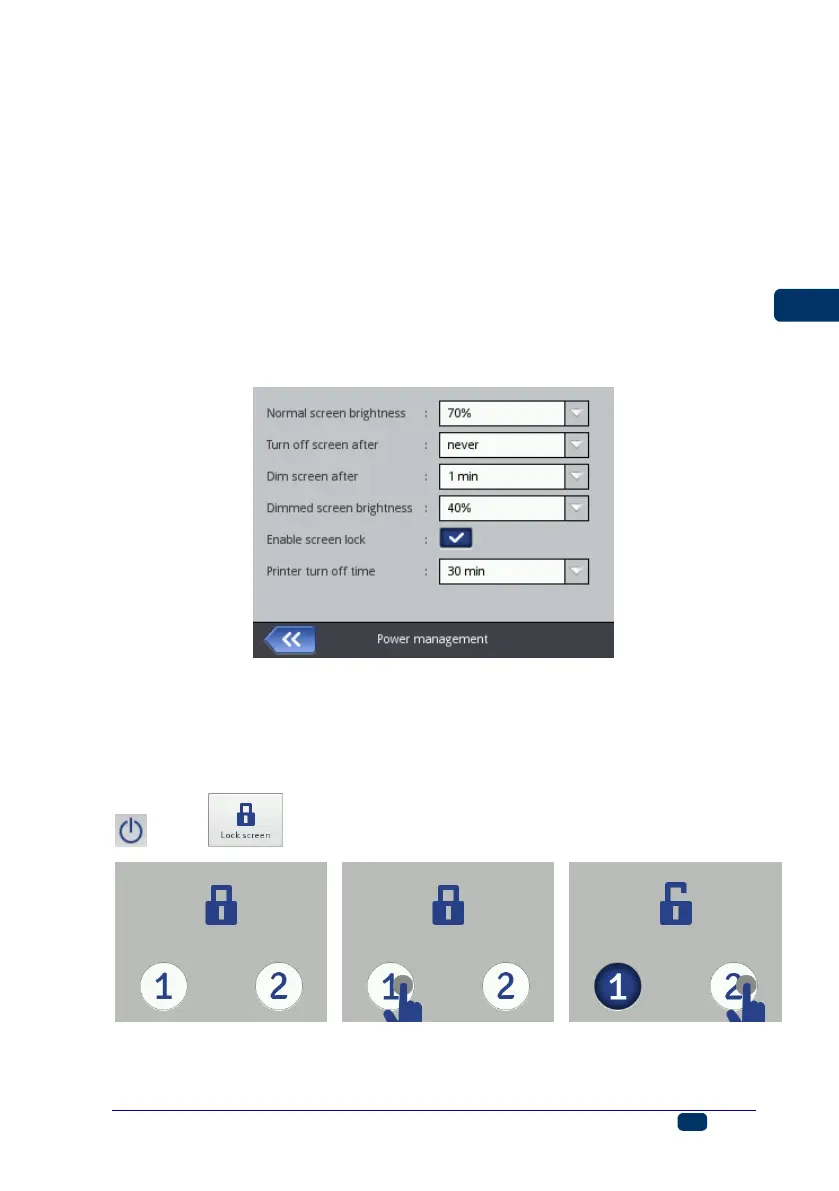
display parameters. Touch the following buttons in turn: Tools (U), Settings
and Power.
On screen displayed you can do the following:
Set Normal screen brightness,
Blank the screen after a time with the Turn off screen after command,
Dim the screen after a time with the Dim screen after command,
Modify the setting of the Dimmed screen brightness parameter,
Allow the screen to be locked with the Enable screen lock command,
Set the time after which the printer switches off automatically, with the
Printer turn off time parameter (the time is counted from the moment
when screen 12, keypad 10 or trigger 6) is last touched.
The screen lock can be enabled when the setting of the Turn off screen after
parameter is different than never. In addition, when the Dim screen after
parameter is enabled, the screen locks after the sum of both of the times, Dim
screen after and Printer turn off time, expires. The screen lock can be
disabled after the two buttons (1 and 2) displayed are touched quickly. The
screen lock can be enabled at any time by holding button 24 or by touching the
(I) and buttons.



 To Next Page