12
EBS Ink Jet Systeme 20140704#1.0
Preparing the Printer for Operation and Setting Basic
Parameters
Operating Touch Screen
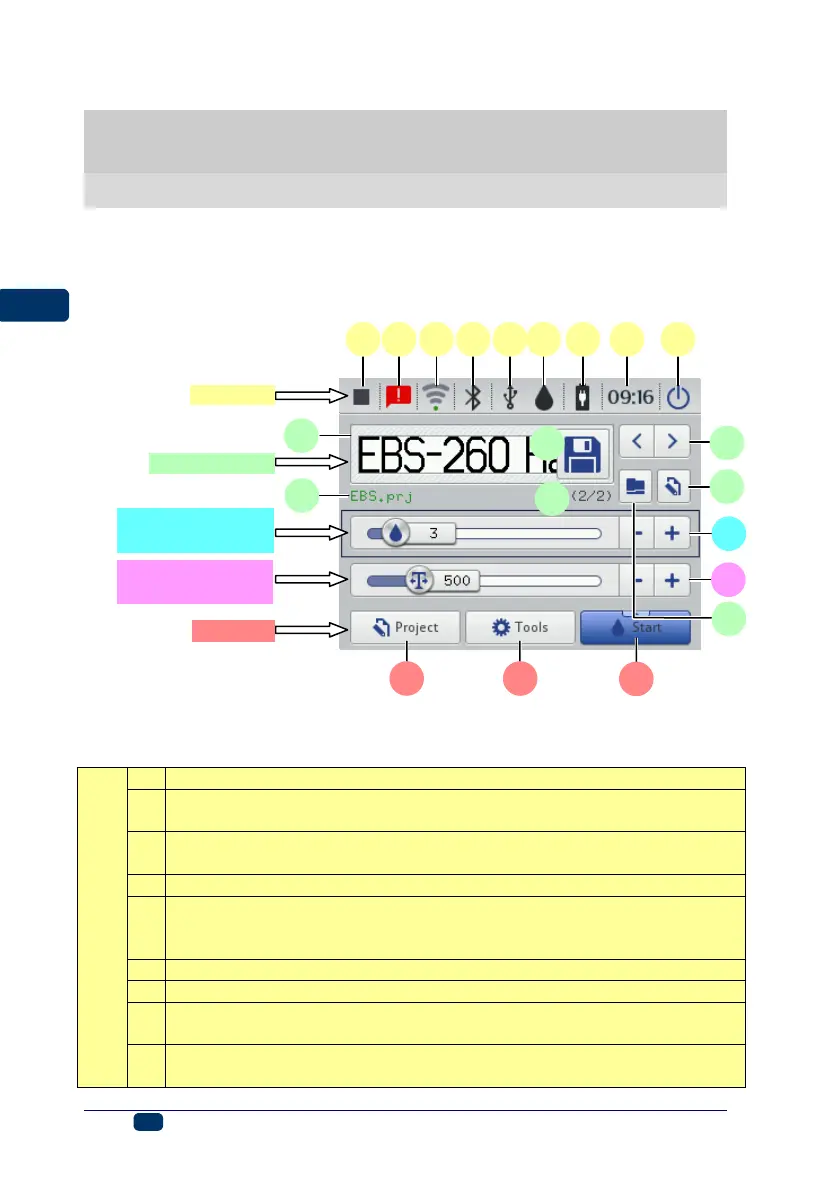
The main screen of the printer consists of the following elements:
Printing status – see Printing a Project via Printer LCD (p. 118),
Messages containing the information on printer operation (the icon
displayed when the messages are available) – see Messages (p. 37),
Status and the settings of WiFi wireless network – see WiFi Wireless
Connection (p. 29),
Bluetooth status and settings – see Bluetooth Interface (p. 32),
Pendrive/USB disc status (the icon is not displayed, when the disc is
not connected to the printer) – see Connecting USB Disc to the
Printer (p. 34),
Ink container status – see Ink Level in Container (p. 20),
Battery status – see Energy Management (p. 25),
The current time of the printer and the date and time settings – see
Date and Time Settings (p. 22),
Switch the printer off and then on again, log out the user and disable
the screen – see also Switching the Printer Off (p. 16).
Intensity printing
parameter window
Resolution printing
parameter window



 To Next Page