28
EBS Ink Jet Systeme 20140704#1.0
The modified parameter settings should be confirmed with the button or
abandoned with the button. If no modifications have been made, you can
go back to the previous screen by touching the button.
User Manager
The printer can be used by a few users; each of them have different
authorizations. Touch the Tools (U), Settings and Users buttons in turn to
open User Manager.
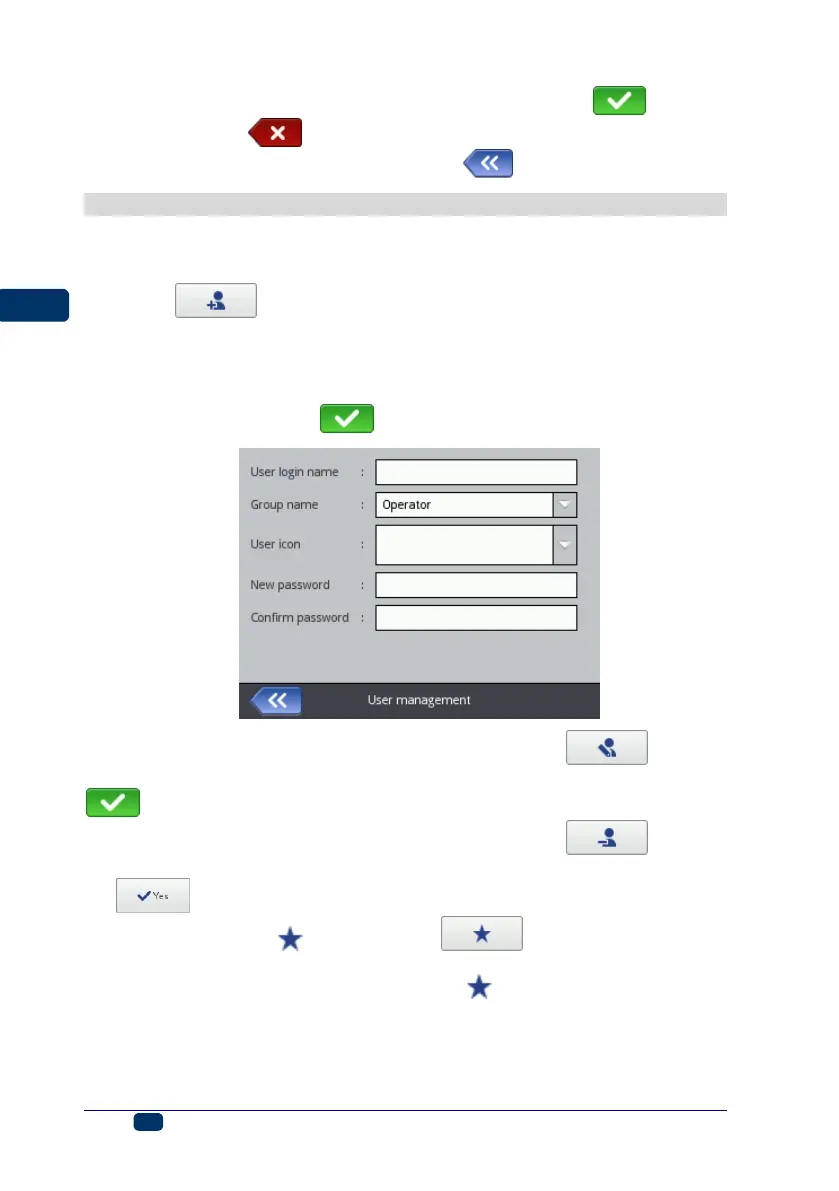
Touch the button to add a new user. In the window displayed fill in
the User login name, New password, Confirm password fields, and also
choose the group to which the new user is to be assigned. You can also choose
an icon for identifying the user (the icon must saved in printer memory in
advance – see Image Manager (p. 105)). The modified parameter settings
should be confirmed with the button.
Highlight the name of a user in the user list and touch the button in
order to edit the user data. The modified data should be confirmed with the
button.
Highlight the name of a user in the user list and touch the button in
order to remove the user. The user removal operation should be confirmed with
the button on the screen.
If a user is marked with (by touching the button after the user has
been highlighted), this user will be logged in automatically after the printer has
been switched on. Administrator is marked with , by default.



 To Next Page