20140704#1.0 EBS Ink Jet Systeme
15
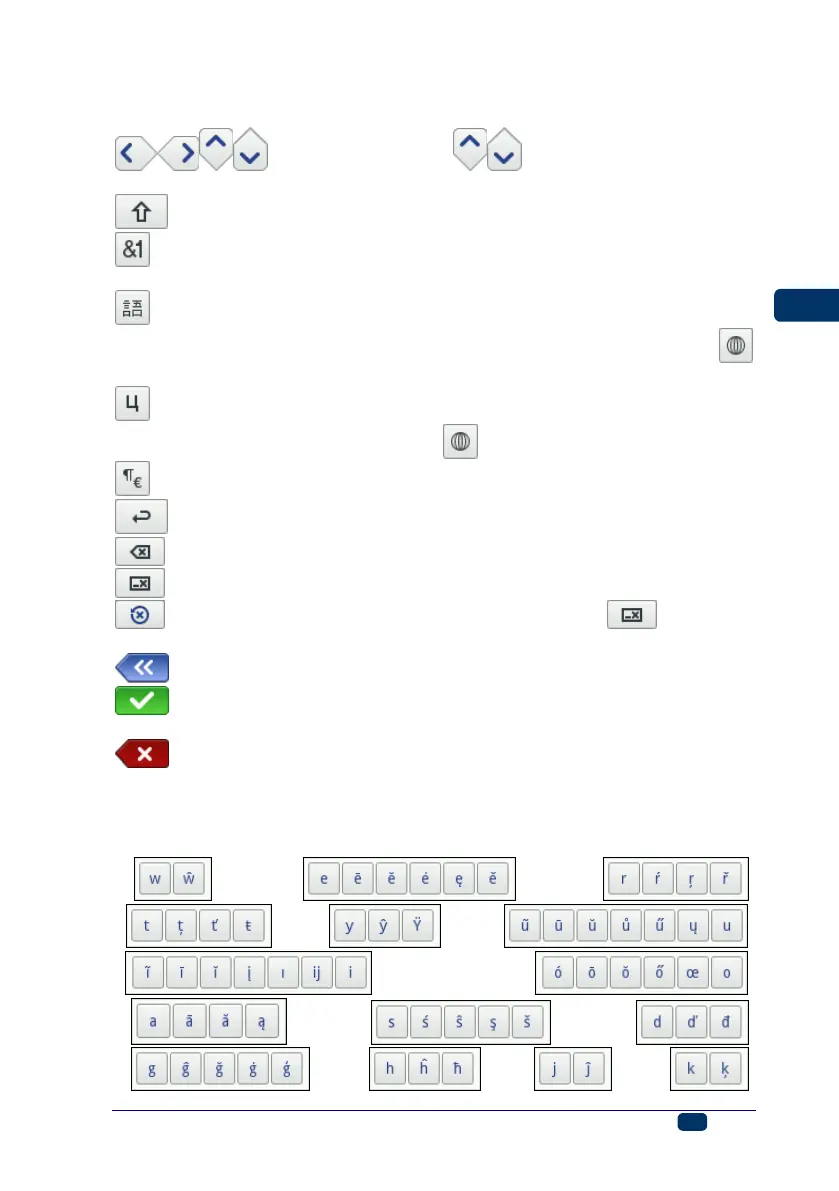
The keypad contains a full set of Latin letters and a set of digits; moreover it
also contains special buttons:
– to move the cursor ( are available for the keypads
that are displayed while multiple-line text objects are being edited),
– to shift between small letters to capital letters and the other way round,
– to shift between letters and punctuation marks and digits and the other
way round,
– to convert the Latin letters into Chinese characters (mode of input:
pinyin) and the other way round (the button is available after the
button has been touched),
– to convert the Latin letters into Cyrillic letters and the other way round
(the button is available after the button has been touched),
– to convert letters into special symbols and the other way round,
– ENTER – to move to the following line,
– to delete the character that is on the left of the cursor,
– to delete an entire text (to clear the edit field),
– to undo deletion (the button is available after the button has
been touched),
– to move back to the previous display,
– to confirm that you want to input a text you have typed in (the button is
available after you have started typing in),
– to abandon inputting a text (the button is available after you have
started typing in).
Moreover, diacritical characters are hidden under certain buttons (the are available
after a given button has been touched and held on). These buttons include:
w- ; e- ; r- ;
t- ; y- ; u– ;
i- ; o- ;
a- ; s- ; d- ;
g- ; h- ; j- ; k- ;



 To Next Page