52
EBS Ink Jet Systeme 20140704#1.0
The current date and time generated by the printer clock are given in the Main
sheet tab, where you can also preview a time and/or date print. With the
clock icon or the calendar icon you can choose components for printing –
the date, the time or both of them. You can change the order of these
components with the arrow icon.
The Date offset parameter allows you to shift the current date by a set number of
days, in order to include an expiration date, for example.
The Time offset parameter allows you to readjust the current time by a set
number of hours (up to 24). The modification can impact on date shifting. Such a
change may cause a calendar day to start at a different time than 00:00 (e.g. at 6
o'clock a.m., when a morning shift in the factory starts).
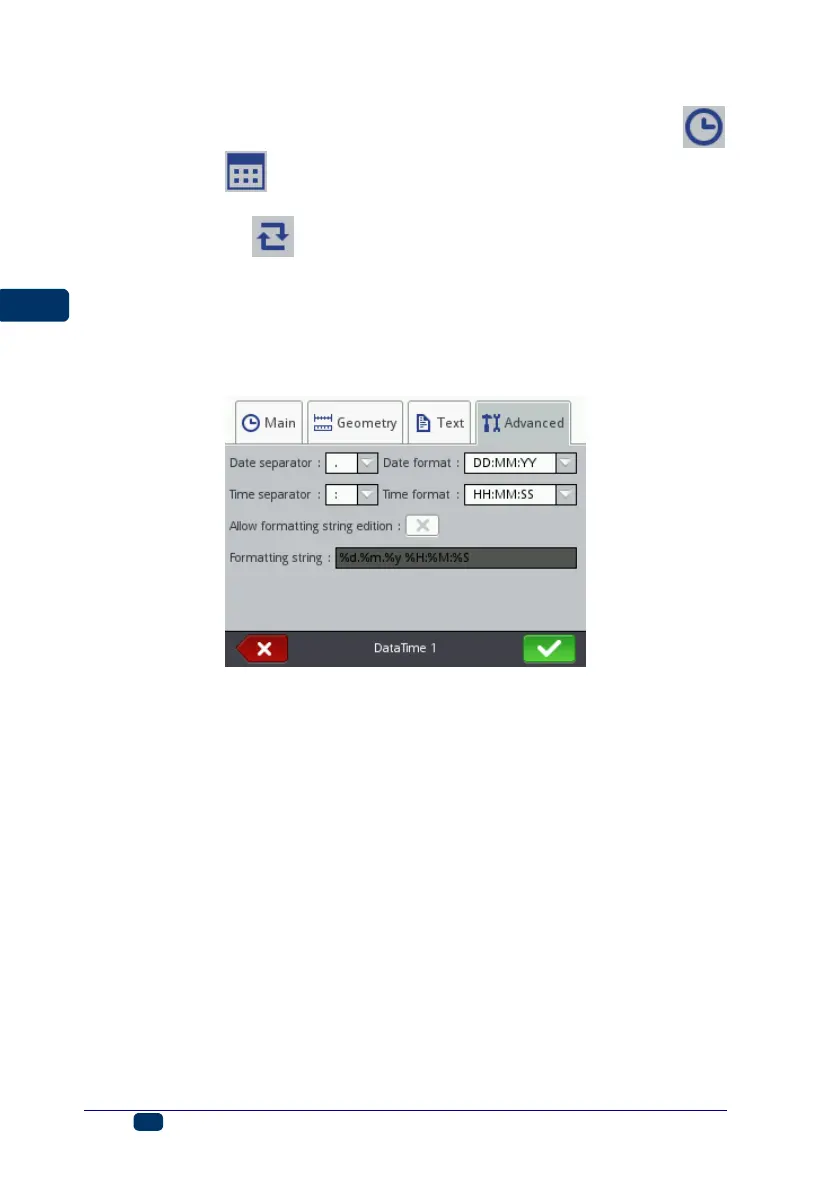
In the Advanced sheet tab you can modify the Date separator and Time
separator parameters (for selecting separators to be used between date/time
components) and also Date format and Time format (for selecting the
sequence of the date/time components).
The default settings of date and time formats and separators for newly created
Date/Time-type text objects can be modified in the Settings menu – see
General Settings (p. 21).
The Formatting string parameter is available when the Allow formatting
string edition check box is ticked. Below there are the characters with which
the date and time components are coded. Any characters that are different from
those mentioned below and also spaces can precede, separate or follow the
successive components of the universal-date special registers. If no local name
exists, an English equivalent is displayed.
%a – local short form for the name of day of the week (Mon, ... , Sun),
%A – local full name of day of the week (Monday, ..., Sunday),
%b – local short form of the name of month (Jan, ... , Dec),
%B – local full name of month (January, ... , December),



 To Next Page