54
EBS Ink Jet Systeme 20140704#1.0
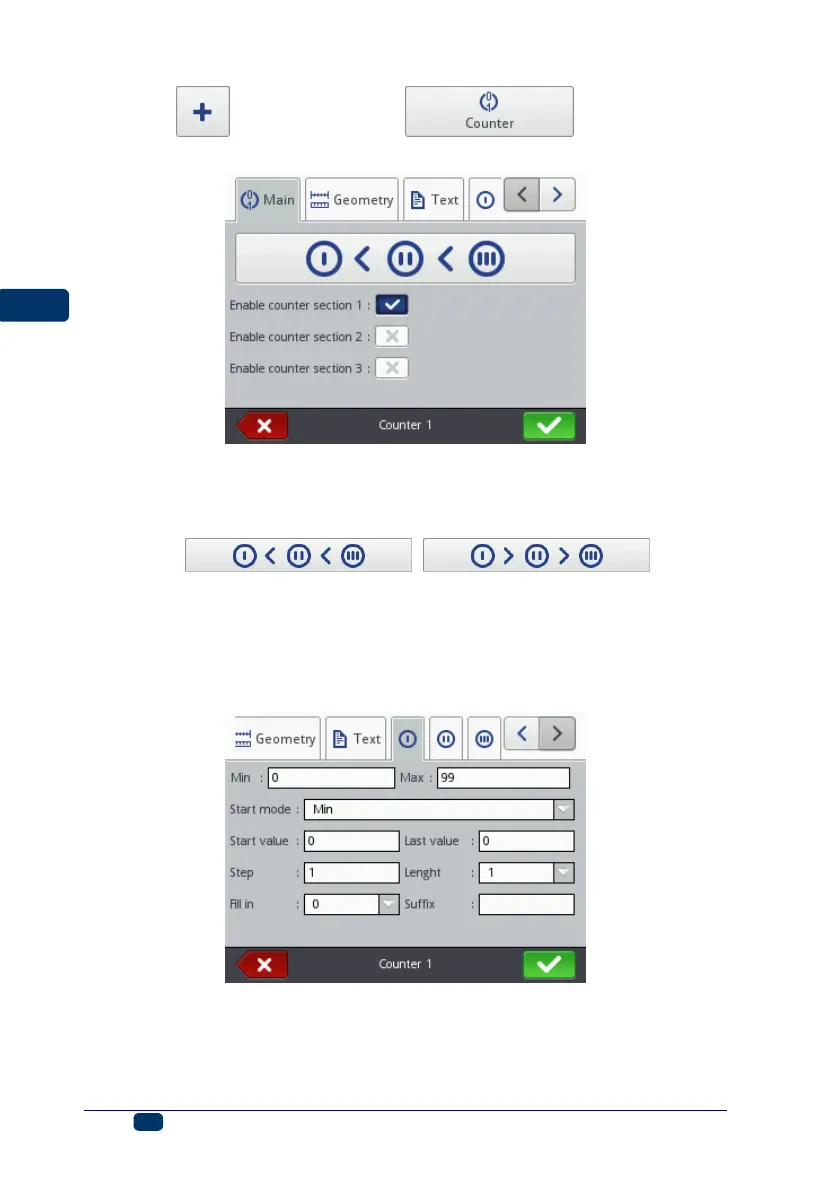
Touch the button and then the button in order to
add a new, Counter-type text object to a project.
In the Main sheet tab you can choose how many sections the Counter is to have.
For simple counting of articles, it is enough to use one, the first section and the
default settings to create a counter–type object. You can use a cascade of up to 3
identical sections. Each of the sections can be visible (displayed) or not.
By touching ( ) you can
change the Priority increment. The parameter defines which of the sections is
considered as first and what the timing order is. The section timed first receives a
timing pulse whenever a print is to be made. Every successive section receives a
timing pulse from the previous section, when that section has counted to the end
(that is, to the Max setting when the counter is incremented or to the Min setting
when it is decremented). The timing pulse modifies the counter by a set Step.
In every counter section you can configure each of the following parameters:
Min – the setting from which counting starts (for counting up), or with which
counting finishes (for counting down).
Max – the setting at which a counter overflows. When a counter overflows,
counting starts again from the Min setting.



 To Next Page