58
EBS Ink Jet Systeme 20140704#1.0
is not met (the defined number of characters has not been received) the
printer behaves according to the No-data action parameter setting.
End character – the printer is ready for printing a project containing a
Communications port object when it receives data ending with a
defined character from an external device, with the character being
defined in the field below the parameter. In this mode you can also
define an ASCII character that is to be the end of a portion of the data
received. For that purpose, tick the ASCII code check box and type in
the decimal value of the ASCII code. If printing is released when the
condition is not met (the defined end-of-data character is not received)
the printer behaves according to the No-data action parameter
setting.
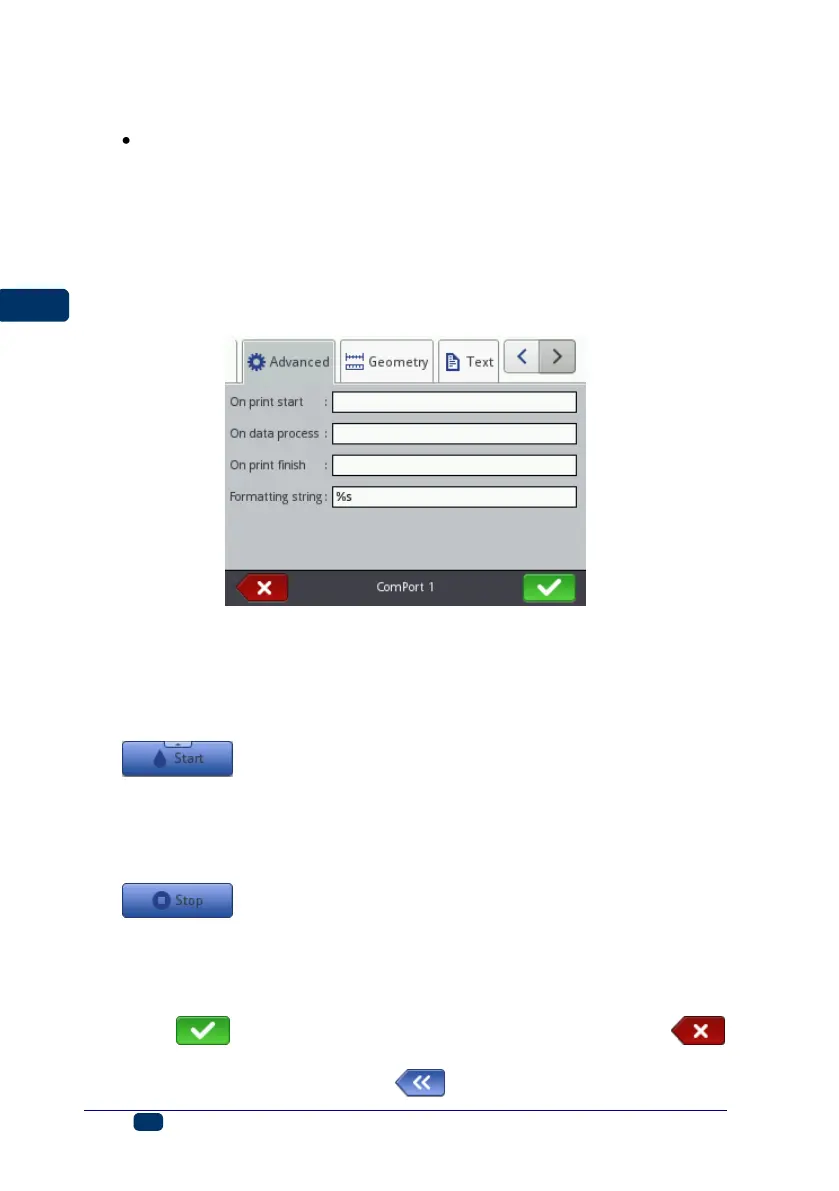
In the Advanced sheet tab you can modify the Expert settings, which define
the rules for processing of the data received from an external device, and also
the mode of acknowledgement of printer states (starting printing, stopping
printing, project printed) to the device:
On print start – it defines the data to be transferred from the printer to the
external device immediately after printing has been initiated (the
button (W) has been touched).
On data process – it defines the data to be transferred from the printer to
the external device each time a project containing the Communications
port object has been printed.
On print finish – it defines the data to be transferred from the printer to the
external device immediately after printing has been stopped (with the
button (W)).
Formatting string – this is an advanced mode of formatting of the data
transferred from an external device to the printer. It describes how the
incoming data is interpreted by Printing Manager. Marks applied: %s – a
character string, %d – a number.
Touch the button in order to add the object to a project or the
button to abandon the addition. If no changes have been made, you can return
to the previous screen by touching the button.



 To Next Page