C
HAPTER
9
| Maintenance Settings
Running Configuration
– 101 –
RUNNING CONFIGURATION
A copy of a previous running configuration may be uploaded to the access
point as a saved file from a remote location, or the current configuration
saved and stored for restoration purposes at a later point. A configuration
file may be saved or downloaded to/from a specified remote FTP or TFTP
server.
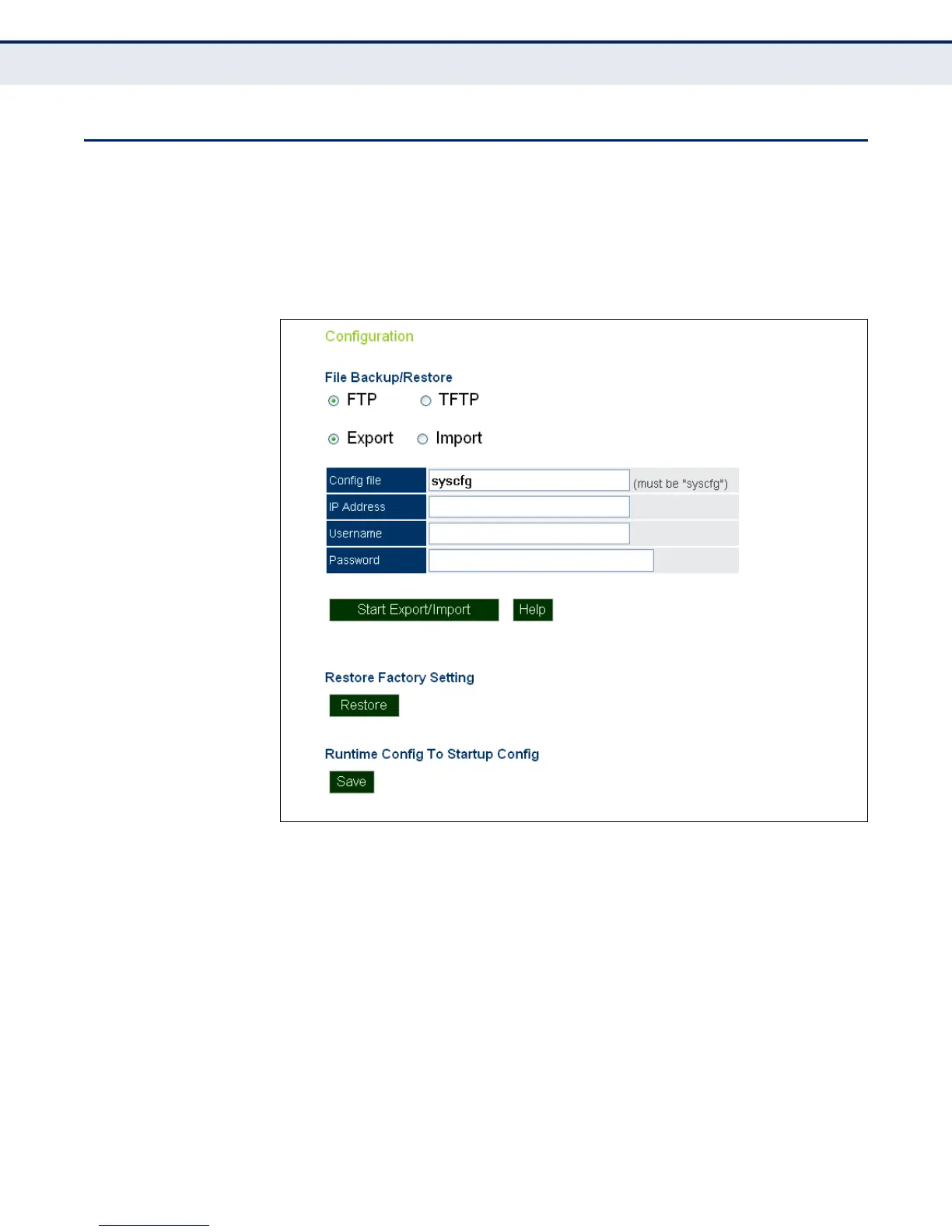
Figure 52: Running Configuration File
The following items are displayed on this page:
◆ File Backup/Restore — Downloads an operation code image file from
a specified remote FTP or TFTP server. After filling in the following
fields, click Start Export/Import to proceed.
◆ Export/Import — Select Export to upload a file to an FTP/TFTP server.
Select Import to download a file from an FTP/TFTP server.
◆ Config file — Specifies the name of the configuration file, which must
always be "syscfg." A path on the server can be specified using “/” in
the name, providing the path already exists; for example, “myfolder/
syscfg.” Other than to indicate a path, the file name must not contain
any slashes (\ or /), the leading letter cannot be a period (.), and the
maximum length for file names on the FTP/TFTP server is 255
characters. (Valid characters: A-Z, a-z, 0-9, “.”, “-”, “_”)


 To Next Page