System Options: EasyLift
C O N F I D E N T I A L – FEI Limited Rights Data 7-15
EasyLift
EasyLift is the tool that allows a sample manipulation during in-situ lift-out technique. This technique consists of
lifting up a piece of material from a bulk and transferring it on a grid (a standard grid that can be loaded into TEM)
inside the chamber of SEM. Equipment has these modifications:
• EasyLift EX – full capacity version
• EasyLift – no rotation control
• EasyLift LT – no rotation and lower movement accuracy
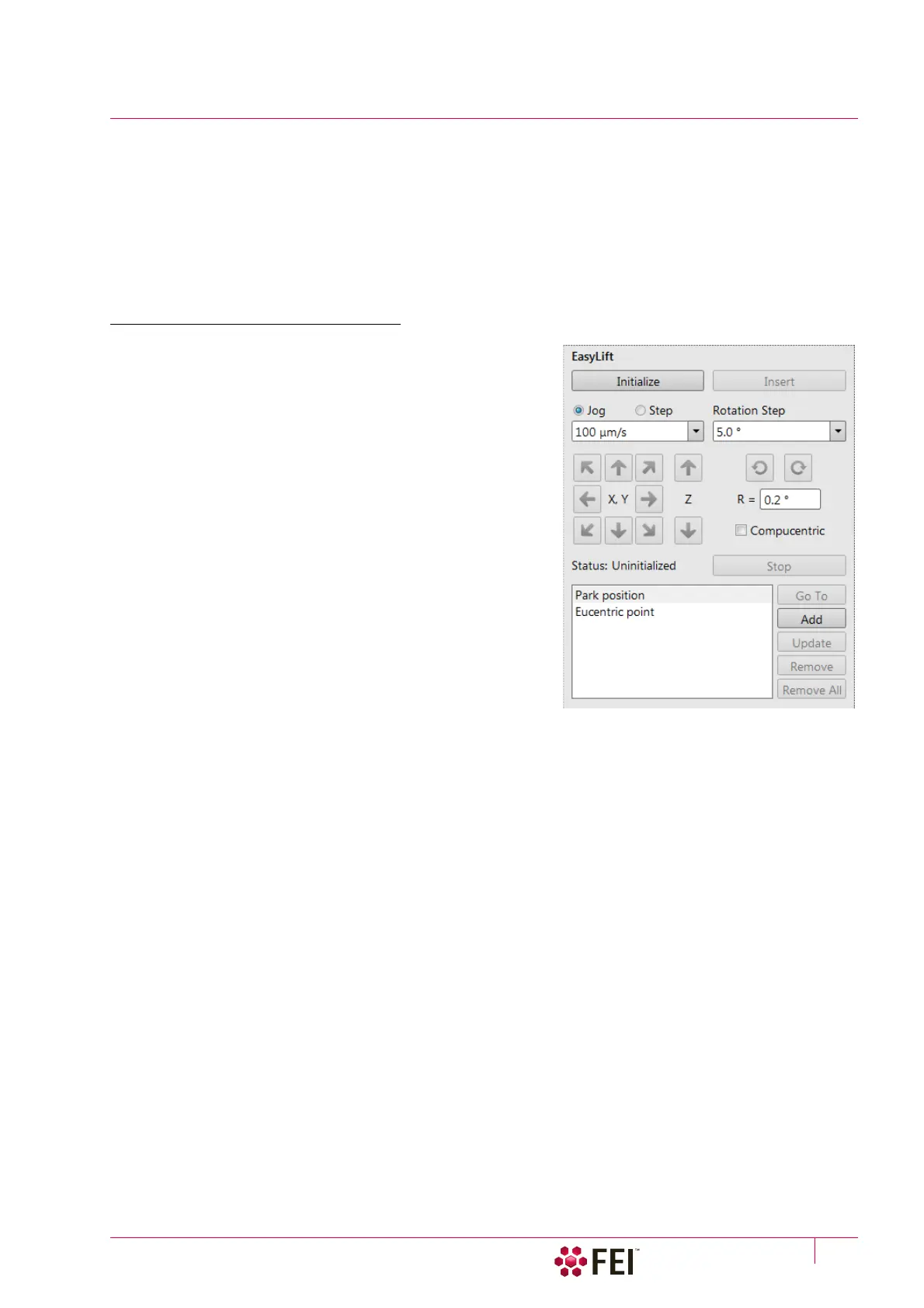
EasyLift Module Control
The EasyLift can be controlled within the EasyLift module which
can be found on the Navigation and Sample Preparation pages.
• Initialize button – can be used when the system is in an
unknown state (for instance after power down). The EasyLift
will be positioned in the retracted position with all axes at
home position.
• Insert / Retract button – will change its function depending on
the state of the EasyLift. Retracting the EasyLift is always
possible. Inserting is only possible when the system is linked
and the WD > 7
mm.
• Jog / Step radio button – enables to define if the EasyLift needs
to be controlled in a Jog or a Step mode.
In the Jog / Step mode the EasyLift moves with a constant
velocity / by a relative step selectable from the predefined
values from the list box.
• Arrows (keyboard) – the EasyLift can be controlled by clicking
on any arrow button.
In the Jog mode, as long as the mouse button is held, the
EasyLift jogs in the arrow direction. By releasing the mouse
button, the jog movement stops.
In the step mode, each mouse click on moves the EasyLift with
the predefined step size.
• The needle can only be rotated in the Step mode, the Step size can be selected in degrees from the list box. The
rotation is executed when clicking on the clockwise / counterclockwise arrow button. In the edit box beneath
the arrow buttons (R =) an absolute rotation value can be set with the 0.2° accuracy.
Note
The rotation with the manipulator can be performed also in the retracted position.
• Compucentric check box – activates the compucentric rotation correction of the needle. This keeps the needle tip
in the centre of the imaging after each rotation.
• Status (information field) of the EasyLift is noted:
– Uninitialized – run the Initialize procedure
– Retracted – the EasyLift is not inserted
– Ready – the EasyLift is ready for use
– Moving – the EasyLift is moving
• Stop button – stops any EasyLift motion
• variable Insert / Insert To button – inserts the EasyLift / inserts the EasyLift and drives it to the activated position
The Park position is 200 µm above the Eucentric point (SEM coordinates). These two predefined needle positions
can be changed by the EasyLift: Needle Exchange / Calibration procedure.
• The user can add stored position to the list by clicking on the Add button.
• When clicking on a stored value, moving to a new position and clicking on the Update button, the actual EasyLift
position will be linked to the stored position. The position can be renamed by activating and clicking on its name.
• Clicking on the Remove / Remove All button – removes selected / all stored position(s). The park and eucentric
positions cannot be removed.



 To Next Page