System Control: Vacuum System
C O N F I D E N T I A L – FEI Limited Rights Data2-12
Vacuum Modes
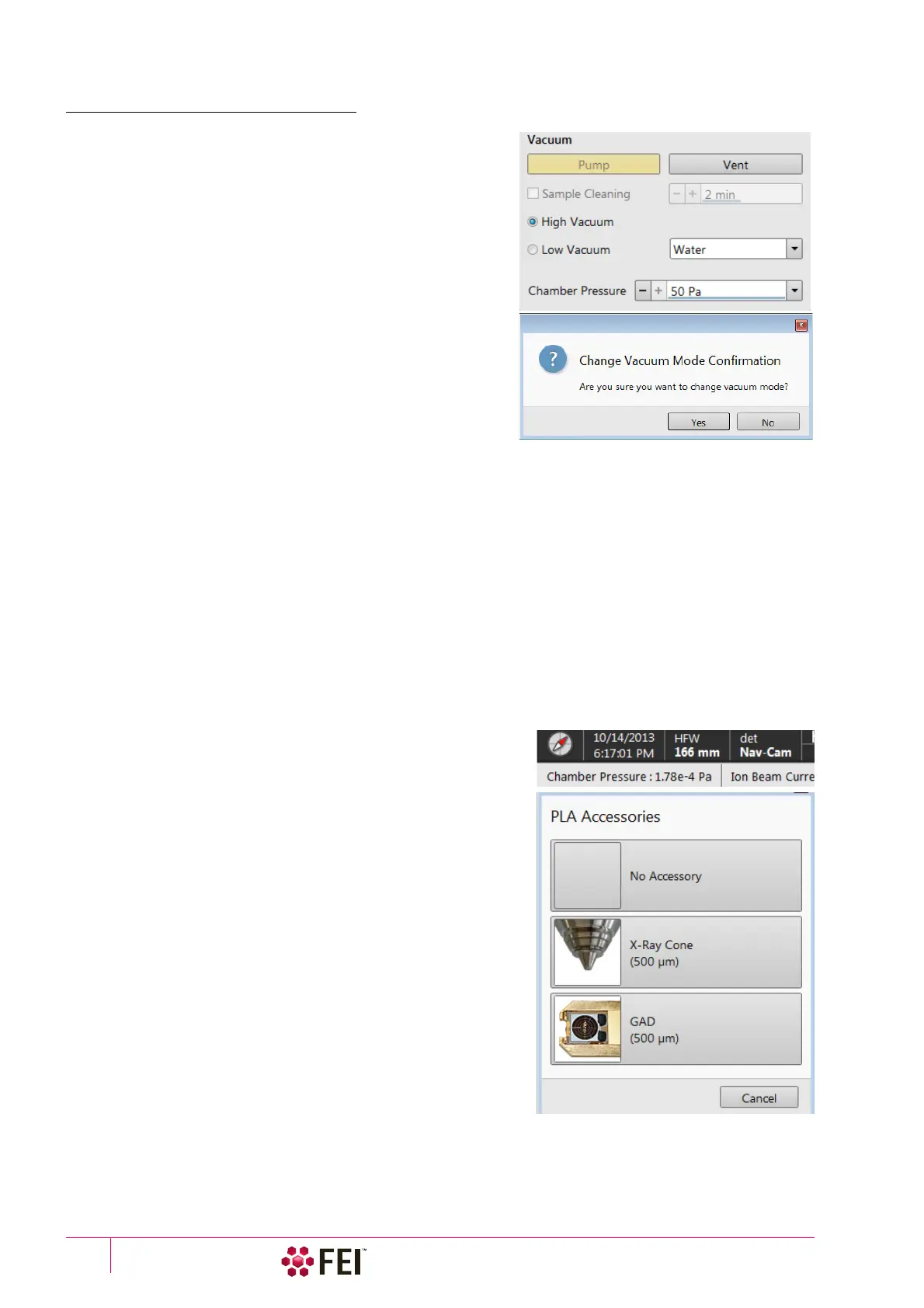
The Vacuum module / High Vacuum or Low Vacuum radio buttons
are used to select the instrument target operating mode when a
Pump sequence is initiated.
When changing the vacuum mode from one mode to another, a
confirmation dialog appears.
High Vacuum (HiVac) Mode
For High Vacuum the system achieves the lowest pressure
possible throughout the column and specimen chamber. The
typical pressure value is within the order of 10
-2
to 10
-4
Pa.
Low Vacuum (LoVac) Mode
In this mode, the column section is under lower pressure than the
specimen chamber, where the pressure ranges from 10 to 500
Pa
(0.08 to 4 Torr). This mode uses water vapor from a built-in
water reservoir, or a gas from an auxiliary gas inlet (the dropdown
list).
When entering the LoVac mode from the vented state or when
changing the gas type, chamber pressure goes to the HiVac value and subsequently to the desired LoVac value, so
the old gas mixture in the chamber is first exhausted and then replaced by gaseous atmosphere. Entering the HiVac
mode can by unwanted for highly outgassing samples (see the Preferences… dialogue / Low Vacuum section / Fast
Low Vacuum Pumping Through High Vacuum check box functionality).
The system automatically detects any Low Vacuum detector installed (LVD and GAD) and offers to switch to the
LoVac vacuum mode. If a relevant detector is not in place, a warning appears informing a user that the detector
should be installed for the mode selected. However, the system will not abort the pump sequence.
Pressure
The Chamber Pressure adjuster is used to set and show the target chamber pressure. Pascal, Torr or Millibar units
are available and can be selected in the Preferences… dialogue / Units tab.
When the system is in LoVac mode and the Chamber Pressure value is changed, the pressure automatically changes
to the new value. When the system is in any other status and the chamber pressure value is changed, the new
value is used as the target pressure when the system starts pumping to a Low Vacuum mode again.
The actual specimen chamber pressure is shown in the Status bar /
Chamber Pressure field.
PLA (Pressure Limiting Aperture) Accessories
When the LoVac mode is entered from the HiVac mode or from the
Vented status, the system prompts a user with the PLA Accessories
dialogue. This happens only for the first time after a particular Vent
procedure.
Note
The number and types of accessories within the PLA Accessories dialog
vary according to the actual system configuration.
The maximum allowed specimen chamber pressure in LoVac mode
is determined by the size of the PLA cone and a gas type. The PLA
Accessories dialogue prompts to inform the system about the PLA
cone size (a part of a dedicated gaseous detector) according to the
figure when pumping or switching to LoVac mode. Along with a gas
type, this information sets pressure limits and rates for pressure
changes.
Clicking the appropriate accessory button informs the system that it
is mounted on the final lens. The system starts pumping to the
LoVac mode. From that point on, this information is automatically
used until the system is vented again, when the PLA is set to
“unknown”. Clicking the Cancel button leaves the system in its
actual status mode (Pumped or Vented).
•
X-Ray Cone
(500
µ
m aperture) is used for EDX analysis (option) and for the LoVac and low voltage imaging (i.e.
below 5 kV) to reduce beam loss in the gas. For EDX samples are scanned at 7
mm working distance, which is the



 To Next Page