Operating Procedures: Patterning
C O N F I D E N T I A L – FEI Limited Rights Data5-48
Patterns Processing
Once a pattern shape has been drawn, it can be modified (see Shapes editing above).
Importing / Exporting Patterns
User created patterns may be imported or exported (saved) via
the File menu / Import or Export / Patterns item. The saved file
(.ptf) contains all parameters found at the Patterning property
editor (Basic / Advanced) for all patterns drawn in the active
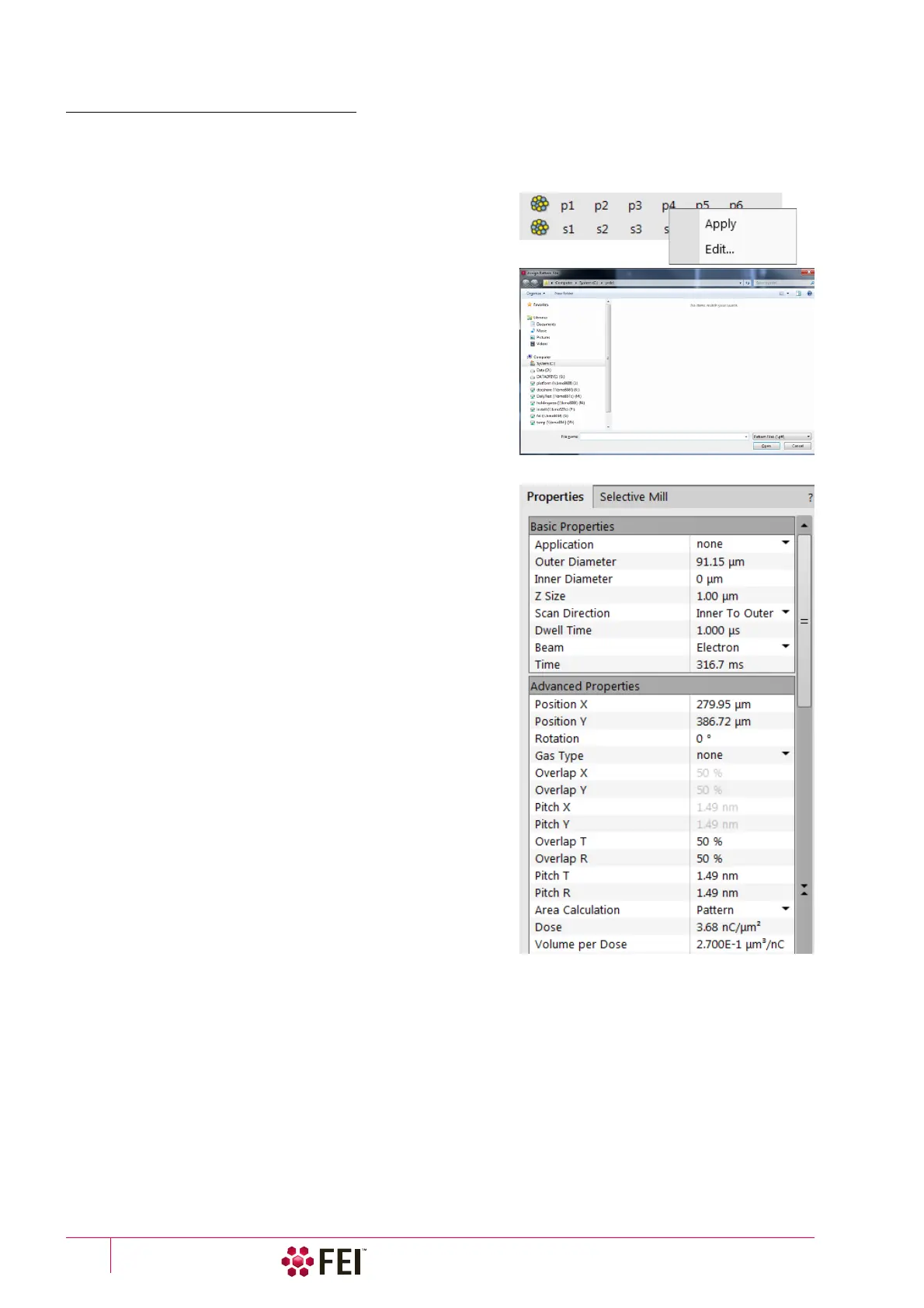
display. Six (for each beam) toolbar Pattern Presets (labeled p#)
can be individually assigned to any of these .ptf file.
Right-clicking on the selected button calls up the menu:
• Apply item – selects appropriate button (highlighted with an
orange background) and starts the patterning with the preset
parameters (the same as clicking on the button directly)
• Edit item – opens the Assign Pattern File (.ptf) window to assign
desired parameter file to a selected button
The toolbar Pattern Presets assignment to the particular .ptf file
can be saved or loaded by the File menu / Export or Import /
System Parameters item.
Property tab Module
A certain pattern can be selected from the list box with many
associated parameters which can be set via the Property module:
• Application – clicking on the value slot enables a down arrow
bringing a drop down list of applications. Choosing the
required one sets the subsequent properties.
• X / Y / Z size – dimensions of the pattern
• Scan Direction – scan movement direction (Bottom to Top; Top
to Bottom)
• Dwell Time – a time the beam spends on a single pixel per pass
(rounded to a multiple of 25 ns).
• Beam – the beam used for patterning
• Time – required to process this pattern
• Position X / Y of the pattern relative to the origin (the display
center)
• Rotation of the patterns (the positive direction is clockwise)
• Gas Type – the gas to be used to process the pattern (or None if
no gas is to be used). This determines the pattern color
onscreen.
• GasDutyCycle –
• GasNeedlePosition –
• OverlapX / Y – sets the beam diameter overlap. The value of
the overlap can be positive or negative depending on a
particular application. The overlap parameter influences the
Area Calculation and the Dose.
• PitchX / Y – sets the pitch between two spots
• Area Calculation – defines how the patterning area will be calculated in order to get the most accurate value of
the Dose. This value is related with the OverlapX/Y. The Pattern (default) / Array are set for positive / negative
overlaps.
• Dose –
• Volume per Dose – the volume of material that is removed per charge
• Saturation Sputter Rate – the maximum linear sputter rate for a given gas. For Gas = None this is 0 (actually not
used).
• Refresh Time – the minimum loop time that must at least elapse before the next pass, so that the adsorbed gas
can be refreshed
• Loop Time – the time required for a single pass (read only)
• Area – the surface area of the pattern (read only)



 To Next Page