System Control: Vacuum System
C O N F I D E N T I A L – FEI Limited Rights Data 2-11
Vacuum Status
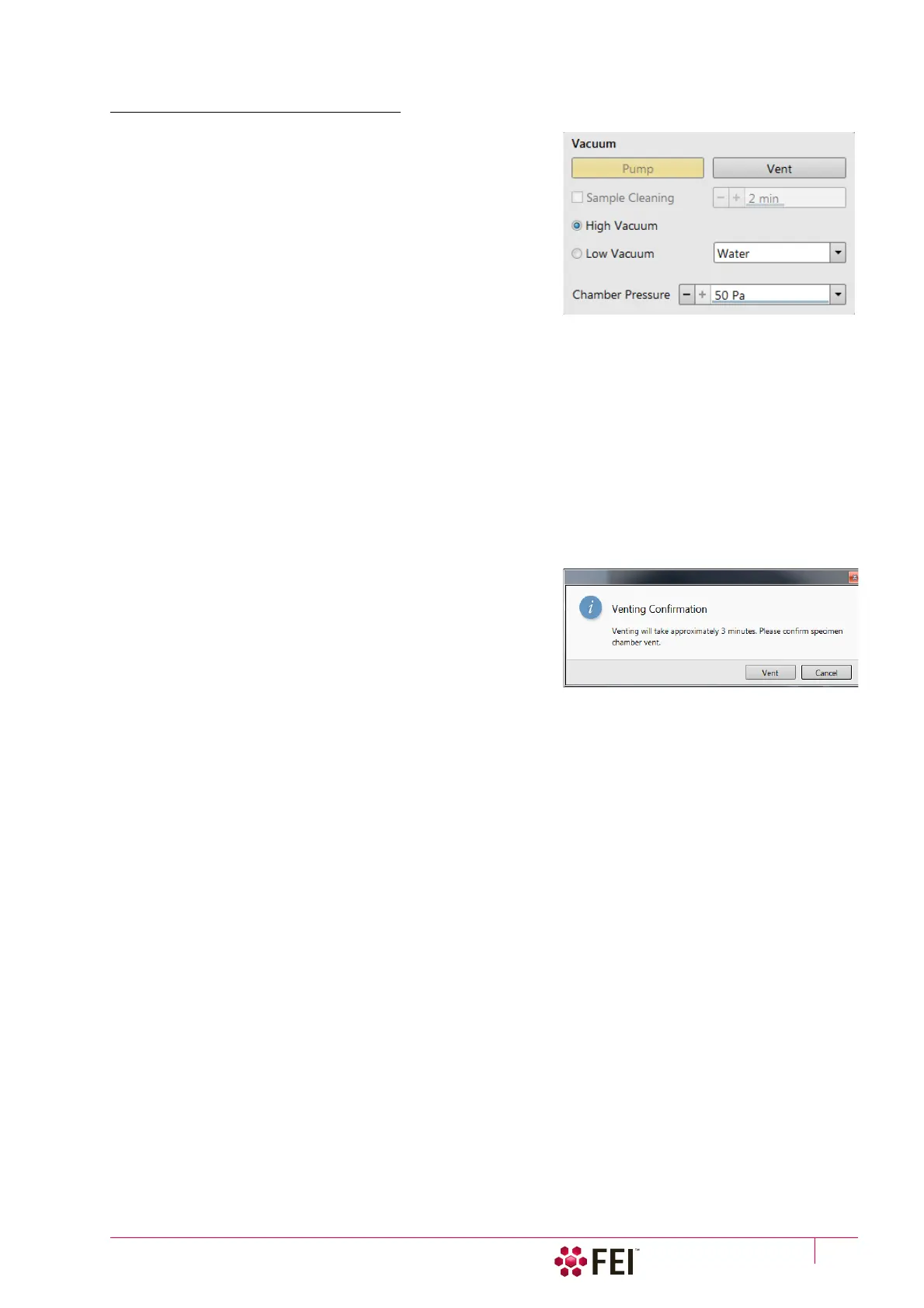
The vacuum status controls are in the Vacuum module. The Pump
button starts pumping the chamber for the operating pressure
and the Vent button starts venting the chamber for a sample
exchange.
At the bottom right side of the status bar the actual vacuum
status is represented by the colored icon, which may have three
possible colors with the following meanings:
• Green: PUMPED to a desired vacuum mode
• Orange: TRANSITION between vacuum modes
(pumping / venting / purging)
• Gray: VENTED to atmospheric pressure
Pump button
When the Pump button is clicked and the status is Vented or when changing the vacuum mode, the system starts to
pump. The target pressure depends on the selected vacuum mode. The Pump button is highlighted and not
accessible.
For High Vacuum, the system achieves the lowest pressure possible. For the Low Vacuum it achieves the pressure
specified in the Vacuum module / Chamber Pressure adjuster. The purge function can be defined in the Preferences…
dialogue / Low Vacuum tab (see Chapter 3).
When the Pump button is clicked and the status is Transition (venting), the venting procedure stops and the system
immediately starts to pump to the actually selected vacuum mode.
Vent button
When the Vent button is clicked and the status is Pumped, the
confirmation dialog appears. After confirmation, the system
switches off the detector voltages, high voltage supplies, vacuum
pumps and uses the appropriate valves to vent the system with
the use of the dry Nitrogen brought to the Nitrogen Inlet. Nitrogen
is recommended to obtain the better vacuum for high resolution
imaging in HiVac mode.
The Sample Exchange window and progress bar are shown, the
Vent button is highlighted and not accessible. After a specified venting time the venting valve closes and the
vacuum status should indicate Vented (see Preferences… dialogue / General tab / Venting valve opening time item).
The chamber door can be opened and the button is again enabled.
When the Vent button is clicked and the status is Transition (pumping), the dialog appears. After confirmation, the
pumping procedure stops and the venting procedure starts.
When the Vent button is clicked and the status is Vented, the dialog appears. After confirmation, the venting valves
re-open for the specified venting time and then the valves close.
Note
If you vent the system in order to change a detector, wait until the icon with a gray specimen chamber appears in the Status
module. Otherwise there is a risk of a detector assessment malfunction, and as a result the PLA will not be known by the
system.



 To Next Page