Software Control: Preferences Dialog
C O N F I D E N T I A L – FEI Limited Rights Data3-40
Magnification
When storing / printing an image (while in a Single / Quad image mode / Large Image Window) the databar
magnification representation may not be correct.
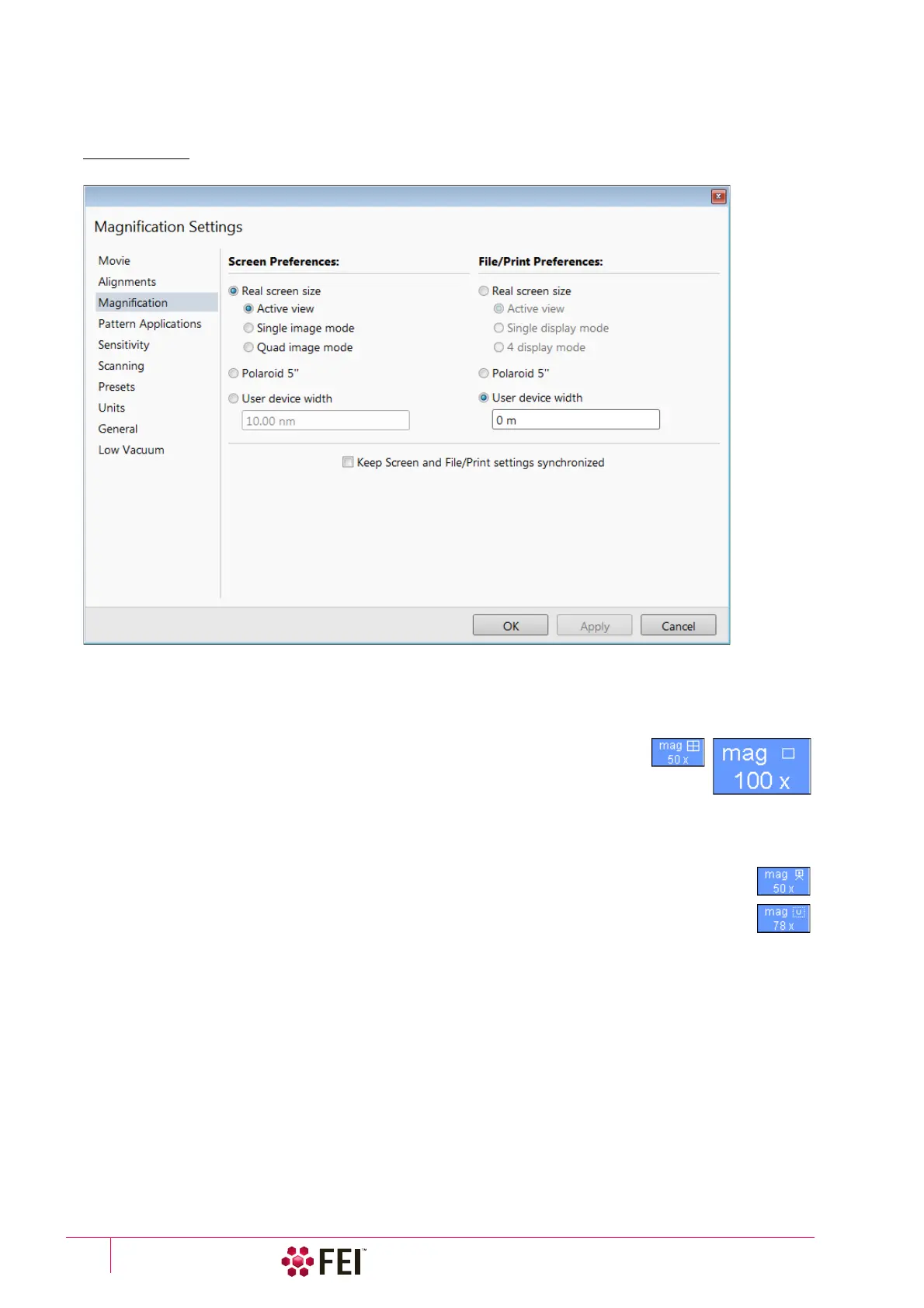
FIGURE 3-20 Magnification Preferences
The Screen preferences area sets the imaging databar magnification representation behaviour while the File / Print
preferences area sets the storage / printing databar magnification representation behaviour. Selecting the radio
button activates its functionality:
• Real screen size: the imaging pixel width is handled.
– Active view: the databar magnification value depends on whether the Single or
Quad Image mode is selected. It is shown in the image databar and stored / printed
with an icon representing the Single / Quad Image mode.
– Single display mode: Single image mode magnification value is shown in the
databar and stored / printed with an image.
– Quad image / 4 display mode: Quad image mode magnification value is shown in the databar and stored /
printed with an image.
• Polaroid 5”: Polaroid film width is handled. A recalculated magnification value is shown in the
databar and stored / printed with an image.
• User device width (set by a user via the edit box): A recalculated magnification value is shown in the
databar and stored / printed with an image.
The Keep Screen and File / Print settings synchronized check box keeps both settings identical.



 To Next Page