4.4.12.18
AM
1SeM
Selecting AM allows you to select internally modulated amplitude modulation or
suppressed carrier modulation. From the AM Setup screen you can independently set
the carrier frequency and the modulation frequency, as weIl as set the modulation
waveform. The carrier waveform will always be a sine wave. From the Standard
Waveform screen, select "am" to build the AM waveform. Or, select
"am
setup
...
"
to setup the waveform.
Selecting "am setup
...
" to display the AM SETUP screen; see figure 4-95a.
~
~
:~TU~
-~%mo~:
50 •
o
sem
o exit next
<>
Figure 4-95a.
AM
Setup Sereen
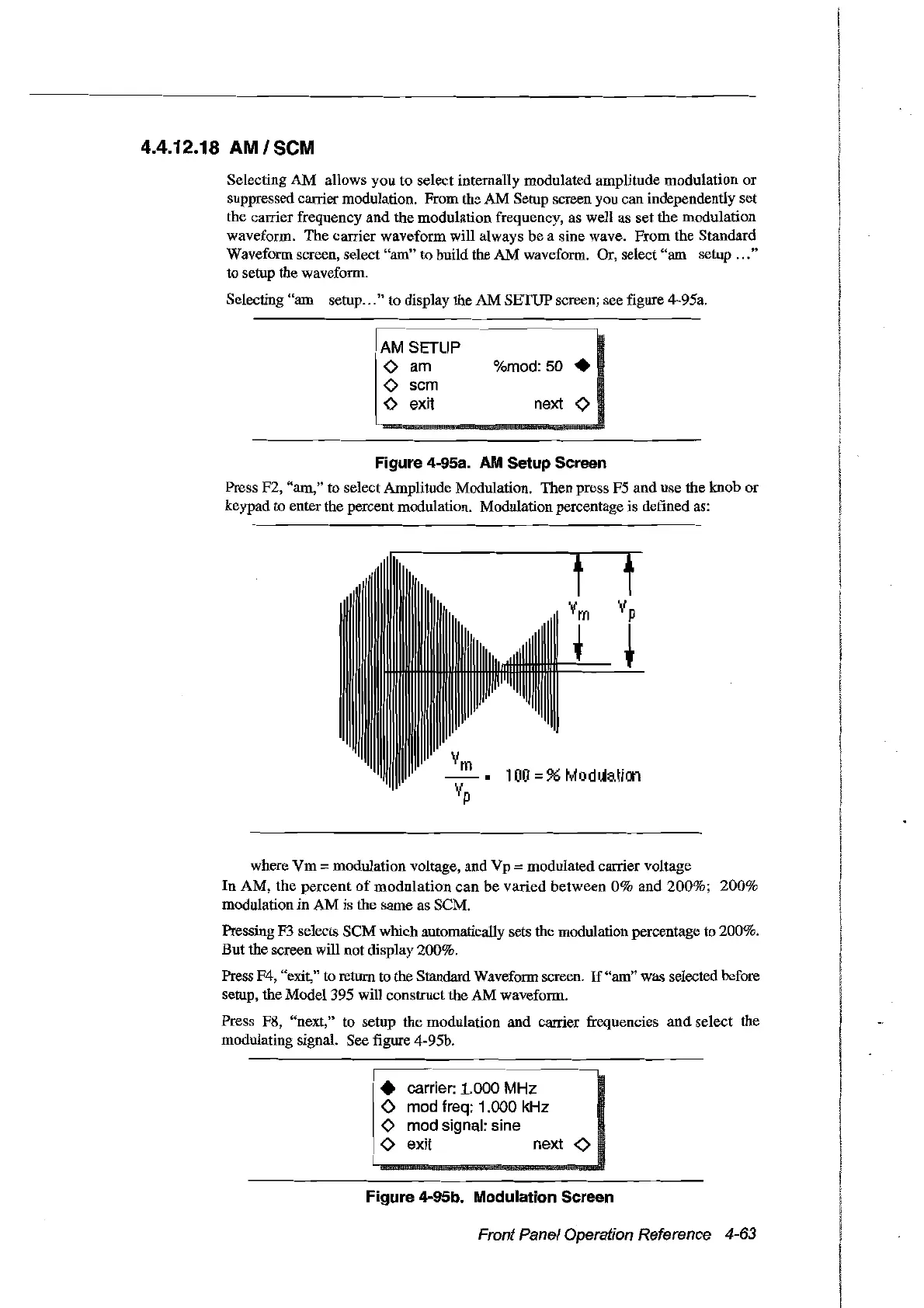
Press F2, "am," to select Amplitude Modulation. Then press F5 and use the knob or
keypad to enter the percent modulation. Modulation percentage is defined as:
100
=% M
oduaticn
where
Vm
=modulation voltage, and Vp =modulated carrier voltage
In
AM,
the
percent
of
modulation
can
be varied
between
0%
and
200%;
200%
modulation in AM is the same
as
SCM.
Pressing F3 selects SCM which automatically sets the modulation percentage to 200%.
But the screen will not display 200%.
Press F4, "exit," to return
10
the Standard Waveform screen.
If
"am" was selected before
setup, the Model 395 will construct the AM waveform.
Press P8, "next," to setup the modulation and carrier frequencies
and
select the
modulating signal. See figure 4-95b.
• carrier: 1.000 MHz
o
mod
treq: 1.000
kHz
o
mod
signal: sine
o exit next
<>
Figure 4-95b. Modulation Sereen
Front Panel Operation Reference 4-63
Artisan Technology Group - Quality Instrumentation ... Guaranteed | (888) 88-SOURCE | www.artisantg.com



 To Next Page