+2047
+1536
+1024
+512
~
+0000
<C
C
-512
-1024
-1536
1
tz'
....
-
1
~f
-.J
1
1 1
i
l
1
'----'
1
1
i
1
-2048
o
500 1000 1500
ADDRESS
2000
2500
3000
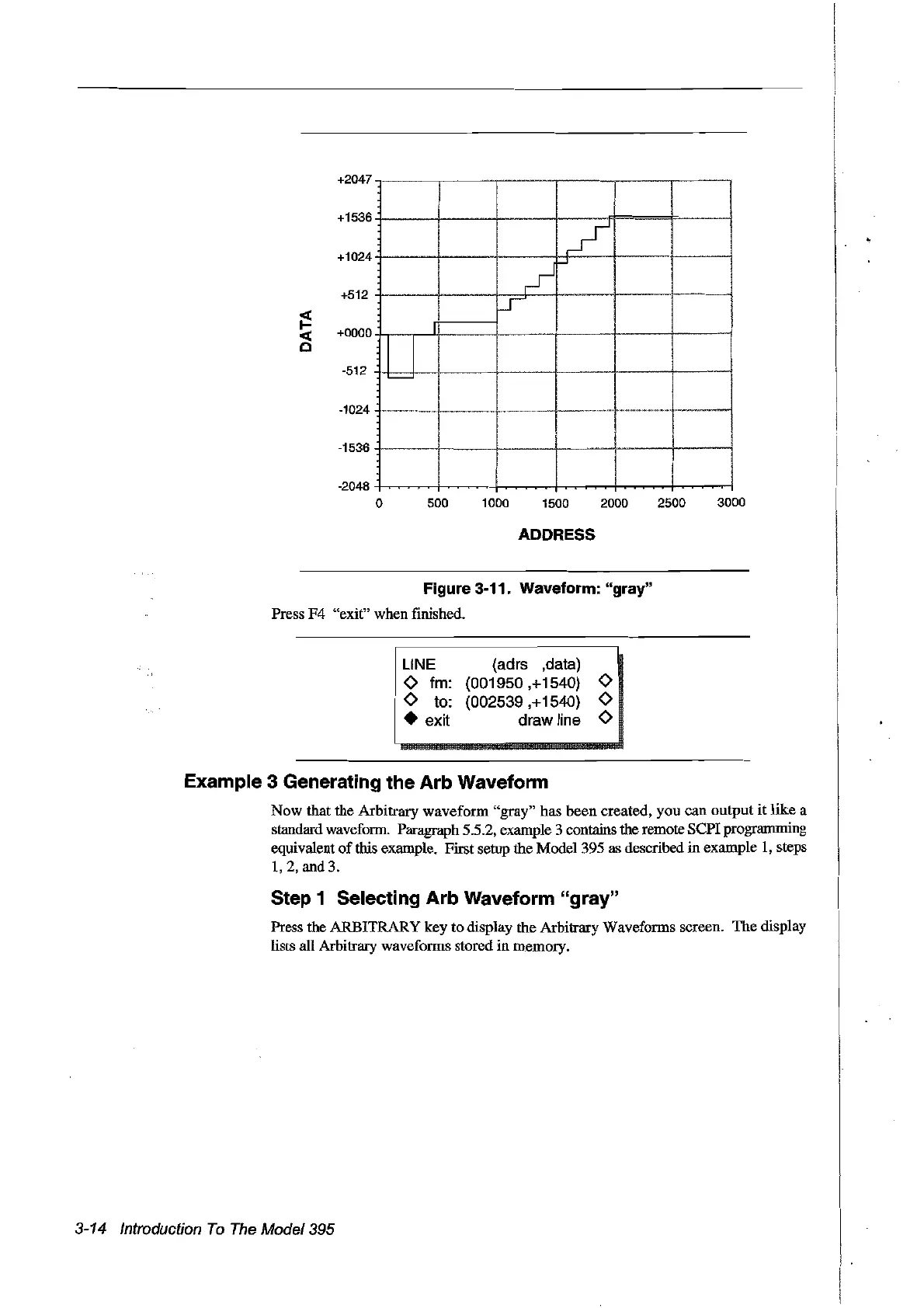
Figure 3-11. Waveform: "gray"
Press
F4
"exit" when finished.
UNE
o fm:
Ota:
• exit
(adrs ,data)
(001950,+1540)
0
(002539,+1540) 0
draw line 0
Example 3 Generating the Arb Waveform
Now that the Arbitrary waveform
"gray"
has
been
created, you can output
it
like
a
standard waveform. Paragraph 5.5.2, example 3 contains the remote
SePI
programming
equivalent
of
this example. First setup the Model 395 as described in example
1,
steps
1,2,
and
3.
Step 1 Selecting Arb Waveform "gray"
Press the ARBITRARY key to display the Arbitrary Waveforms screen. The display
lists all Arbitrary waveforms stored
in
memory.
3-14 Introduction
Ta
The
Model395
Artisan Technology Group - Quality Instrumentation ... Guaranteed | (888) 88-SOURCE | www.artisantg.com



 To Next Page