( )
ARBITRARY
ARBITRARY WAVEFORMS
• gray 002540
<>
wv1
001
024
(use
knob
to
seroU)
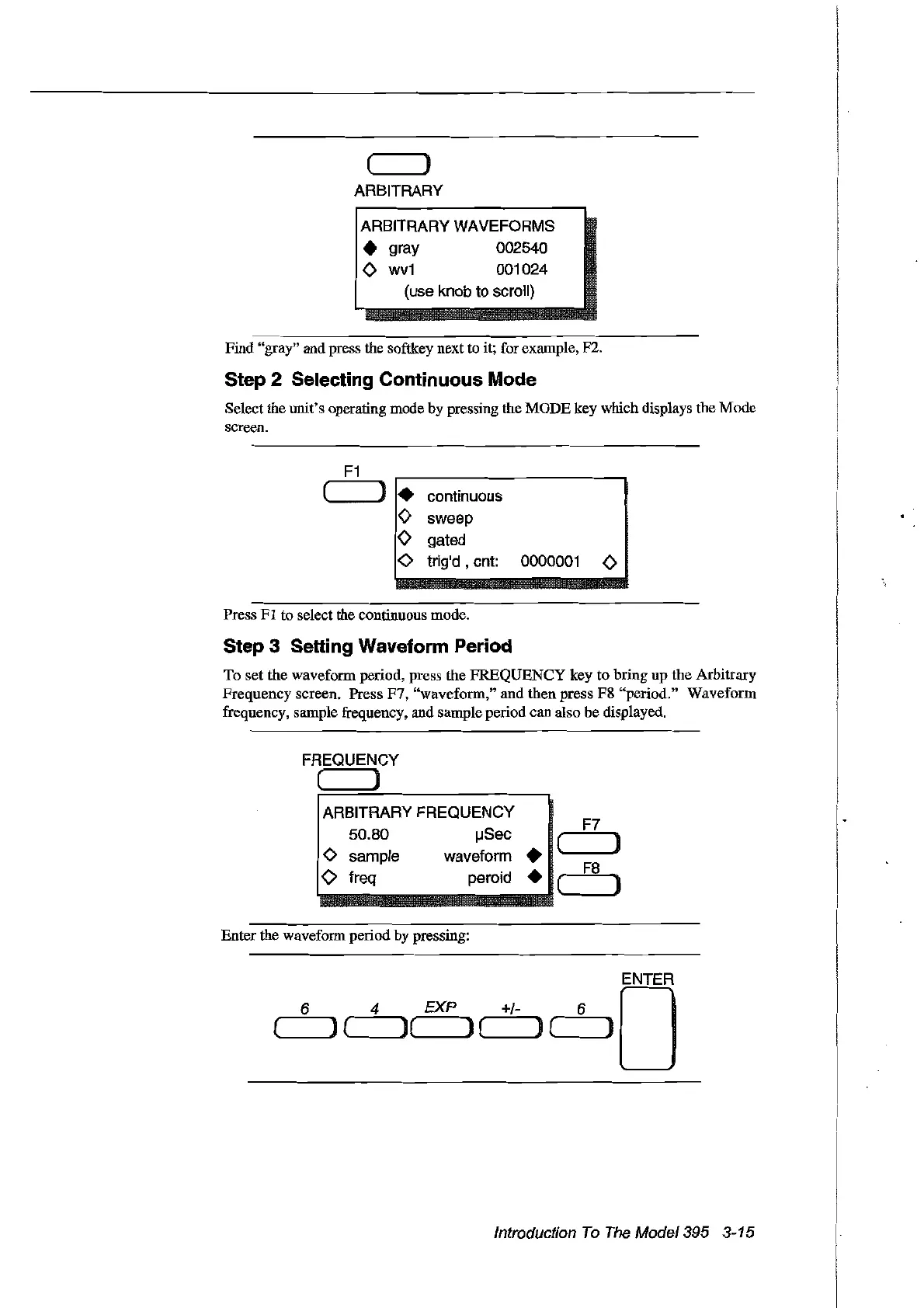
Find "gray" and press the softkey next to it; for example, F2.
Step 2 Selecting Continuous Mode
Select the unit's operating mode by pressing the MODE key which displays the Mode
screen.
F1
(
)
•
eontinuous
<>
sweep
<>
gated
0
trig'd ,
ent:
0000001
<>
Press
FI
to select the continuous mode.
Step 3 Setting Waveform Period
To set the waveform period, press the FREQUENCY key to bring up the Arbitrary
Frequency screen. Press F7, "waveform," and then press F8 "period." Waveform
frequency, sample frequency, and sample period can also be displayed.
FREQUENCY
( ]
ARBITRARY FREQUENCY
F7
50.80
IJSee
( )
o sample
waveform.
'--_.J
F8
o freq pereid • (
--Il
Enter the waveform periodby pressing:
(,-_6
__
) (
4_](
EXP ) ( +/- ) (,-_6
__
) 0
Introduction
To
The
Model395 3-15
Artisan Technology Group - Quality Instrumentation ... Guaranteed | (888) 88-SOURCE | www.artisantg.com



 To Next Page