5.3 REMOTE RS-232 SETUP
Operating the Mode1395 via RS-232 consists ofthree steps: hardware setup, instrument
setup, and SCPI commands.
5.3.1 Hardware Setup
Paragraph 2.7.1 describes the Mode1395 RS-232 hardware connections. Wavetek-
Datron ships the Mode1395 with a standard RS-232 (interface type E) cable
(PIN 6002-
00-0061) and adapter (PIN 2100-02-0328).
5.3.2 Instrument Setup
Press the
REM01E
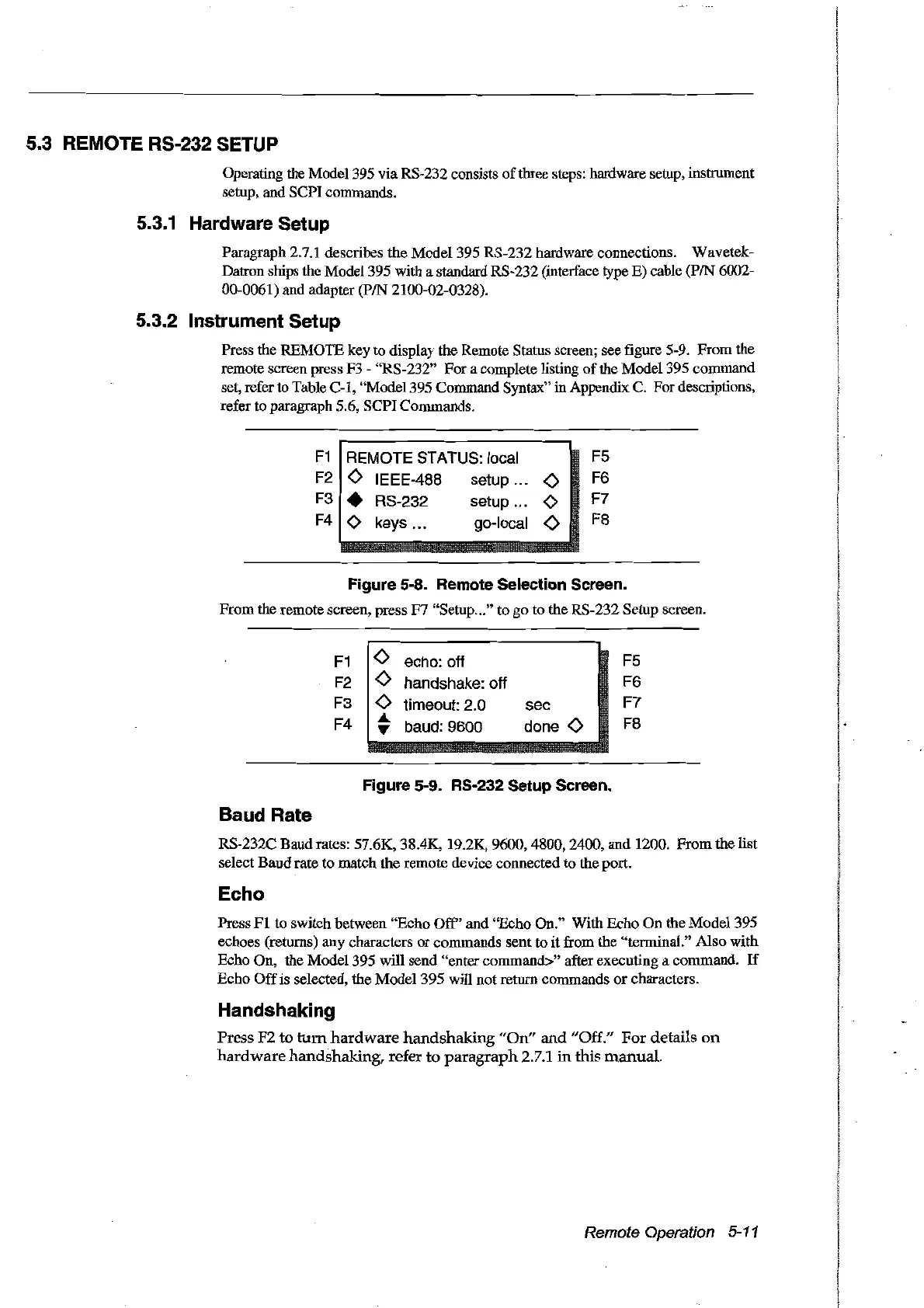
key ta display the Remote Status screen; see figure 5-9. From the
remote screen press F3 "RS-232" For a complete listing
of
the Madel 395 command
set, refer to Table
C-l,
"Model 395 Command Syntax" in Appendix C. For descriptions,
refer to paragraph 5.6, SCPI Commands.
F1
REMOTE STATUS: local
F5
F2
<>
IEEE-488 setup
<>
F6
F3
• RS-232 setup
<>
F7
F4
<>
keys...
go-local
<>
F8
Figure 5-8. Remote Selection Sereen.
From the remote screen, press F7 "Setup
..
."
to go to the RS-232 Setup screen.
F1
F2
F3
F4
<>
echo: off
<>
handshake: off
<>
timeout: 2.0
~
baud: 9600
sec
done
<>
F5
F6
F7
F8
Figure 5-9. RS-232 Setup Sereen.
Baud Rate
RS-232C Baudrates: 57.6K, 38.4K, 19.2K, 9600, 4800, 2400, and 1200. From the list
select Baudrate to match the remote device connected to the port.
Echo
Press
FI
to switch between "Echo
Off'
and "Echo
On."
With Echo On the Model 395
echoes (retums) any characters
or
commands sent to it from the "terminal." Also with
Echo On, the Madel 395 will send "entercommand>" after executing a commando
If
Echo
Off
is selected, the Model 395 will not retum commands
or
characters.
Handshaking
Press
F2
to
tum
hardware
handshaking
"On"
and
"Off." For details
an
hardware
handshaking, refer
ta
paragraph
2.7.1
in
this
manual.
Remote Operation 5-11
Artisan Technology Group - Quality Instrumentation ... Guaranteed | (888) 88-SOURCE | www.artisantg.com



 To Next Page