Sync Out
Use the knob
or
keypad to enter the "program" value. For pulse periods <655
!ts,
the
delay is programmable between -600
flS
and +600
!ts.
For pulse periods >655
!ts,
the
width is programmable between -99.9% and +99.9%
of
the pulse period. The screen
dispIays the actual delay value which may be different from the programmed value
based on the overall pulse parameters.
Press F4, "exit," to return to the Standard Waveformscreen. The "next" key, F8, returns
to the Pulse Period screen.
4.4.12.12 Pulse Train
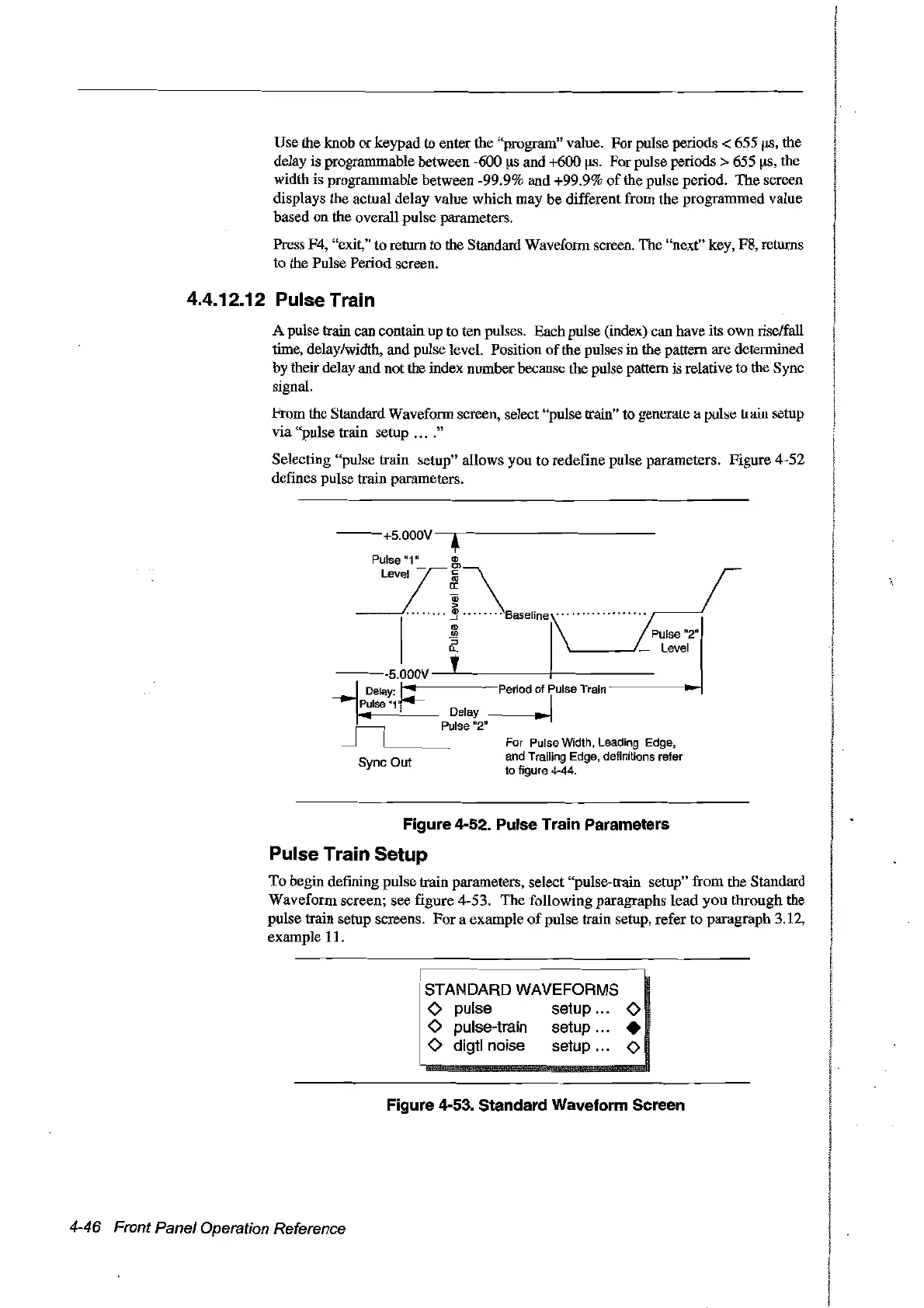
A pulse train can contain up to ten pulses. Bach pulse (index) can have its own rise/fall
time, delay/width, and pulse level. Position
of
the pulses in the pattern are determined
by their delay and not the index numberbecause the pulse pattern is relative to the Sync
signal.
l'rom the Standard Waveform screen, select "pulse train" to generale a
puls~
Ilain setup
via "pulse train setup
....
"
Selecting "pulse train setup" allows you
ta
redefine pulse parameters. Figure 4-52
defines pulse train parameters.
--+s.ooov
•
Pulse "1"
(Il
-:!.I\8œ~oonnnnnnn
~_--.J
1
~
1\
Pulse
"2"
0.. . _ Level
---s.OOOV-'----+-----
Delay:
t-"!-
m-Period
of Pulse Train
-----~
pulse"1'~
1
Delay
_m-_...-J
Pulse "2"
For Pulse Width, Leading Edge,
and Trailing Edge, definitions refer
ta figure 4-44.
Figure 4-52. Pulse Train Parameters
Pulse Train Setup
To
begin defining pulse train parameters, select "pulse-train setup" from the Standard
Waveform screen; see figure 4-53. The following paragraphs
lead
you through the
pulse train setup screens.
For
a exampIe
of
pulse train setup, refer
ta
paragraph 3.12,
example 11.
STANDARD WAVEFORMS
o pulse setup 0
o pulse-train setup •
o digtl noise setup 0
Figure 4-53. Standard Waveform Sereen
4-46 Front Panel Operation Reference
Artisan Technology Group - Quality Instrumentation ... Guaranteed | (888) 88-SOURCE | www.artisantg.com



 To Next Page