1
7
2
6
éJ
8
0
3
4 5
6
4
0
0
+/-
5
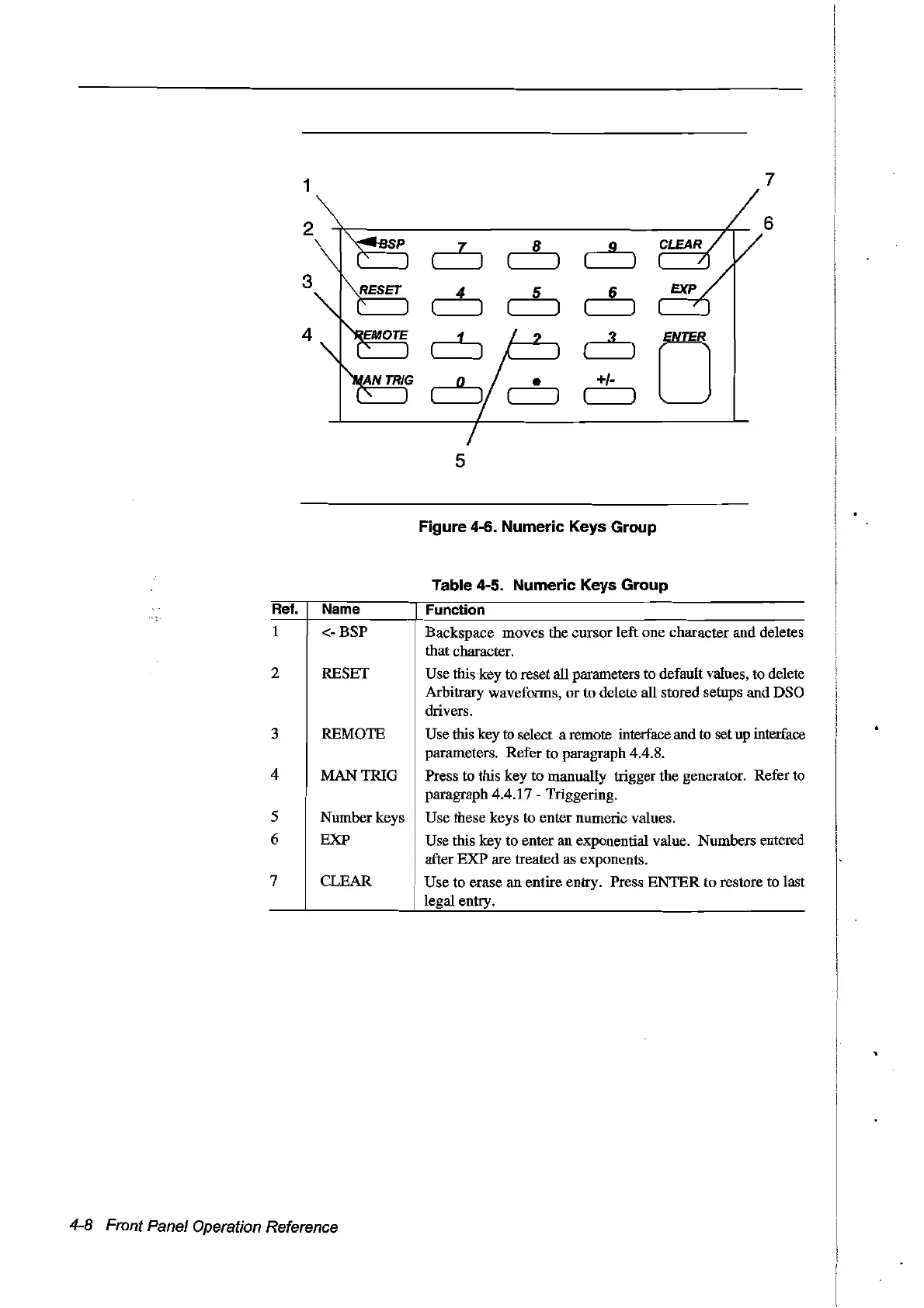
Figure 4-6. Numeric Keys Group
Table 4-5. Numeric Keys Group
Rel.
Name
Function
1
2
3
4
5
6
7
<-BSP
RESET
REMüTE
MANTRIG
Numberkeys
EXP
CLEAR
Backspace moves the cursor left one character and deletes
that character.
Use this key to reset all parameters to default values, to delete
Arbitrary waveforms,
or
to delete all stored setups and DSa
drivers.
Use this key to select a remote interface and to set up interface
parameters. Refer to paragraph 4.4.8.
Press to this key to manually trigger the generator. Refer
to
paragraph 4.4.17 Triggering.
Use these keys to enter numeric values.
Use this key to enter an exponential value. Numbers entered
after
EXP
are treated as exponents.
Use to erase
an
entire entry. Press
ENTER
to restore to last
legal entry.
4-8 Front Panel Operation Reference
Artisan Technology Group - Quality Instrumentation ... Guaranteed | (888) 88-SOURCE | www.artisantg.com



 To Next Page