Heart and Respiration Rate Monitoring System powered by EarlySense
96 Centrella® Smart+ Bed with Heart and Respiration Rate Monitoring System powered by EarlySense Instructions for Use
(193587 REV 10)
CHANGE HR AND RR ALARM THRESHOLDS
HR and RR Alarm Thresholds Specification
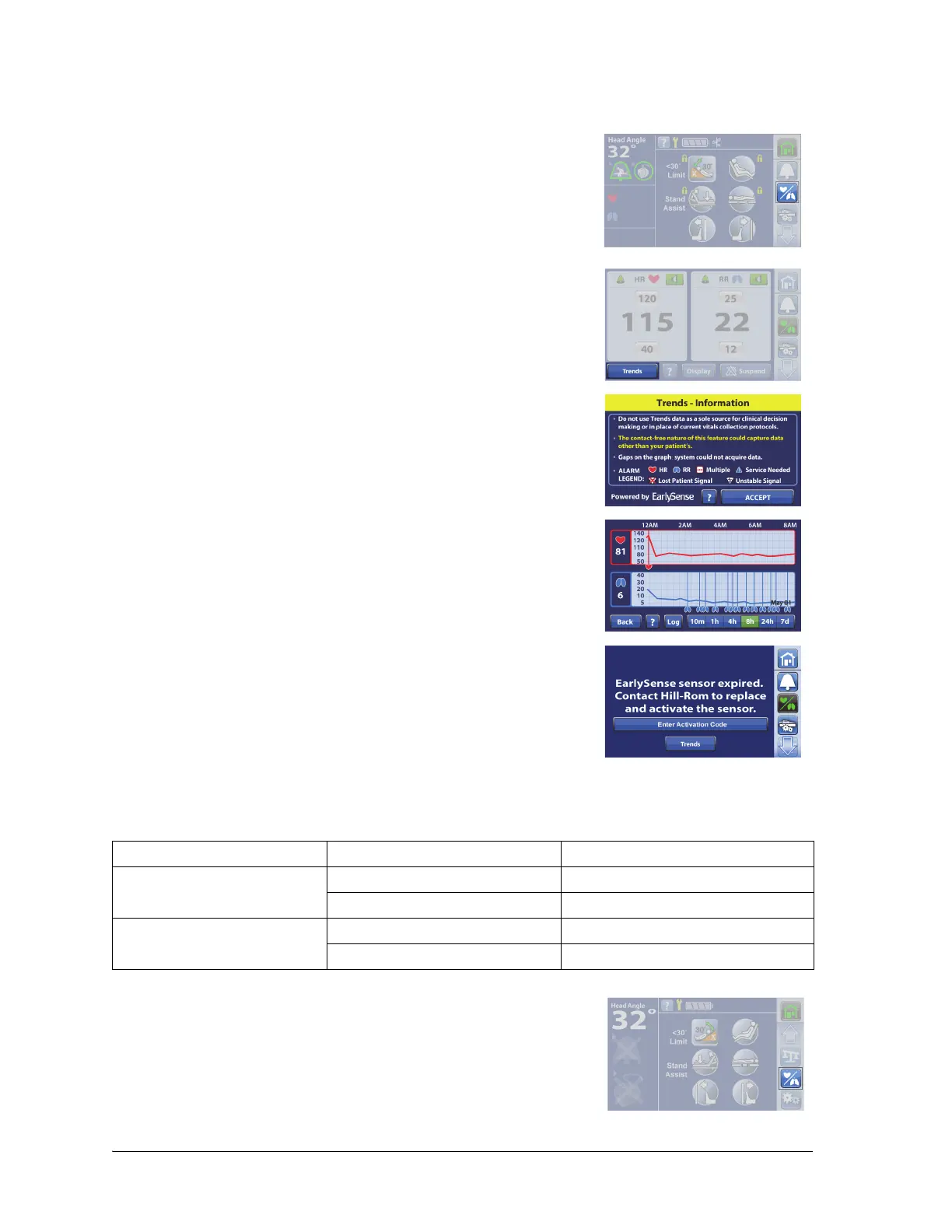
To View HR and RR Trends
1. Press the HR/RR menu control.
2. Press Trends.
3. Press Accept.
4. Select the time period view.
NOTES
• The Trends screen default is 8 hours.
• If the sensor expired, you can view the previous trend data
through the Trends control.
Heart Rate Respiration Rate
Default Alarm Thresholds Low = 40 BPM Low = 8 Br./min
High = 130 BPM High = 32 Br./min
Min. to Max. Settable Alarm
Thresholds
Low: 35 BPM Low: 8 Br./min
High: 150 BPM High: 44 Br./min
1. Press the HR/RR menu control.















 To Next Page