Heart and Respiration Rate Monitoring System powered by EarlySense
100 Centrella® Smart+ Bed with Heart and Respiration Rate Monitoring System powered by EarlySense Instructions for Use
(193587 REV 10)
Turn On/Off Remote Alarms
The HR and RR Monitoring System can provide remote alarms when connected to a Nurse Call System.
To turn off the remote RR/HR Alarms, contact your facility-authorized maintenance persons or Hill-Rom
Technical Support for assistance.
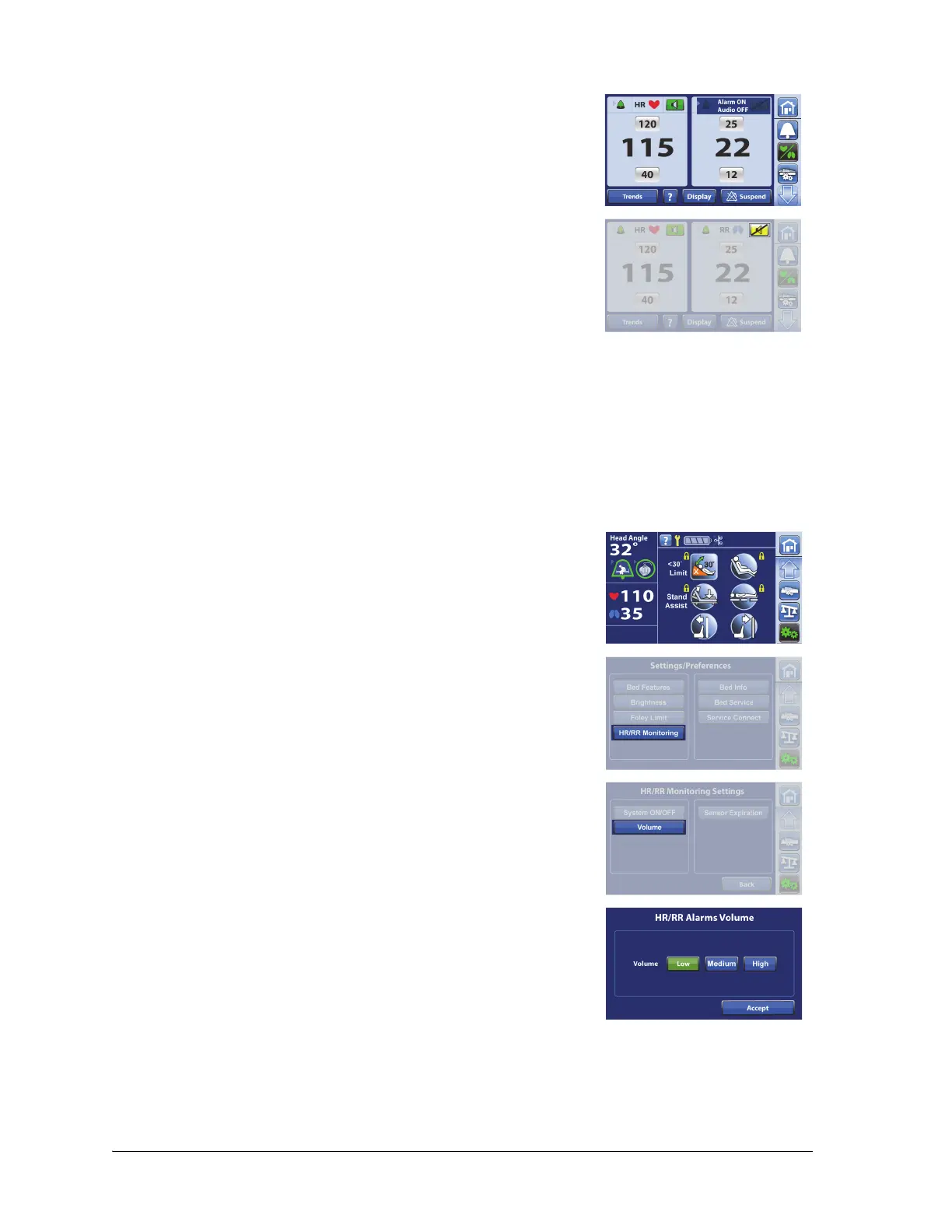
Change HR and RR Alarm Volume
The volume can be adjusted for the HR and RR Alarms.
4. Make sure the screen shows a message that the alarm is on and
audio is off.
5. Make sure the HR/RR Alarm Sound control shows that it is silenced.
6. Press the HR/RR Alarm Sound control again to enable the audible
alarm.
1. Press the Settings/Preferences menu control.
2. Press HR/RR Monitoring.
3. Press Volume.
4. Select the volume setting, then press Accept.
Contact your facility-authorized maintenance person or Hill-Rom Technical Support for assistance to
change the tone of the alarms.















 To Next Page