SideCom® Communication System
42 Centrella® Smart+ Bed Instructions for Use (193587 REV 10)
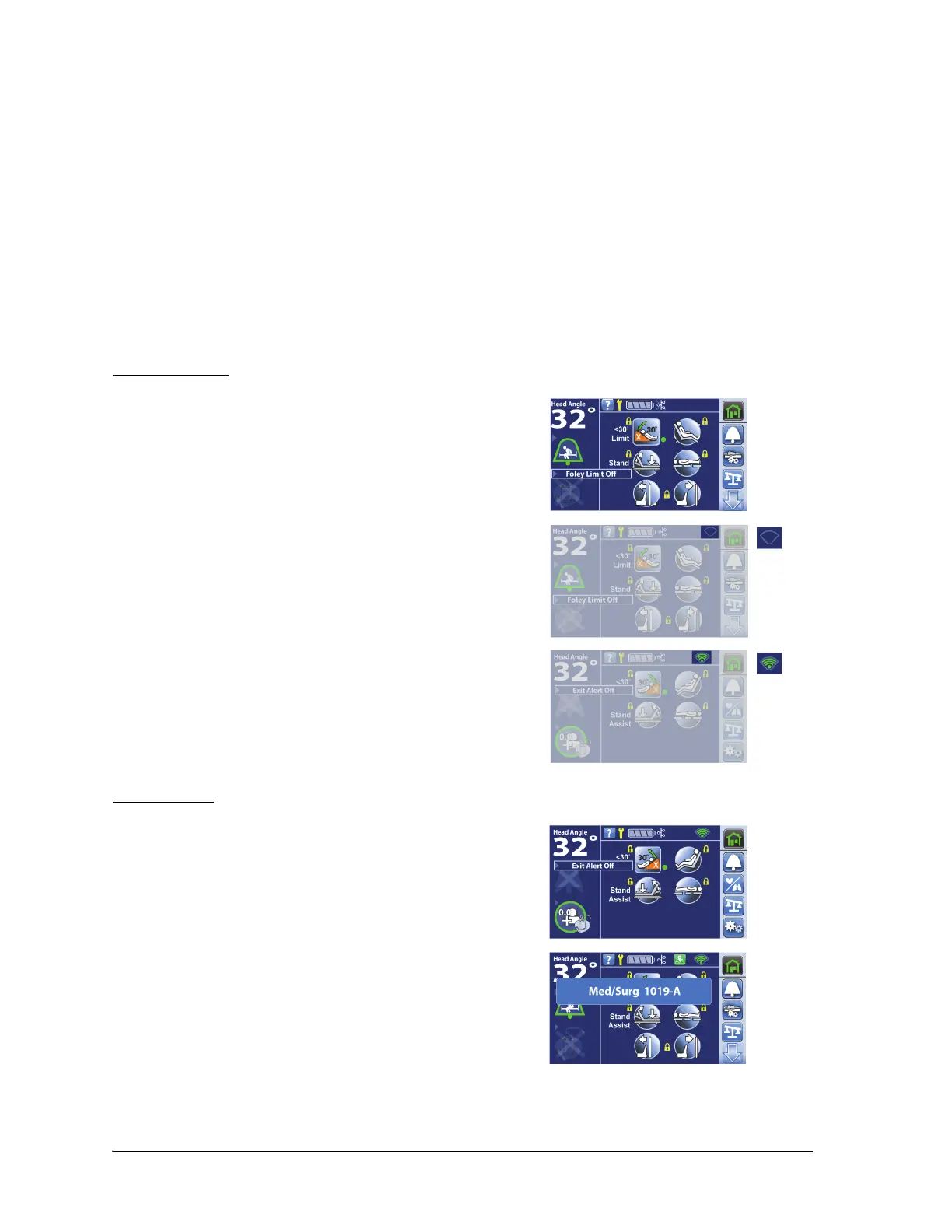
Wireless and Bed Location Indicators on the Touchscreen
When you plug the bed into AC power, the color of the Wireless Status and Bed Location indicators on
the touchscreen will identify the wireless connectivity status:
Wireless Status
Bed Location
The Wireless Connectivity module permits bed and mattress data to be sent to a hospital’s information
system without a communication cable; the module does not communicate nurse call information.
The module has a Location feature that identifies the location of the bed when it is in a facility that has
a real-time location system (RTLS) installed. The data is sent through Hill-Rom’s middleware solution,
NaviCare® SmartSync® System, to the hospital’s information system. (For electrical specifications, see
“Wireless System Characteristics” on page 141.)
The module operates only when the bed is connected to AC power; it does not operate on battery
power.
• No indicator—the wireless module is not operating
correctly or it is not receiving power.
• White outline—the wireless module is operating
correctly, but it is not connected to the wireless network or
it has not been configured.
• Green bars—the wireless module is operating correctly
and is connected the wireless network.
• No Location control—the wireless module is operating
correctly, but it has not received a location or it has not
been configured.
• Room Number—the wireless module is operating
correctly, it has received a location, and the Location
control is pressed.
The Location control will not show if there is no wireless
connection or it has not received a location.















 To Next Page