Graphical Caregiver Interface (GCI)® Controls
60 Centrella® Smart+ Bed Instructions for Use (193587 REV 10)
Re-Zero (Same Patient)
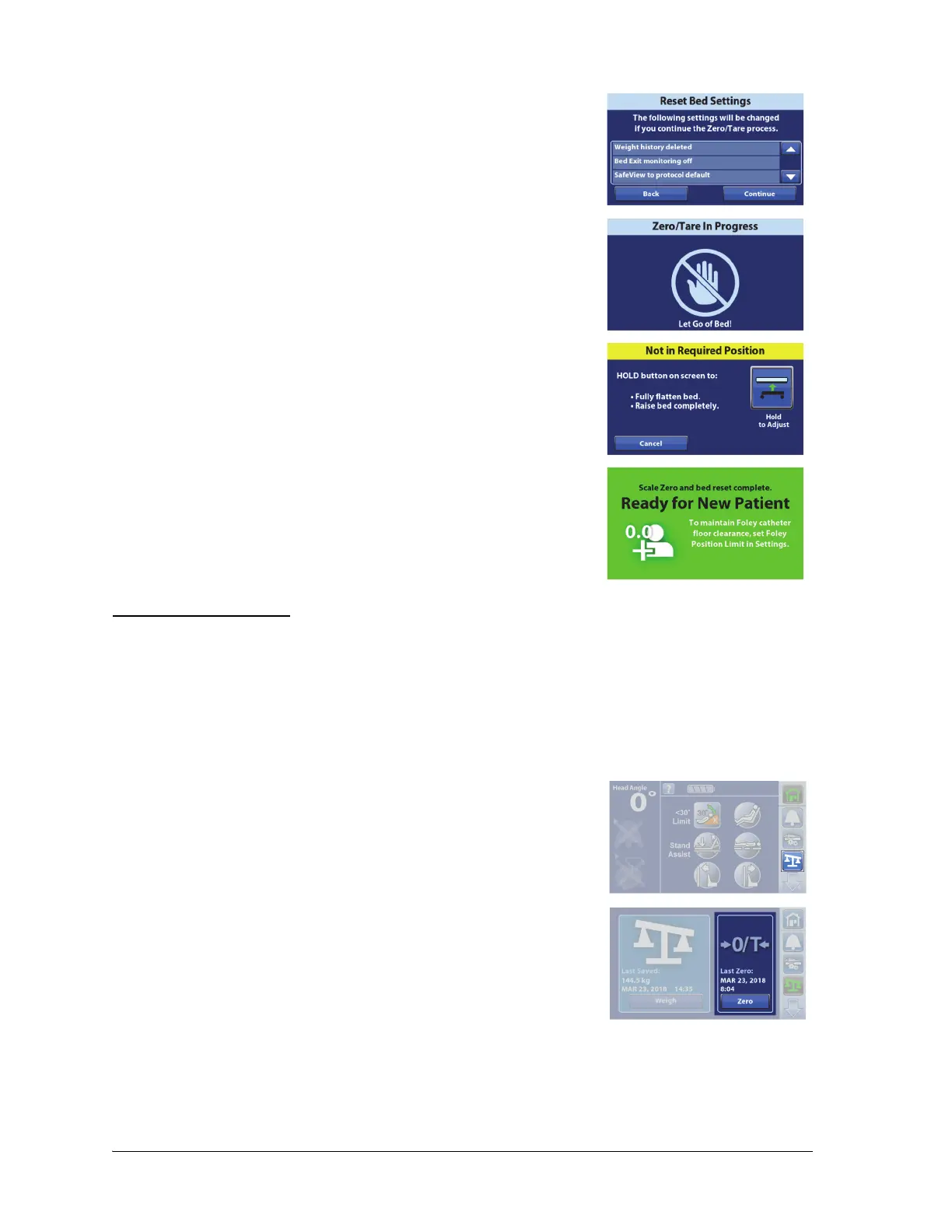
• Info will show what bed features will be reset if you continue
to Zero.
3. The touchscreen will show that the bed is zeroing. Do not touch
the bed while the bed zeroes.
If the “Not In Required Position” screen shows, press the Hold to
Adjust control on the touchscreen.
4. A single beep will sound and the touchscreen will show that the
bed is ready for a new patient. To return to the Home screen, touch
the screen or place a patient in the bed.
To learn more about the Foley Position Limit, see “Foley Position Limit”
on page 72.
Use Re-Zero whenever you add equipment or other items to a bed that previously has been zeroed for
the patient. An example of this would be if you replace a mattress with a heavier mattress or if there are
inconsistent weight readings. Before you press Re-Zero, make sure that the patient is not in the bed.
The Re-Zero control will—
• Not reset the bed settings.
• Zero the Scale for the Same Patient (does not clear the history).
1. Press the Scale menu control.
2. Press Zero.















 To Next Page