Graphical Caregiver Interface (GCI)® Controls
Centrella® Smart+ Bed Instructions for Use (193587 REV 10) 67
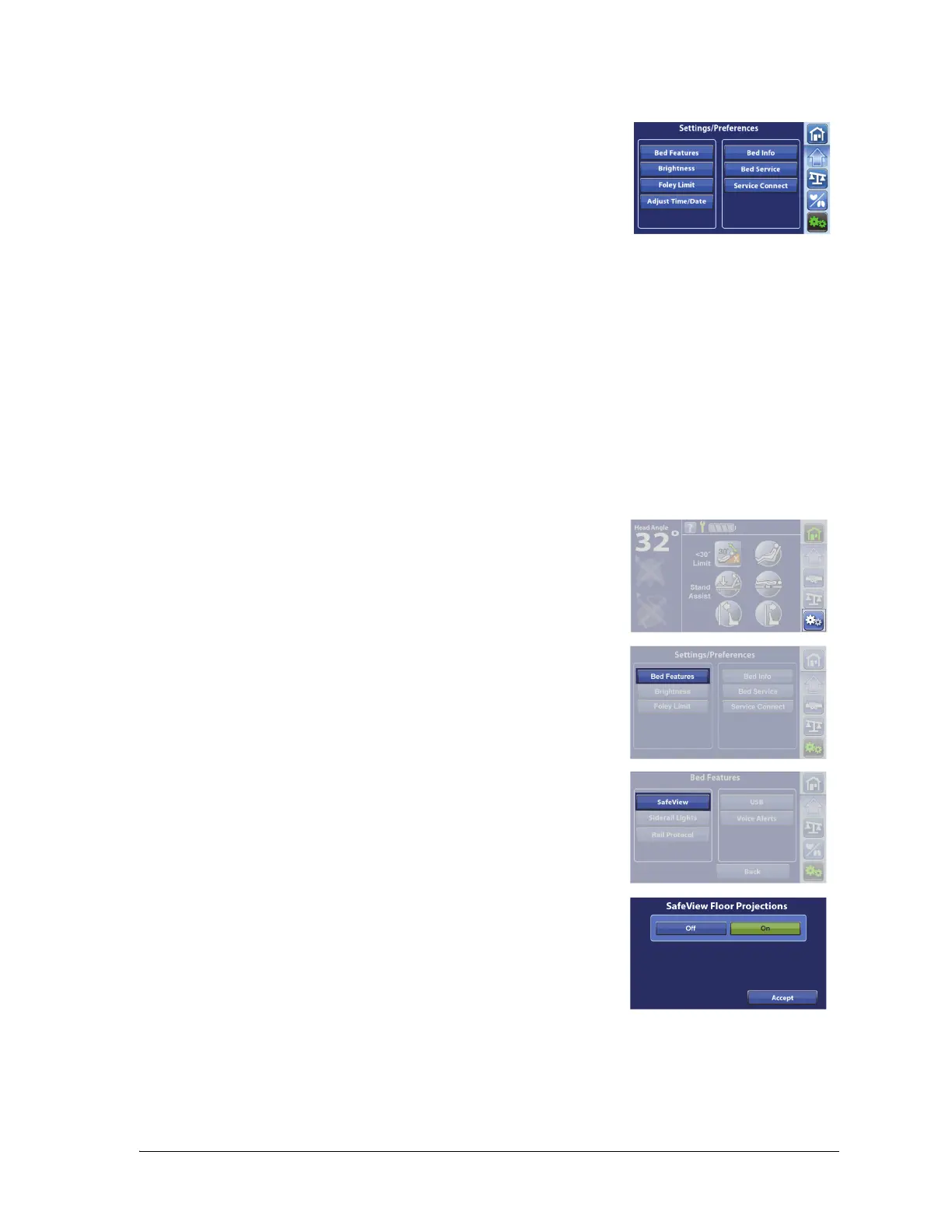
SETTINGS/PREFERENCES
SafeView®+ Alerts Floor Projections Option—ON/OFF
Through the Settings menu control, you can—
• Set these bed features: SafeView®+ Alerts option Floor
Projections, Siderail Lights, Siderail Protocol, USB Charging
Port, Voice Alerts, and Mattress Features.
• Adjust the touchscreen brightness.
• Set the Foley Limit feature.
• Adjust the time zone, time, and date (only beds with the NAWI
Compliant (EN 45501).
NOTES:
• Not all bed models are equipped with the features listed above.
• The list on the right side is intended for service information. Only facility-authorized person
should service the bed.
Beds equipped with the SafeView®+ Alerts Floor Projections option show the bed’s status at the foot
end of the bed and project status indicators on to the floor. For more information about the
SaveView®+ Alerts option, see page 26.
1. Press the Settings menu control.
2. Press Bed Features.
3. Press SafeView.
4. Press Off or On for the SafeView Floor Projections.
5. Press Accept.















 To Next Page