Symbols
Centrella® Smart+ Bed Instructions for Use (193587 REV 10) 7
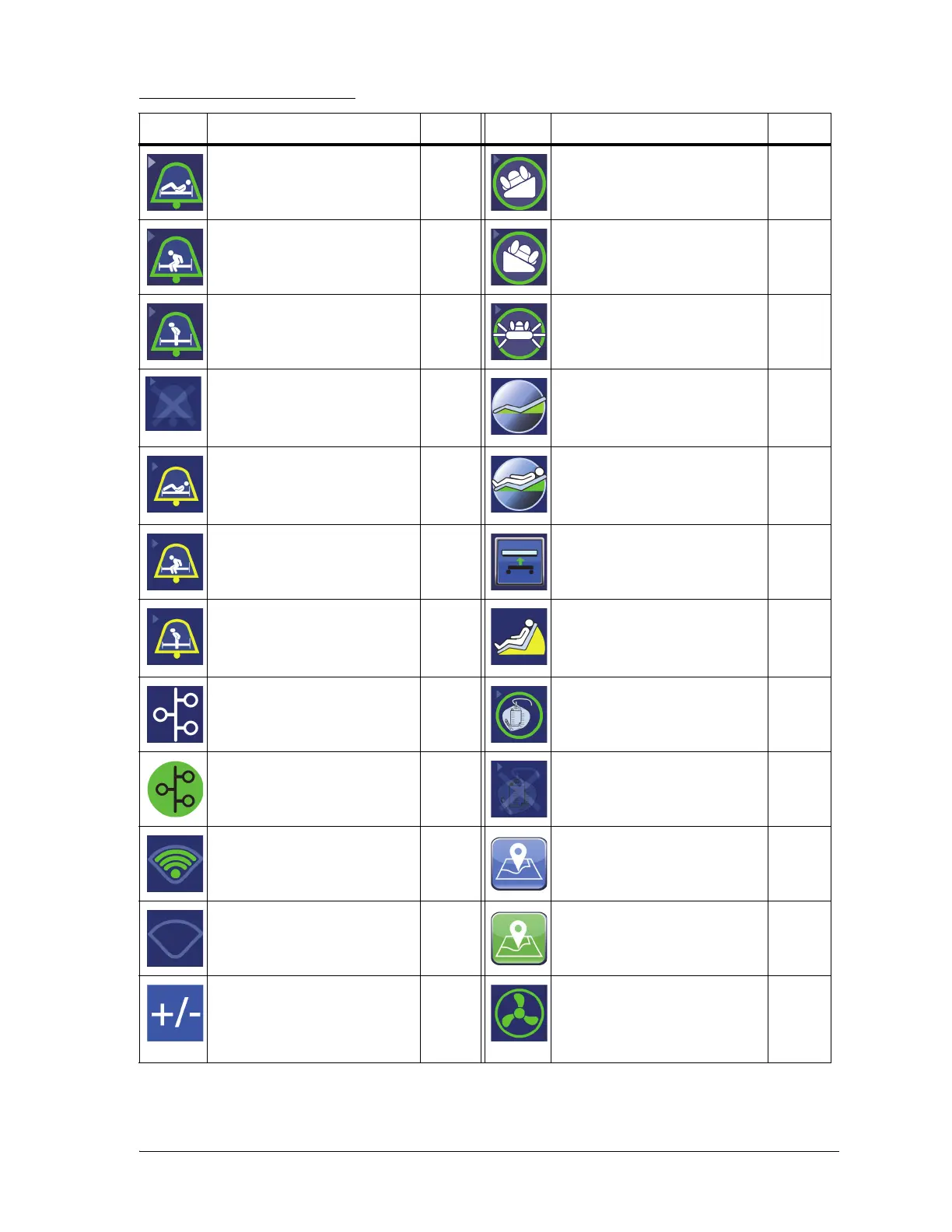
Other Touchscreen Symbols
Symbol Description Page Symbol Description Page
Position Mode Bed Exit
Alert—ON indicator
48 Turn Assist—patient right
indicator
108
Exiting Mode Bed Exit Alert—
ON indicator
48 Turn Assist—patient left
indicator
108
Out of Bed Mode Bed Exit
Alert—ON indicator
48 Max Inflate status indicator
(only on Centrella® max mat-
tress)
105
Bed Exit Alert system—OFF
indicator
49 Adjust Bed Button control (for
zero scale)
52
Position Mode Bed Exit
Alert—SILENCED indicator
49 Adjust Bed Button control (for
weigh patient and turn assist)
54
Exiting Mode Bed Exit Alert—
SILENCED indicator
49 Hold to Adjust control (for
weigh patient with an NAWI
compliant scale)
58
Out of Bed Mode Bed Exit
Alert—SILENCED indicator
49 Not In Optimum Position
when patient was weighed
54
NaviCare® Patient Safety
Monitoring—SUSPENDED
indicator
43 Foley Limit status—ON 72
NaviCare® Patient Safety
Monitoring—ON indicator
43 Foley Limit status—OFF 72
WiFi—signal strength indica-
tor
41 Bed Location control—bed
located
42
WiFi—bed equipped with
WiFi but no WiFi Signal found
indicator
41 Bed Location indicator—con-
trol is active to show the bed’s
location
42
+/- Control (Add/Remove
Items)
61 MCM—ON indicator for beds
equipped with the pro+ mat-
tress (integrated)
107















 To Next Page