Graphical Caregiver Interface (GCI)® Controls
68 Centrella® Smart+ Bed Instructions for Use (193587 REV 10)
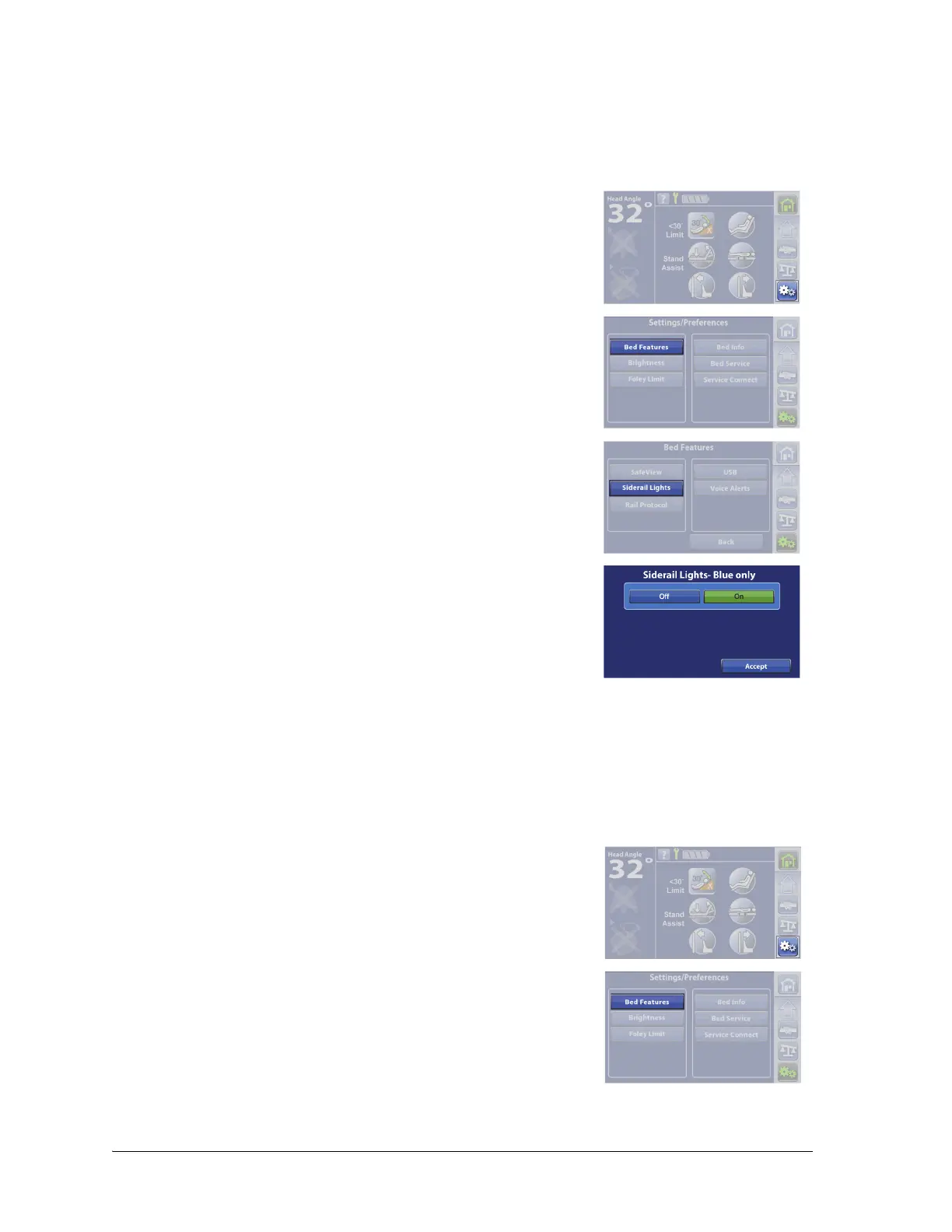
IllumiGuide® Siderail Handgrip (blue light only)—ON/OFF
Beds equipped with the IllumiGuide® siderail handgrip allow the patient to easily find the grip location
on the siderail when the patient exits the bed. The light will stay on for 15 minutes after the patient exits
the bed and 2 minutes after the patient returns to the bed.
Siderail Protocol
1. Press the Settings menu control.
2. Press Bed Features.
3. Press Siderail Lights.
4. Press On or Off.
5. Press Accept.
If Off is selected, the IllumiGuide® siderail handgrip light will still show
amber indications for the Bed Exit Alert status (alerting and silenced) if
the feature has been armed.
Beds equipped with the SafeView®+ Alerts option show the status of the Siderail Protocol (green or
amber) at the foot end of the bed. The Siderail Protocol allows you to set the siderail configuration for
the patient’s needs. If more siderails are down than the set siderail protocol, the siderail indicator will
flash amber at the foot end of the bed.
1. Press the Settings menu control.
2. Press Bed Features.















 To Next Page