Graphical Caregiver Interface (GCI)® Controls
70 Centrella® Smart+ Bed Instructions for Use (193587 REV 10)
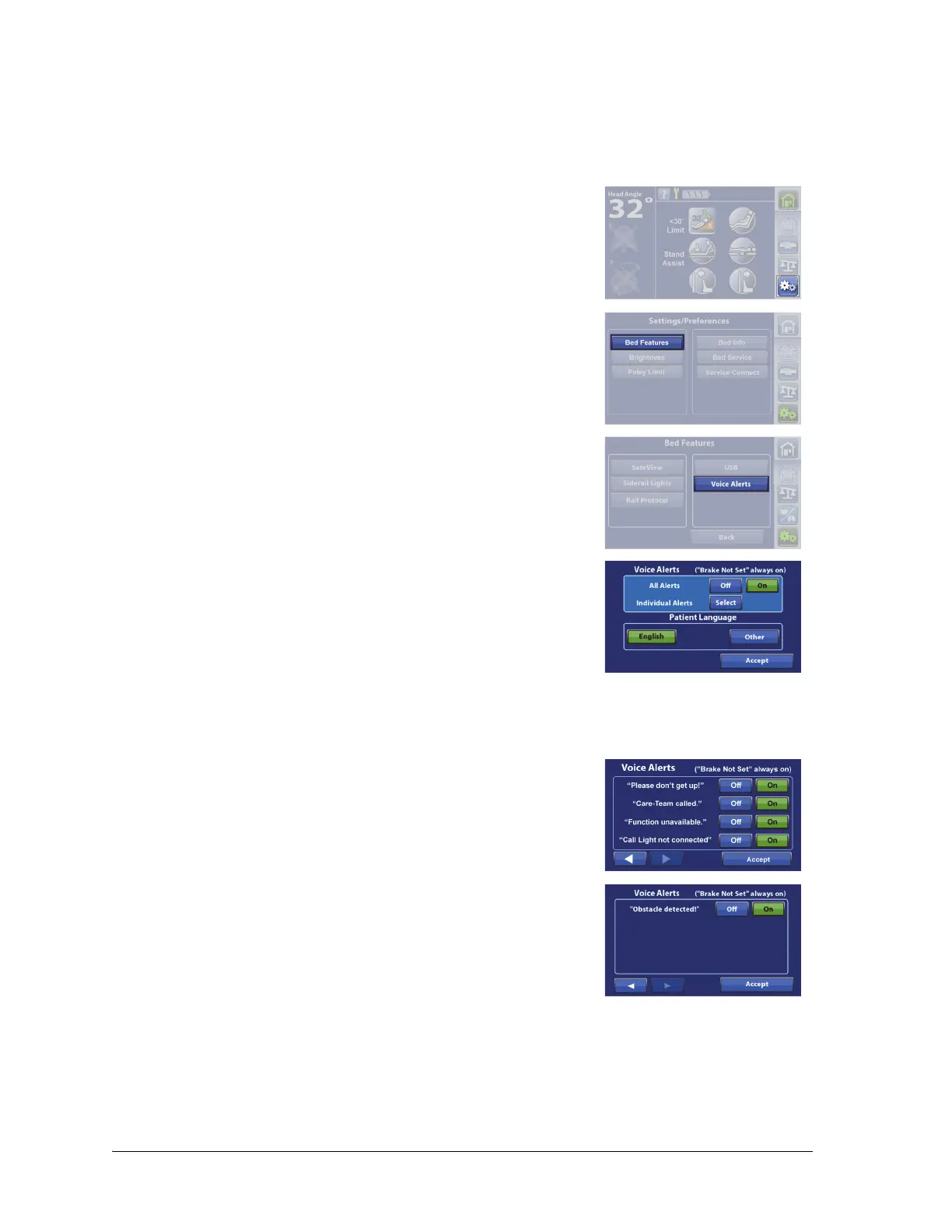
Voice Alerts
Beds equipped with the Voice Alerts feature provide audible messages through the siderail speakers
to provide guidance to the patient or caregiver. You may select English, Spanish, or French for the
voice alerts. For more information about Voice Alerts, see page 13.
1. Press the Settings menu control.
2. Press Bed Features.
3. Press Voice Alerts.
You have three options:
• All Alerts Off—turns all voice alerts off.
• All Alerts On—turns all voice alerts on.
• Individual Alerts Select—lets you turn off or on each
individual voice alert.
The “Brake Not Set” voice alert is always active even when All Alerts is
set to Off.
4. Press the applicable option. If you press Select for Individual
Alerts, press Off or On for each voice alert, and then press the back
arrow to return to the previous screen.















 To Next Page