Graphical Caregiver Interface (GCI)® Controls
Centrella® Smart+ Bed Instructions for Use (193587 REV 10) 73
Adjust Time/Date
BEDSIDE ASSOCIATION
The Bedside Association feature permits the caregiver to associate the bed to a room and patient
through WiFi. You must have the Hillrom™ Digital Health Gateway version 1.2 or greater for this feature
to operate. This feature uses the facility’s electronic chart to associate a room and patient to the bed.
This feature is enabled by a service/maintenance technician through the service menu on the
touchscreen (per the facility’s request).
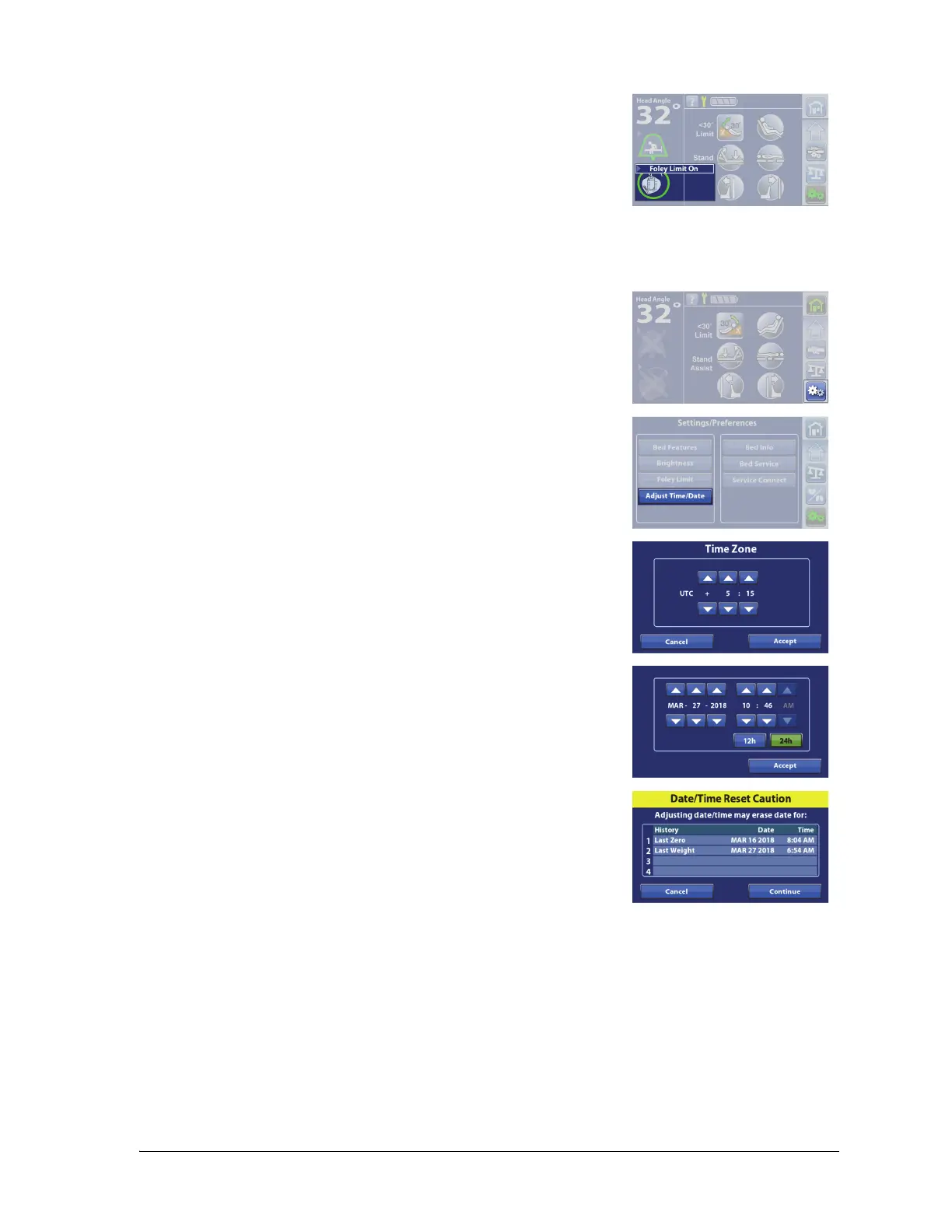
The Foley Limit indicator will show on the Home screen when the
Foley Position Limit is on.
The time zone, time, and date can be adjusted on beds equipped with the NAWI scale.
1. Press the Settings menu control.
2. Press Adjust Time/Date.
3. Press the up and down arrows to adjust the time zone.
4. Press Accept.
5. Press the up and down arrows to select the date and time.
6. Press Accept.
7. A triple beep will sound to alert you that changing the date and
time could erase the Patient History data.
8. Press Cancel or Continue.















 To Next Page