Graphical Caregiver Interface (GCI)® Controls
Centrella® Smart+ Bed Instructions for Use (193587 REV 10) 63
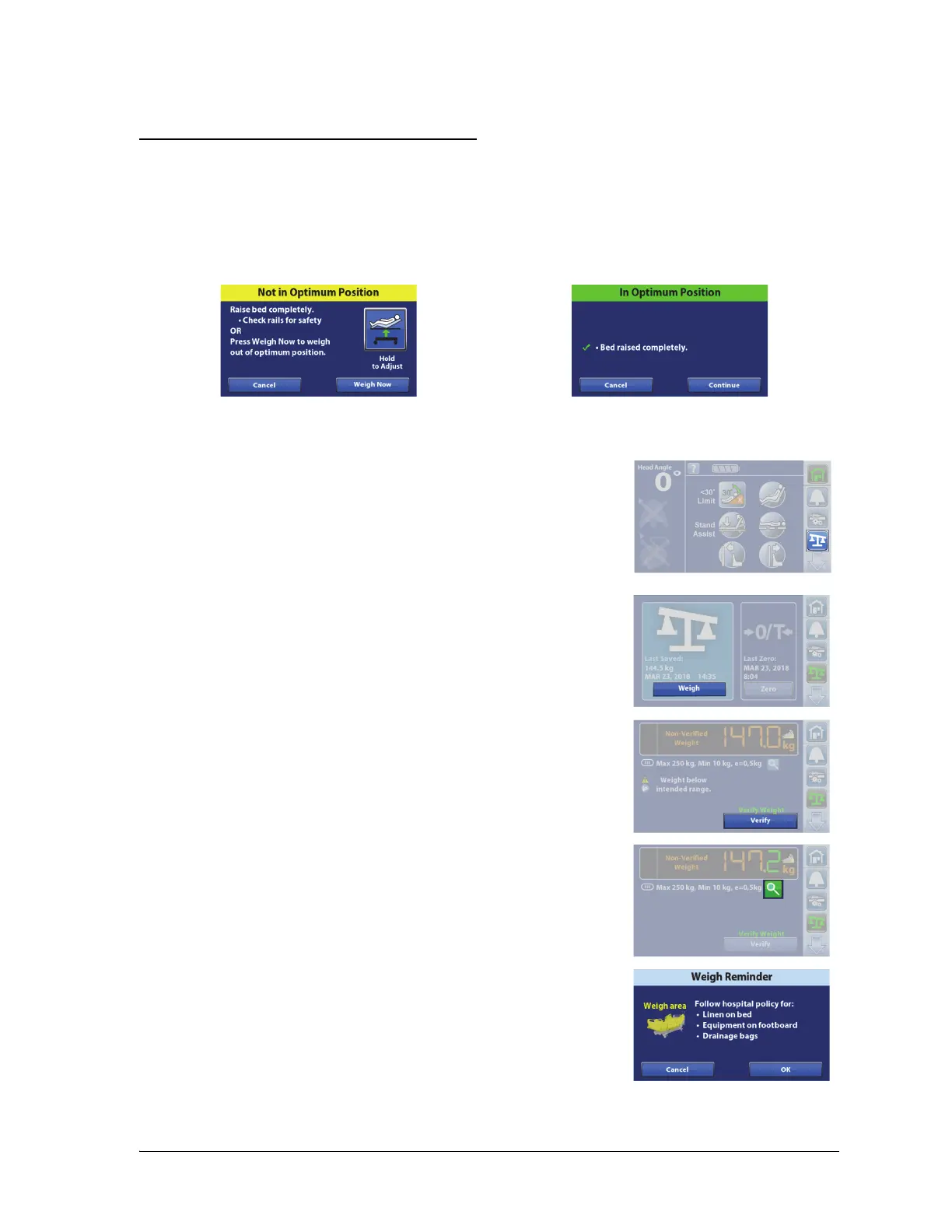
To Weigh the Patient
Optimum Bed Position to Weigh the Patient
The optimum bed position is as follows:
• The bed in the highest position.
If the bed is not in the optimum bed position to weigh the patient, a Not in Optimum Position screen
will show on the touchscreen. Press the Hold to Adjust control on the touchscreen, or use the
caregiver or patient controls to adjust the bed to the optimum position.
1. Center the patient on the bed.
2. Press the Scale menu control.
3. Press Weigh.
4. The Non-Verified Weight will show, press Verify.
The Magnification Mode will change the scale display increments to
0.1 kg for 5 seconds. The weight can not be saved in the Magnification
Mode.
5. Weigh Instructions will show on the touchscreen. Follow the
instructions, and then press OK.
NOTES:
• Remove everything attached to the upper frame, siderails,
and foot end of the bed that has not been zeroed or the
items will be included in the patient’s weight.















 To Next Page