Symbols
8 Centrella® Smart+ Bed Instructions for Use (193587 REV 10)
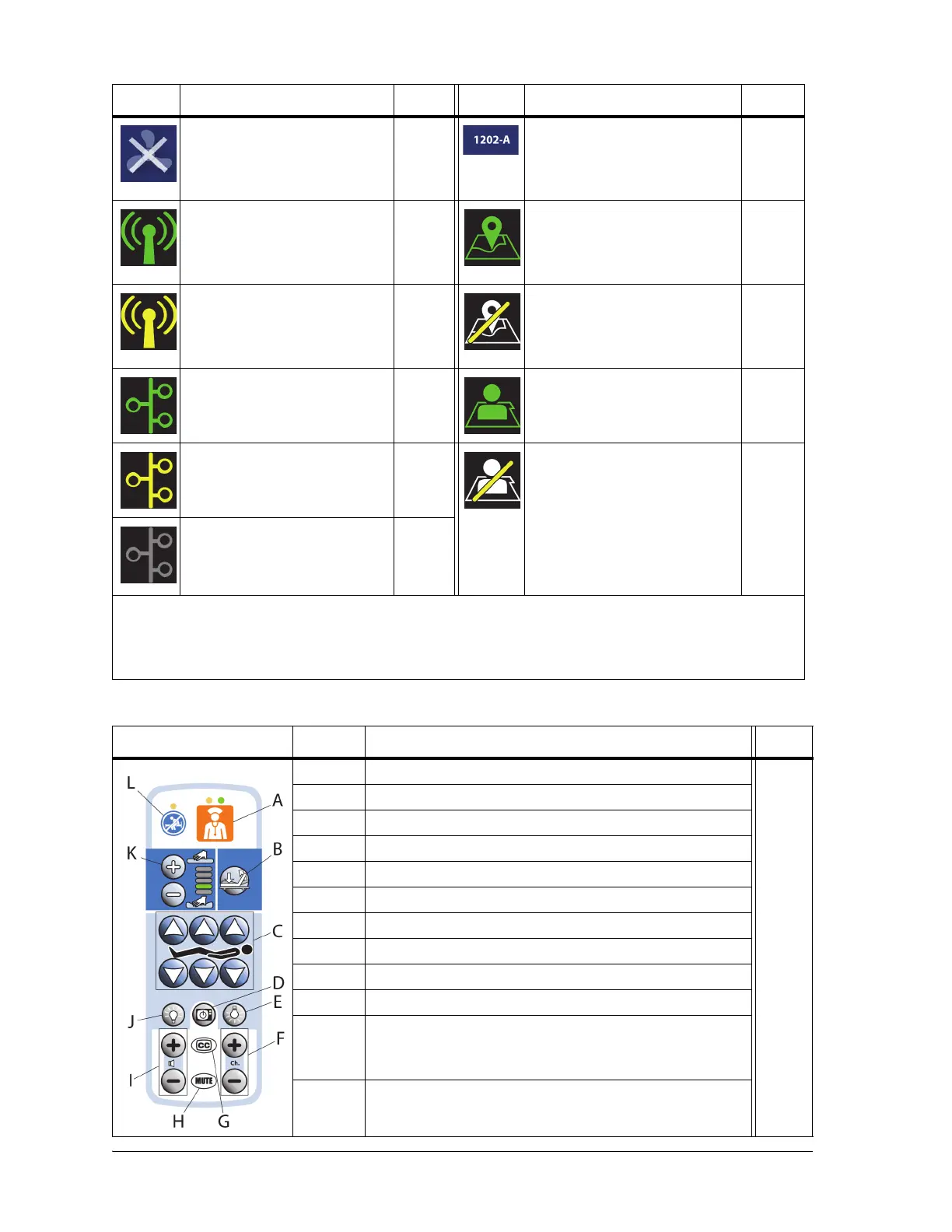
Patient Pendant (Handheld Remote) Option
MCM—OFF indicator for
beds equipped with the pro+
mattress (integrated)
107 Room associated indicator
(home and status screens)—
beds with Bedside Associa-
tion
73
WiFi connected indicator—
beds with Bedside Associa-
tion
73 Room associated indicator
(bed/patient locate screen)—
beds with Bedside Associa-
tion
73
WiFi connecting indicator
(flashing)—beds with Bed-
side Association
73 Room not associated indica-
tor (bed/patient locate
screen—beds with Bedside
Association
73
Network connected indica-
tor—beds with Bedside Asso-
ciation
73 Patient identity verified indi-
cator—beds with Bedside
Association
73
Network connecting indica-
tor (flashing)—beds with
Bedside Association
73 Patient identity is not verified
indicator. When flashing, a
patient is assigned, but not
verified, or the bed has
rejected the patient iden-
tity—beds with Bedside Asso-
ciation
73
Network not connected indi-
cator—beds with Bedside
Association
73
For symbol identification for the HR and RR Monitoring System powered by EarlySense option, see
page 84.
Item Description Page
A Nurse call control with LED indicators 39
B Stand Assist control
C Head, knee, and foot up/down controls
DTV power control
EReading light control
F Channel up and down control
G Closed caption control
HMute control
IVolume up and down control
J Ambient light control
K Comfort adjust pressure increase and decrease controls
with indicators (only on beds with a Centrella® max
mattress)
L Stay in Bed indicator
Symbol Description Page Symbol Description Page















 To Next Page