Heart and Respiration Rate Monitoring System powered by EarlySense
Centrella® Smart+ Bed with Heart and Respiration Rate Monitoring System powered by EarlySense Instructions for Use 91
(193587 REV 10)
ACTIVATE THE LICENSED MODE
HR and RR Monitoring must be activated prior to use. Contact Hill-Rom to activate this feature. When
you contact Hill-Rom, be prepared to give the bed’s serial number. The serial number is on the right side
of the upper frame at the head end of the bed.
The bed must be empty to activate the heart and respiration rate monitoring.
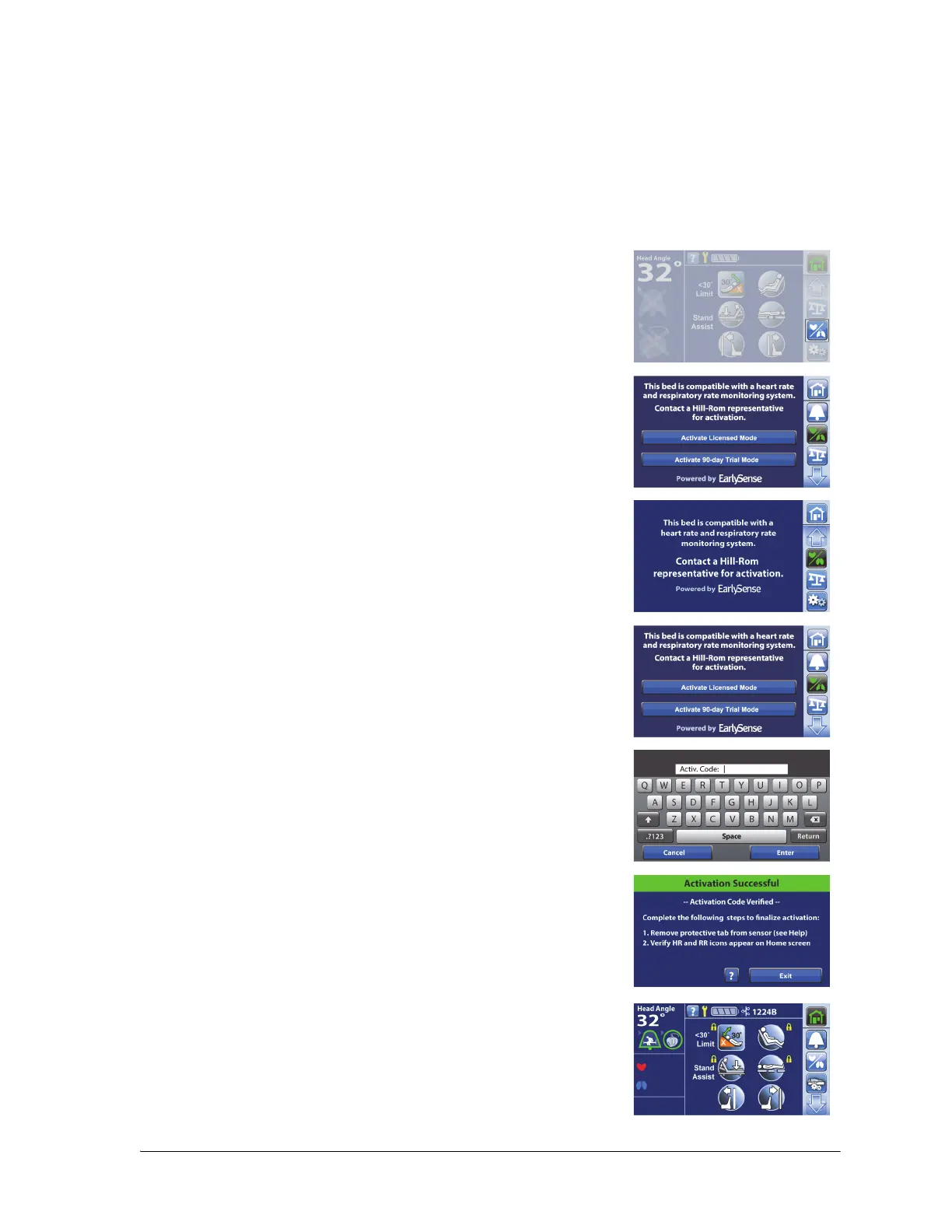
1. Press the HR/RR menu control.
2. Contact Hill-Rom to receive the activation license code. Make sure
to specify that the code is for the licensed mode.
If the Activation control is not included on the screen, the software to
monitor HR and RR is not installed. Contact Hill-Rom.
3. Press Activate Licensed Mode.
4. Enter the activation code, and press Enter.
5. Follow the on-screen instructions, and press Exit when complete.
6. Press the Home menu control. The HR and RR symbols will show in
the bed indicators section of the Home screen.
NOTES:
• The HR/RR values will show by default when a patient is in
the bed.















 To Next Page