Graphical Caregiver Interface (GCI)® Controls
74 Centrella® Smart+ Bed Instructions for Use (193587 REV 10)
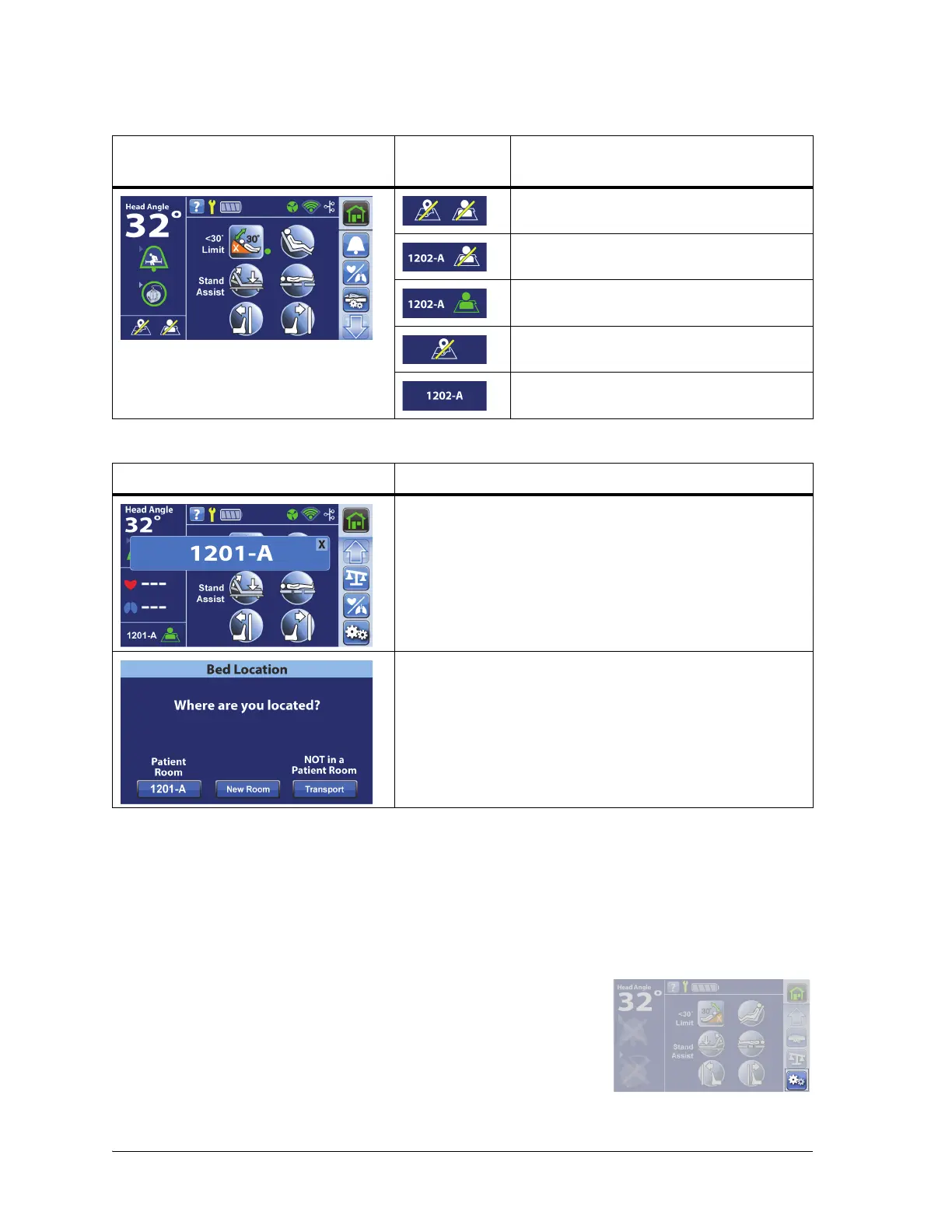
The Room and Patient icons on the Home screen tell you the status of the association and also permits
you to associate a room and patient to the bed.
There are two ways to associate a room and its patient to the bed through the touchscreen:
• “Set Up the Bed Association through the Settings Menu” on page 74
• “Set Up the Bed Association Using the Room/Patient Icon” on page 76
Set Up the Bed Association through the Settings Menu
Home Screen
Room/Patient
Icons
Description
No room associated; no patient verified
Room associated; no patient verified
a
a. The Patient icon flashes when a patient is available from the gateway but has not yet been verified.
Room associated; patient verified
No room associated; patient identification
is off
Room associated; patient identification is
off
Transport Screens Description
When the bed is plugged in after being unplugged for less
than five minutes, the room number will show on the screen
for two minutes unless a control is pressed. If you press the
“X,” the room number window will close. If you press the
room number, the Bed Location screen will show. See
“Associate a Room to the Bed” on page 76.
If the bed is plugged in after being unplugged for more
than five minutes, the Bed Location screen will show and
stay on the screen until the question is addressed. See
“Associate a Room to the Bed” on page 76.
1. At the Home screen, press the Settings menu control.















 To Next Page