Heart and Respiration Rate Monitoring System powered by EarlySense
Centrella® Smart+ Bed with Heart and Respiration Rate Monitoring System powered by EarlySense Instructions for Use 103
(193587 REV 10)
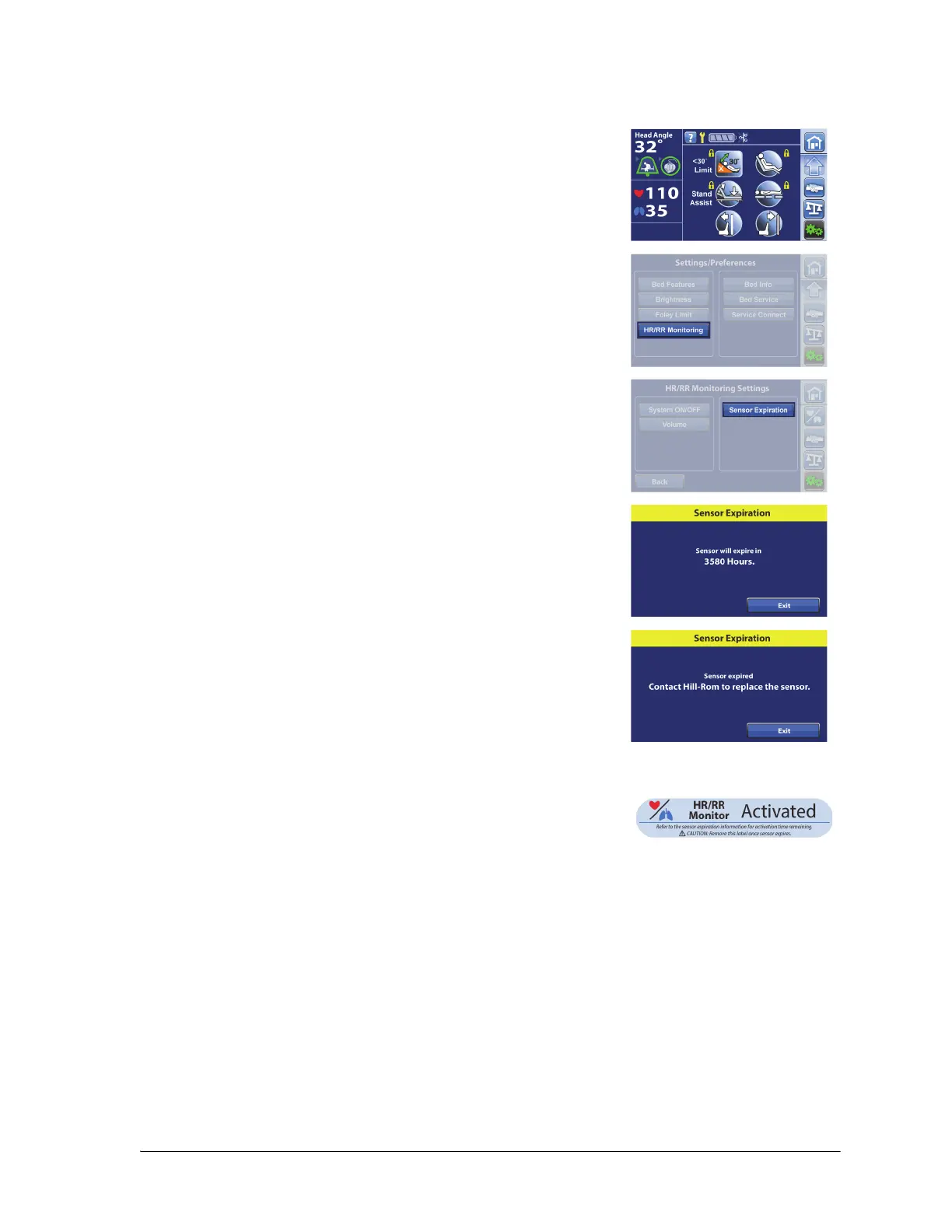
VIEW SENSOR EXPIRATION INFORMATION
HR/RR MONITOR ACTIVATED LABEL OPTION
NAVICARE® SYSTEM—HR/RR MONITORING
The NaviCare® System is an enterprise system that connects and monitors certain Hillrom™ products
including the HR/RR Monitoring System. When there is an HR/RR alarm, the NaviCare® System sends the
alarm status to the network applications for caregivers to view and receive. For complete operational
instructions for the NaviCare® System, refer to the NaviCare® System User Manual.
1. Press the Settings/Preferences menu control.
2. Press HR/RR Monitoring.
3. Press Sensor Expiration.
4. Press Exit to return to the previous screen.
Contact Hill-Rom for the HR/RR Monitor Activated label.
For label placement, see “Department Identification Label
Placement” on page 143.















 To Next Page