Graphical Caregiver Interface (GCI)® Controls
Centrella® Smart+ Bed Instructions for Use (193587 REV 10) 53
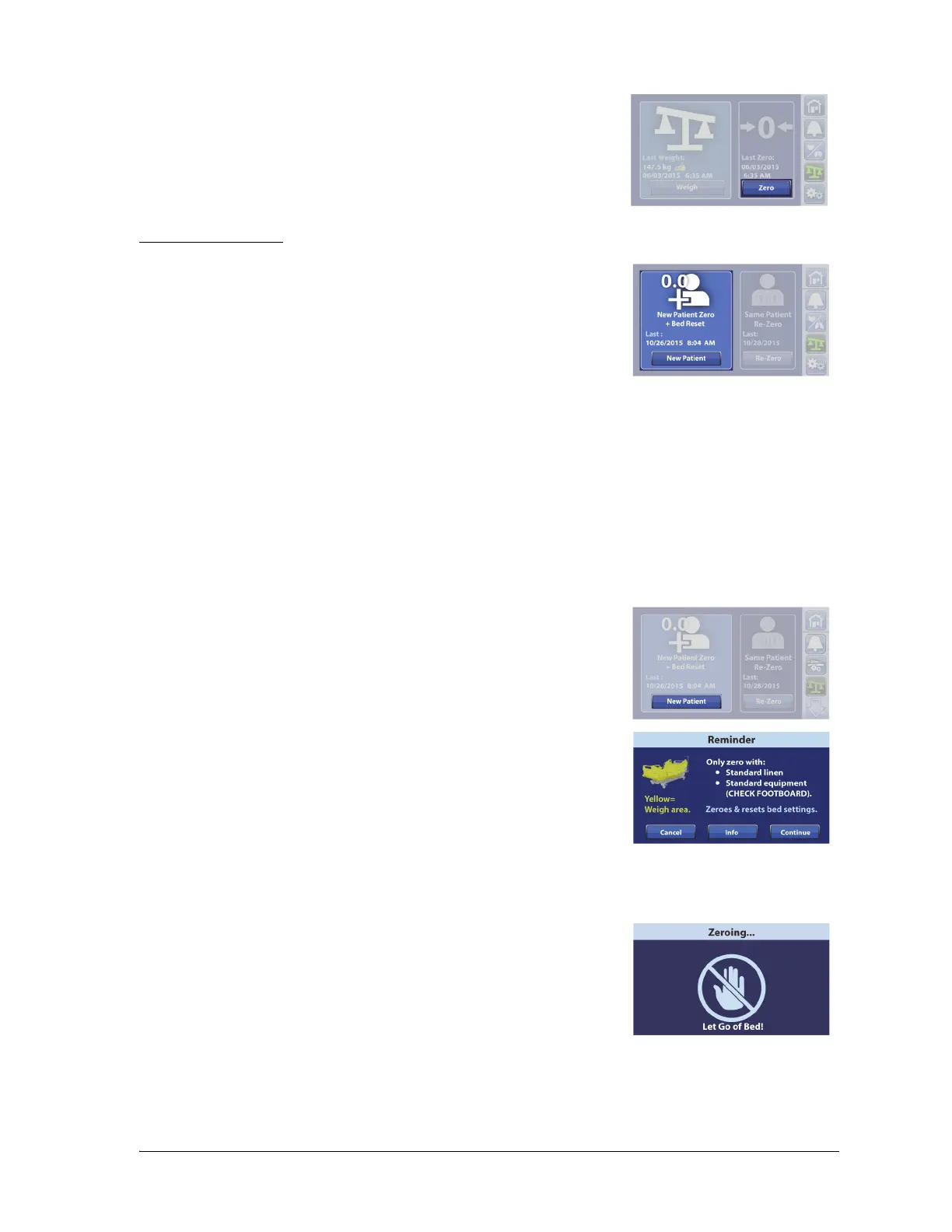
New Patient (Zero)
7. Press Zero.
Use New Patient zero every time a new patient is admitted to the bed.
The New Patient control will—
• Clear the previous and current weight history
•Zero the scale
• Reset these features:
– Bed Exit Alert to off
– SafeView®+ Alerts option to the default protocol
– HR and RR monitoring data
– Audible indicator to the default protocol
– Alert setting to the default protocol
– Head <30° Limit to off
– Frame lockouts to off
– Comfort settings to Normal
1. Press New Patient.
2. A reminder message shows. Follow the on-screen instructions.
NOTES:
• Remove everything attached to the upper frame, siderails,
and foot end of the bed or the items will be included in
the patient’s weight.
• The headboard and devices mounted to the head end of
the bed will not be included in the patient’s weight.
• Cancel will return the touchscreen to the previous screen.
3. The touchscreen will show that the bed is zeroing. Do not touch
the bed while the bed zeroes.















 To Next Page