Graphical Caregiver Interface (GCI)® Controls
Centrella® Smart+ Bed Instructions for Use (193587 REV 10) 49
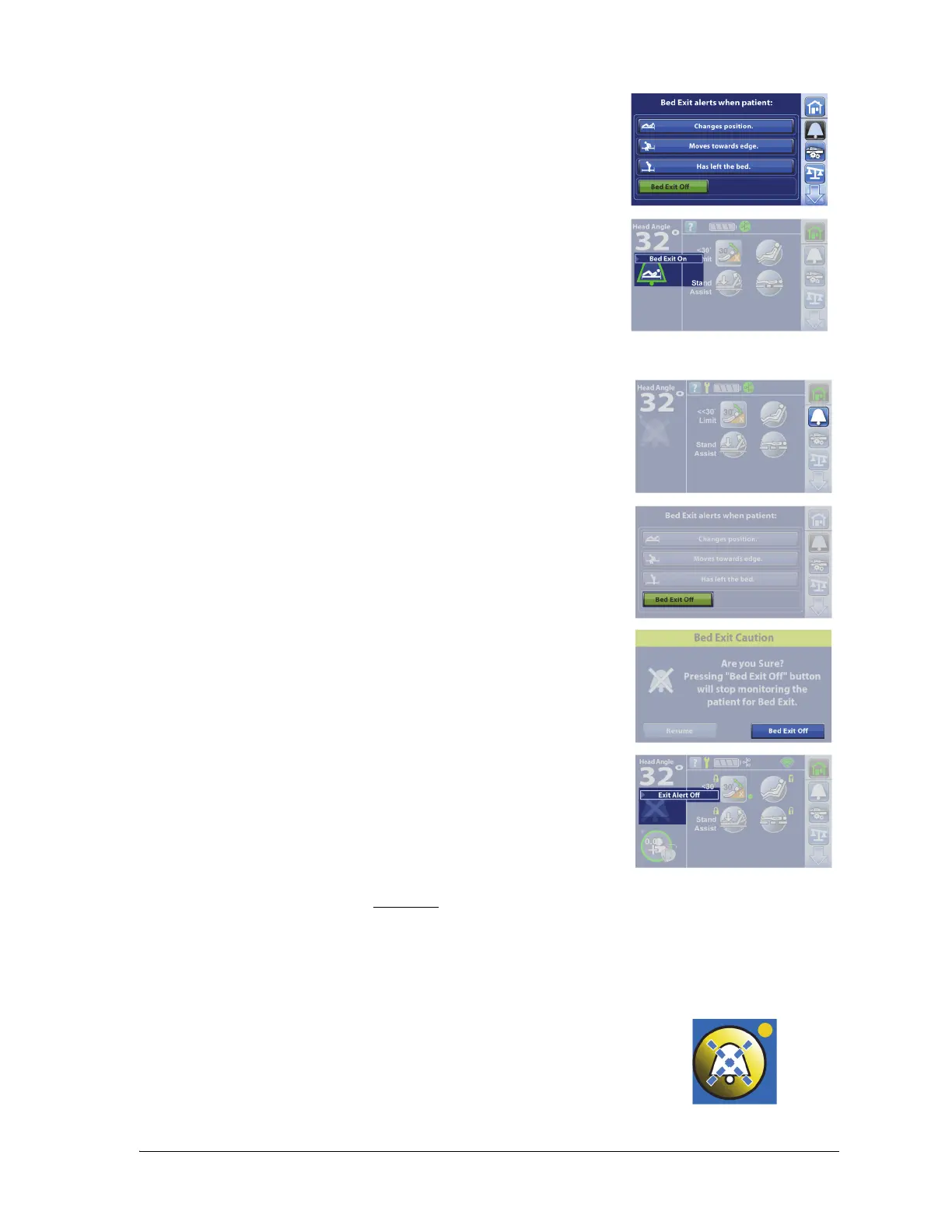
To Deactivate the Alert
To Silence the Bed Exit Alert without Deactivating the System
When a Bed Exit mode is armed, you can silence the alert system. During this Silence mode, the system
stops monitoring the patient movements; therefore, the system will not notify the care team or cause
an alert. While the system is in the Silence Mode, you can change the position of the patient or assist
the patient out of the bed. You can silence the alert before it sounds (preemptively) or after it sounds.
3. Press one of these modes:
• Changes position.
• Moves towards edge.
•Has left the bed.
When the system beeps one time and the Bed Exit On indicator shows
on the Home screen, the system is armed.
1. Press the Alerts menu control.
2. Press Bed Exit Off.
3. Press Bed Exit Off.
At the Home screen, the Alert Status indicator shows an “X”, the alert
icon is no longer green, and shows “Exit Alert Off” for 10 seconds.
To Activate the Preemptive Alert Silence
Press the Silence control on the caregiver controls until the indicator
light next to the control is on.















 To Next Page